How to Top Up NIKKE (Goddess of Victory) – Step-by-Step Guide 2026
This guide provides a complete walkthrough for topping up GODDESS OF VICTORY: NIKKE on international servers in 2026. It covers three primary top-up methods: official in-game store, third-party platforms using UID-based systems (including a recommended platform with a direct purchase link), and value packs like the 30-Day Supply. The article includes step-by-step instructions for finding your Player ID, a detailed gem pack value comparison, practical security tips for identifying safe vendors, and advice on maximizing value through first-time purchase bonuses and event timing. A comparison table and authoritative external links are included to help players make informed, safe, and cost-effective purchasing decisions.
Topping up Gems in GODDESS OF VICTORY: NIKKE on international servers doesn‘t have to be confusing or expensive. Whether you’re on the NA, SEA, KR, JP, or Global server, this 2026 guide breaks down every method—official in-game shop, top-up platforms, and value packs—so you can get the best exchange rate without risking your account.
Let‘s walk through everything: finding your UID, available payment options, gem pack value comparisons, where to find the best prices, and how to top up safely without breaking the bank.
Part 1: Before You Begin – What You’ll Need
Before making any purchase, you‘ll need just two things:
Your NIKKE Player ID (UID) – not your login email or password. A UID is a unique account identifier that allows top-up systems to deliver credits directly to your account without requiring login credentials.
Your server name (NA, SEA, KR, JP, or Global)
You will not need to share your password with any third-party top-up platform. Legitimate services operate on UID-based systems only.
🔒 Important security note: A UID alone cannot be used to access or hack your account. Never share your actual login credentials with any third-party website—any platform that asks for your password is a scam.
Part 2: How to Find Your NIKKE UID and Server
Here’s how to locate your Player ID in three simple steps:
Step 1: Launch GODDESS OF VICTORY: NIKKE on your mobile device or PC.
Step 2: Tap your Profile icon in the upper left corner of the main screen.
Step 3: Your UID (Player ID) will appear as a numeric string under your nickname. Your server name (e.g., NA, SEA, KR, JP, or Global) is displayed beside or below the UID.
📸 Tip: Screenshot or copy your UID before leaving the game—you’ll need it at checkout on any top-up platform.
Part 3: Three Ways to Top Up NIKKE International Server
There are three primary methods to purchase NIKKE Gems. Each has pros and cons depending on your location, payment preferences, and budget.
Method 1: In-Game Official Shop (App Store / Google Play / Steam)
The simplest but often most expensive route.
How it works: Navigate to the in-game shop, select a gem pack or the 30-Day Monthly Pass, and complete payment through your platform’s store (Apple App Store, Google Play Store, or Steam Wallet).
Supported payment methods: Credit cards, PayPal, carrier billing, and platform-specific balances.
Regional pricing: The system auto-detects your region, which can work for or against you depending on where you live.
Pros: Official, zero risk of account issues, instant delivery.
Cons: No discounts beyond platform store pricing; generally the most expensive per-gem option.
Method 2: Third-Party Top-Up Platforms (UID-Based Systems)
Third-party platforms use your UID to deliver gems directly to your account, typically at significant discounts.
How it works: Visit a trusted top-up site, enter your UID and server, select a gem pack, complete payment, and wait 3–10 minutes for delivery.
Supported payment methods: PayPal, credit/debit cards, e-wallets, gift cards, and various local payment methods.
Security: Reputable UID-based platforms never require your login credentials. Transactions are routed via official APIs, with SSL encryption and automated systems.
Typical discounts: 15–30% off official pricing, plus occasional first-time buyer bonuses.
Pros: Substantial savings, wide payment method variety, fast delivery, buyer protection via PayPal.
Cons: Requires choosing a reputable provider—scam sites exist.
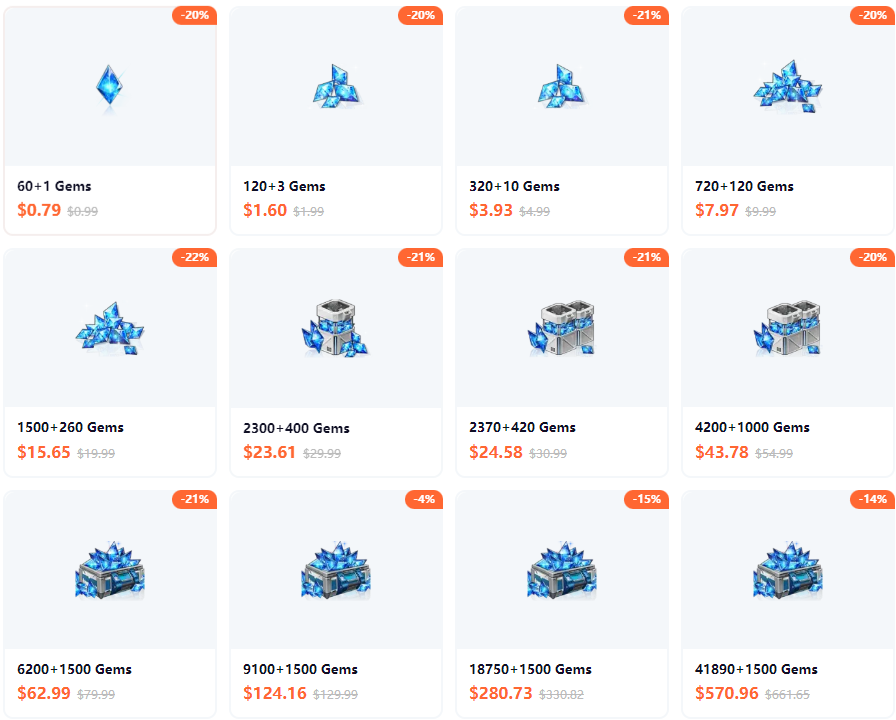
If you’re looking for a safe and affordable way to top up, you can get your NIKKE gems at Topuplist, a platform that offers secure UID-based checkout and instant delivery.
Method 3: Monthly Pass & Value Packs (Best Bang for Buck)
The 30-Day Supply pack is universally recognized as the best value purchase in NIKKE.
30-Day Supply ($4.99): 330 total gems delivered as 100 gems daily for 30 days + 330 gems upfront.
Cost per pull: Approximately $0.45 per pull**, compared to standard gem packs that range from **$1.94 to $4.00 per pull.
Other value packs worth considering: First Purchase Bonus packs (effectively double gems for your first purchase on each tier), Campaign Packs, and Battle Pass (includes a skin and SSR shards).
Pros: Best value per gem; perfect for consistent daily players.
Cons: Requires daily login to claim the full 330 gems; gems are delivered over 30 days rather than instantly.
Part 4: NIKKE Gem Pack Value Comparison
Not all gem packs are created equal. The table below compares the most common pack types to help you decide where to put your money.
📊 Data source: Prydwen Institute‘s NIKKE Spender Guide, last updated 2026
Takeaway: If you’re going to spend any money on NIKKE, your first purchase should take advantage of the First Purchase Bonus (doubles your gems on each tier until used). For ongoing daily play, the 30-Day Supply pack provides the best long-term value. Standard gem packs without bonuses or progression rewards are generally poor value unless purchased on discount through third-party platforms.
Part 5: How to Top Up – Step-by-Step Walkthrough
Using a Third-Party Top-Up Platform (Recommended for Savings)
Find your UID and Server (as described in Part 2 above).
Go to a trusted NIKKE top-up platform – a secure, UID-based option with PayPal support is Topuplist.
Select your server (Global/NA/SEA/KR/JP) and enter your UID exactly as it appears in-game.
Choose your desired gem pack – some platforms also offer Monthly Pass purchases.
Select a payment method – PayPal is recommended for buyer protection.
Complete checkout – gems are typically delivered within 3–10 minutes.
Restart your NIKKE client – if gems don‘t appear immediately, force-close and relaunch the game.
Using the Official In-Game Shop
Mobile: Tap the shop icon on the main screen → select pack → complete purchase via Apple/Google.
PC (Steam): Access shop through in-game menu → purchase via Steam Wallet overlay.
Official Publisher Shop (Level Infinite): Visit the official NIKKE page at nikke-en.com for additional purchase options.
GODDESS OF VICTORY: NIKKE is published globally by Level Infinite, a Tencent-backed international game brand supporting titles including PUBG MOBILE, Honor of Kings, and NIKKE.
Redeeming CD Keys for Free Gems
Don‘t ignore free gems. CD key redemption is an easy way to supplement your top-ups.
Steps: Home screen → the four squares icon → Notice → CD-Key Portal. Community sites regularly post active codes worth 100+ gems each. While it won’t replace paid gems entirely, it adds up over time—especially around anniversary events and holidays.
Part 6: Safety Checklist – Avoid NIKKE Top-Up Scams
Before entering your UID on any third-party platform, run through this quick checklist:
Warning signs to avoid:
Sites promising “too good to be true” discounts (e.g., 70% off)
Platforms that request your login email and password
No HTTPS encryption
No transaction records or invoices
🔐 According to industry reports, over 65% of global digital top-ups in 2025 were processed through authorised third-party sellers due to better pricing, bulk buy options, and regional payment support. UID-based systems are read-only identifiers, making them safer than many users assume.
When you’re ready to top up, you can do so safely and save by using a trusted platform. Topuplist is one such option that provides instant delivery with buyer protection.
Part 7: Maximizing Your Gems – Spending Strategy for Beginners
Once you‘ve topped up, make your gems count. Here’s what experienced players recommend:
Save for limited banners – Collaboration characters (e.g., NieR: Automata, Chainsaw Man) typically never rerun. Seasonal units (swimsuit, Christmas) rerun only once per year.
Don‘t chase normal banners – Standard rate-up characters eventually enter the permanent pool and can be obtained through the Wishlist system.
Use mileage tickets wisely – Spend 200 Gold Mileage tickets for Pilgrim or limited characters. Never waste them on standard units.
Free gem income – Consistent daily play yields approximately 3,200 free gems per month.
Best time to top up – Anniversary events (December–January), New Year celebrations, and holiday promotions often include special bundles and first-purchase bonuses. Weekend promotions frequently boost first-time buyer packages by 30%.
For a complete new-player experience overview, check the Prydwen Institute‘s Beginner’s Guide, widely recognized as the most trusted NIKKE resource hub for mechanics, team building, and progression strategy.
FAQ – Quick Answers to Common NIKKE Top-Up Questions
Q: Is topping up NIKKE through third-party websites safe?
A: Yes—when using a reputable UID-based platform that does not request your login password. Always check for HTTPS, real user reviews, and secure payment options like PayPal with buyer protection.
Q: Can I use PayPal to buy NIKKE gems?
A: Yes. Many third-party top-up platforms accept PayPal, which gives you an extra layer of buyer protection. The official in-game store also supports PayPal via platform integration.
Q: What‘s the cheapest way to get NIKKE gems?
A: Combine first-time purchase bonuses (100% extra gems per tier) with third-platform discounts (15–30% off). For ongoing value, the 30-Day Supply pack at $0.45 per pull is unbeatable.
Q: Do NIKKE gems transfer between iOS and Android?
A: Charged Gems (purchased with real money) are platform-specific and do not transfer. Free Gems (earned through gameplay and events) are cross-platform. If you play on both mobile and PC, be aware that paid gems are tied to the platform where they were purchased.
Q: Why aren’t my gems showing up after purchase?
A: First, restart your NIKKE client. If gems still don‘t appear, wait 15 minutes and contact the platform‘s customer support. Reputable services provide 24/7 live chat for issue resolution.
Final Thoughts
Topping up NIKKE on international servers in 2026 doesn‘t require technical expertise or risking your account. Follow these three core principles:
Use UID-based systems only – never share your login credentials.
Prioritize value over convenience – the 30-Day Supply pack and first purchase bonuses offer the best gems per dollar.
Buy from trusted platforms – verify HTTPS, read reviews, and use PayPal for buyer protection.
Whether you’re pulling for limited collaboration characters or building your end-game roster, a smart top-up strategy ensures your gems go further—and your account stays secure. You can top up safely and affordably at Topuplist whenever you’re ready to get started.