

PUBG MOBILE UC Not Received? Check the Order Before Paying Again
You pay for PUBG MOBILE UC, return to the lobby, and the balance has not changed. It is tempting to tap Buy again, especially when you are waiting for a Royale Pass or a store item. First, find out whether the original purchase is still processing, failed at payment, or was delivered to a different account.
A payment notification proves that something happened on the payment side; it does not by itself prove that the game has credited the correct character. The quickest useful check compares the purchase receipt, the order’s Player ID, and the account currently open in PUBG MOBILE.
How Long Can a PUBG MOBILE Purchase Take?
The game’s purchase-delivery help page says that server delays can sometimes take 10–30 minutes. It recommends fully exiting the game, restarting it and checking again. This is a possible delay window, not a guarantee that every third-party order will complete within 30 minutes.
While you wait, keep the receipt and check the original order status. Avoid making another payment simply to see whether the second attempt works. Two successful purchases can create two valid charges, even if you only intended to buy once.
Also confirm what you bought. UC should affect the relevant currency balance, while other purchased items may arrive through mail or inventory. The help page explicitly notes that delivery location depends on the item. A bundle or a pass should be checked against its own product description rather than against the UC counter alone.
Read the Order Status Before You Choose a Fix
What you can see | What it may mean | Useful next action |
|---|---|---|
Pending payment or authorization | Payment has not been finalized | Check the payment provider or store history |
Paid, delivery processing | The seller has not finished delivery | Keep the order number and ask that seller about the order |
Completed, no UC visible | Account, refresh or delivery issue needs checking | Match the Player ID and receipt before reporting |
Failed or cancelled | The purchase did not complete | Confirm how any payment authorization will be handled |
 PUBG MOBILE

An unresolved purchase should be handled through its original seller or payment route. If you later make a separate purchase through Topuplist’s PUBG MOBILE UC page, keep that order’s record separately. A new seller cannot repair an unrelated store transaction, and a fresh top-up should not be used to diagnose a missing one.
Match the Player ID, Not Just the Nickname
Open the profile of the PUBG MOBILE account that should receive the UC and compare its numeric Player ID with the one on the recharge order. Nicknames can be similar or changed; the actual delivery identifier is the important comparison for an ID-based top-up.
If you use several login methods or play more than one regional version, make sure you are checking the intended account and supported game edition. Do not assume that PUBG MOBILE, a regional release and a different account share one UC balance. Use the compatibility information on the purchase page.
A wrong ID changes the support request. Tell the seller that the recipient information may be incorrect and ask what can be checked before the order is fulfilled. If delivery has already completed, do not assume the currency can be recalled, transferred or refunded. Give support the original details rather than editing your explanation to match the account you meant to use.
Find the Receipt That Identifies the Purchase
If you paid inside the game
Check the store account used for the purchase and the email linked to it. PUBG MOBILE says purchase receipts may be sent through your payment method or linked email, and that purchases can be checked through the store’s customer center. A bank alert is useful context, but the store’s transaction reference makes the purchase easier to locate.
For Google Play, use Google’s order-history instructions. For Apple purchases, check your Apple purchase history. Make sure the receipt belongs to this UC purchase rather than a previous payment with a similar amount.
If you paid on a recharge website
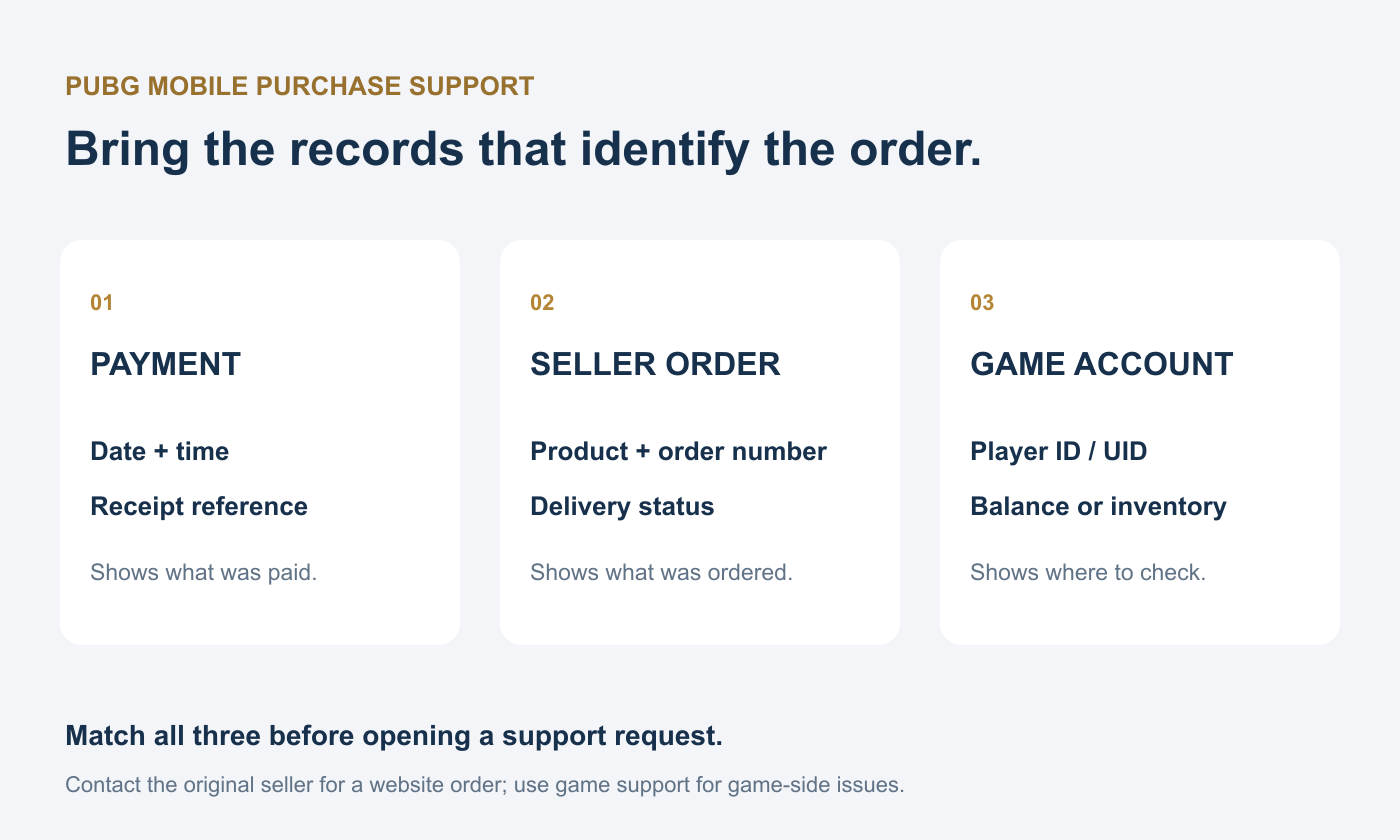
Open that website’s order details. Save the merchant order number, purchased UC product, recipient Player ID, payment time and delivery status. Contact the website that accepted your payment when its order remains in processing; game support may not have access to the merchant’s internal order reference.
If the website marks the order completed, request its delivery check and provide the matching in-game account details. Keep all replies in one support conversation where possible. Opening many tickets for the same order can make the timeline harder to follow without adding new evidence.
What to Send to PUBG MOBILE Support
If the purchase remains unresolved, use the in-game Customer Center. The official help article asks for the payment date and time, UID and purchased item name. Attach the relevant receipt or order screenshot as supporting evidence, and describe the issue in one short timeline.
Account: the UID that should receive the UC.
Purchase: the exact UC product or item name.
Payment: date, time, time zone and transaction reference.
Delivery: seller status and what is missing in the game.
Checks already done: game restarted, correct account checked, receipt matched.
For example: “I purchased [product] for UID [number] at [time and time zone]. The receipt shows [reference] and the order shows [status]. I restarted PUBG MOBILE and checked this account, but the UC balance has not increased.” Replace the brackets with your actual information; never send your password or login verification code.
Should You Request a Refund or Buy Again?
First establish whether the order is failed, still processing, or delivered. Refund handling depends on the purchase route and its rules; a missing balance does not automatically prove refund eligibility. If a payment is only an authorization, ask the payment provider how it will be released rather than assuming there is a completed purchase to refund.
Buy again only when you understand the first order’s outcome and genuinely want another purchase. If both orders eventually deliver, you may receive more UC than planned and have less flexibility than expected. Waiting for a clear status is usually more useful than chasing the missing currency with another payment.
The most effective fix is evidence-based: refresh once, confirm the correct Player ID, find the original receipt, and contact the team responsible for that purchase. Those records give support something concrete to investigate and keep a delayed order from turning into an accidental duplicate.