PUBG MOBILE UC Top Up: Player ID, Region Checks, and Delivery Rules
A PUBG MOBILE UC top-up normally credits the game profile matched to the Player ID entered at checkout. The delivery process should not require the player's game password, email password, social-login credentials, or one-time verification code. The critical task is not simply choosing an amount: the Player ID, game edition, region and live package must all belong to the same intended account.
Why Player ID Controls UC Delivery
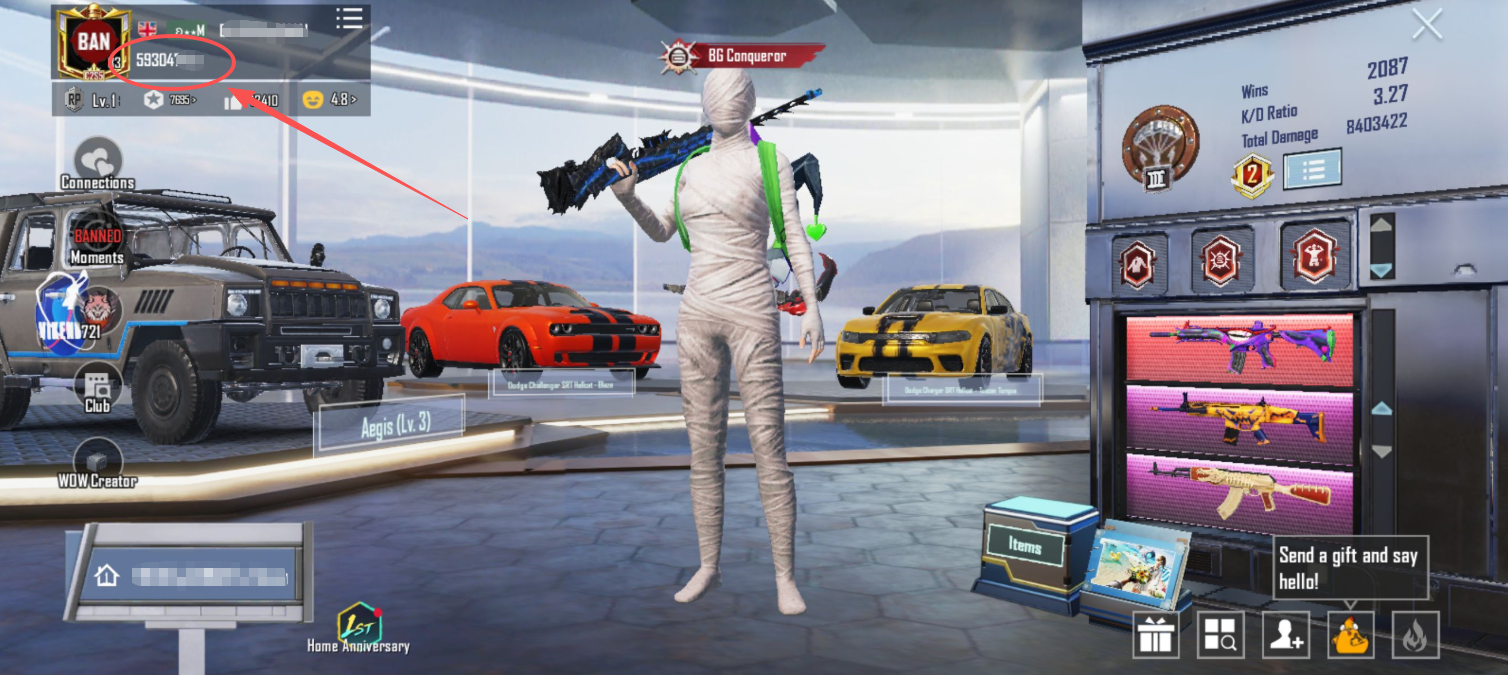
Player ID identifies one account profile. It is different from the visible nickname, clan name, linked email address and social-media login. Nicknames may contain symbols or duplicates, while the numeric identifier points to a specific profile. A copied digit missing from the beginning or end can therefore send an order to the wrong destination.
Open the profile from the PUBG MOBILE lobby and locate the numeric ID displayed with the account information. Use the copy function when available instead of reading the number from a screenshot. The official PUBG MOBILE website identifies the global game, but the identifier needed for recharge must come from the live profile inside the exact client being used.
Keep a pre-purchase screenshot showing the Player ID, public nickname and current UC balance. Do not include a password, login token, QR login screen or one-time code. Those details are unnecessary for an ID-based recharge and create avoidable account risk.
PUBG MOBILE Edition and Region Compatibility
PUBG MOBILE is distributed through global and separately operated regional editions. A similar app icon does not prove that two clients share one payment catalog. The global Google Play listing uses the package identity shown on the official store page; another regional release may use a different account route.
Before ordering, compare the exact app name with the supported account information shown at checkout. If a region or server selector appears, use the value attached to the game account rather than the buyer's temporary physical location. Traveling or changing an app-store country does not automatically convert the account to another edition.
How to Top Up PUBG MOBILE UC with Player ID
The complete process takes only a few checks:
Open the intended PUBG MOBILE account and copy its numeric Player ID.
Confirm that the recharge product supports the exact game edition and region.
Select the current UC package and read the displayed amount again.
Paste the Player ID into the requested field instead of typing from memory.
Review the product, identifier, package and payment total on the confirmation screen.
Complete payment and retain the order number until the balance appears.
Saved browser data is a common source of mistakes. A checkout form may refill the ID used for a previous family member or secondary account. Always compare the final order summary with the live profile. The product page should be reopened for each new account rather than relying on an old browser tab.
 PUBG MOBILE

UC Package and Bonus Verification
Package sizes, regional availability and promotional bonuses can change. An old receipt, search-result snippet or social screenshot is not a current guarantee. Only count a bonus when the live checkout page explicitly includes it in the selected package.
Checkout field | What to verify | Failure prevented |
|---|---|---|
Product | PUBG MOBILE UC for the intended edition | Buying for a different regional client |
Player ID | Every digit matches the live profile | Delivery to another account |
Package | Current UC amount and displayed bonus | Expecting an expired promotion |
Payment | Final total and payment currency | Confusing real-money currency with UC |
Receipt | Order number remains accessible | Missing evidence during support review |
Receiving UC does not guarantee a specific crate reward, Lucky Spin result or Royale Pass outcome. Check the live in-game price or draw rules first, then choose the smallest package that covers the intended purchase. This keeps recharge value separate from the probability of receiving a random cosmetic.
What to Do If UC Has Not Appeared
Return to the lobby or restart the game to refresh the displayed balance. Next, verify whether the order status is successful rather than pending, failed or cancelled. Compare the submitted Player ID with the live profile before assuming that delivery is delayed.
Do not place an identical second order while the first is processing. Prepare the order number, payment receipt, package, submitted Player ID and a current balance screenshot. The official PUBG MOBILE support center provides account and payment help, while an order-specific delivery issue should also be reported through the support channel shown by the seller.
For a recharge order, use its order record when contacting support. Never provide a password or one-time login code. If the submitted ID was wrong, report it immediately, but do not assume completed currency delivery to another valid profile can be reversed.
Frequently Asked Questions
Where can I find my PUBG MOBILE Player ID?
Open the game profile from the main lobby and copy the numeric ID displayed with the account information. Do not substitute the nickname.
Does a UC top-up require my PUBG MOBILE password?
No password should be required for ordinary Player ID delivery. Do not disclose linked email credentials, social-login details or one-time codes.
Can one recharge product work with every PUBG MOBILE edition?
Compatibility should not be assumed. Check that the product supports the exact client and region before payment.
Where can I review PUBG MOBILE UC packages?
After confirming the Player ID and edition, use the recharge panel in this article to open the live package list. Use only the amount and bonus displayed at checkout.