Steam Families: Why Six Members Don’t Mean Six Game Copies
Steam Families can include six people, but joining a family does not turn one purchased game into six independent copies. If two members want to launch the same shared title at the same time, the family needs enough available copies. Two people playing different shared games is a different situation—and is supported.
That distinction changes the buying decision for a household. You may be able to borrow a single-player game while its owner plays something else, yet still need a second copy for two separate launches of the same co-op game. Start with the number of players who need that particular title, not the size of the family library.

Count available game copies, not family members
Valve’s Steam Families FAQ uses Portal 2 and Half-Life to explain the rule. One member can play Portal 2 while another plays Half-Life. For two members to play Portal 2 simultaneously, someone else in the family needs to own another copy. The limit follows the game being launched, rather than locking the owner’s entire library whenever they play.
Household situation | What it means for access |
|---|---|
Different games; each has an available copy | Members can play those different shareable titles at the same time. |
One copy; two members want the same game | Only one shared copy is available; the second player needs to wait or another copy must be owned. |
Two available copies of the same game | Two members can launch it simultaneously, subject to the game’s own requirements. |
 Steam Wallet Code



A shared game is still owned by its purchaser
Valve’s Steam Families announcement makes the ownership boundary explicit: the purchaser keeps the game. Other eligible members gain access through the family. Their own Steam achievements remain tied to their accounts; saved-game behavior depends on the game itself. Shared access is not a license transferred to every member.
If you want a game to remain in your personal collection independently of family access, buying your own copy serves a different purpose from borrowing it. For a planned purchase, compare the exact title, edition and activation conditions in the Steam Games purchase options. Check Family Sharing support separately; a Steam listing alone does not establish that a game can be shared.
Why a game can be missing even when the owner is offline
Not every Steam game is eligible. The support FAQ lists exclusions including games that require an additional third-party key, account or subscription; free-to-play games and their purchased DLC; region-restricted content; unsupported operating systems; publisher exclusions; and games the owner has marked private. Waiting for another person to log off does not fix these restrictions.
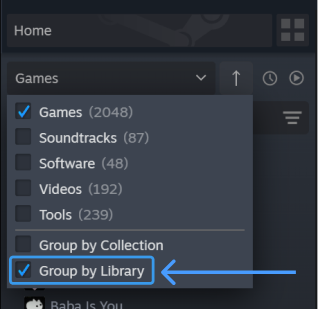
For a missing title, first check its sharing eligibility and whether it is private. For a visible but locked title, check who is using an available copy. These are different diagnoses. If you simply want the client to separate your family’s games from your own, enable “Group By Library” in the game-list dropdown.
Different DLC packages can change which copy you should use
When borrowing another member’s game, you receive that copy’s DLC that the publisher has made shareable. If multiple members own the title, Steam lets you choose whose copy to use and remembers the choice. Do not assume every DLC owned anywhere in the household is combined into one universal package.
If your preferred copy is busy, Steam first looks for another copy with identical DLC. If only a different DLC combination is available, it may offer a switch. Valve warns that saves may or may not work across different DLC combinations. For a long campaign, keeping the DLC package consistent can matter more than launching whichever copy is free first.
Set up the household once; don’t treat families as temporary groups
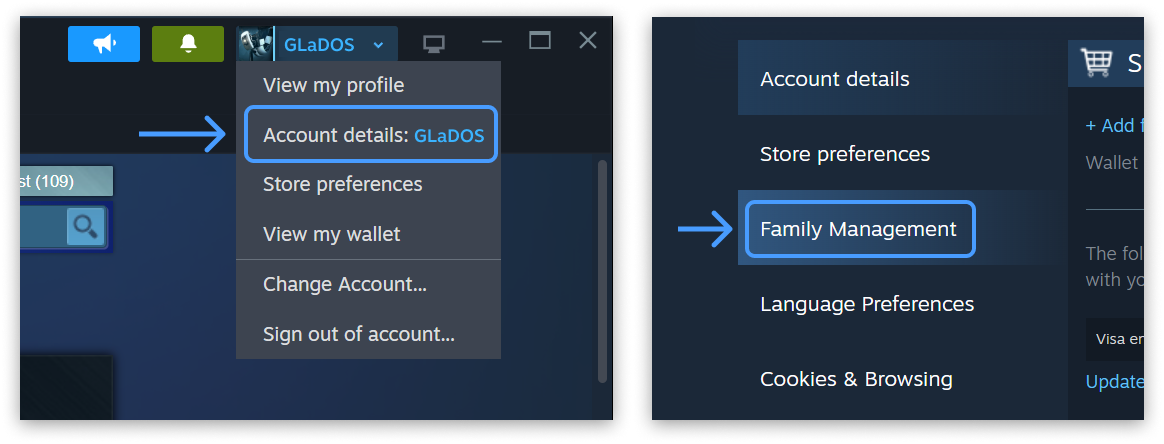
Steam Families is intended for a household of up to six close family members. Setup is under Account Details → Family Management. Adults can manage invitations and restrictions; child accounts are subject to parental controls. An invitation can fail when account activity does not indicate the same household or when a membership or slot cooldown still applies.
The adult membership cooldown is one year from joining the previous family, not automatically one year from the day you leave. Family slots also have a one-year cooldown. Valve separately allows rejoining your last family without waiting if it has room. Read the actual client message before leaving or replacing members; changing families is not a quick way to borrow another library for the weekend.
Buy another copy only when it solves the actual limit
An extra copy helps when two household members regularly want the same eligible game at the same time. It does not override a publisher’s sharing exclusion, a regional restriction or household eligibility. If a supported title still behaves unexpectedly, use Steam’s Families support route with the game name and the message shown in the client. Solve the access problem before paying to solve a different one.