


Which Zenless Zone Zero Steam Points Item Should You Buy First?
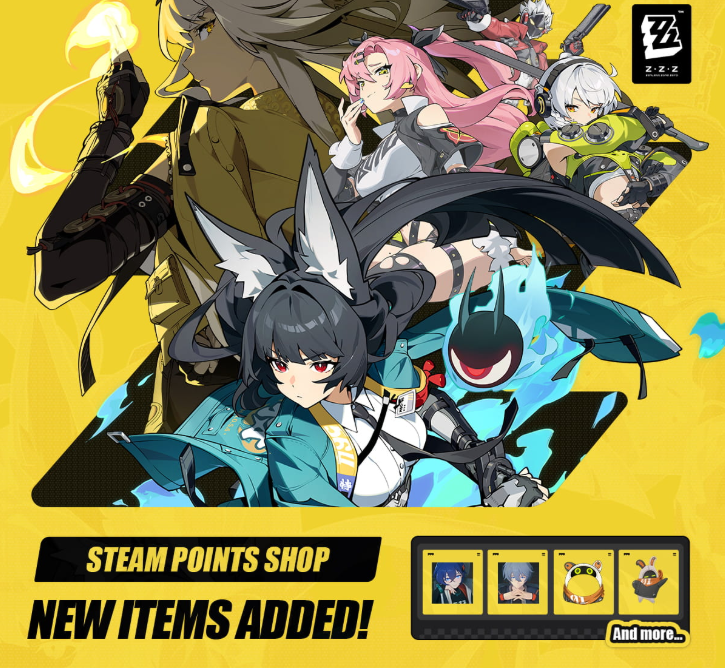
Zenless Zone Zero added its first Steam Points Shop collection on July 30, 2026, including an animated Eous avatar frame, animated avatars for Fairy, Belle, Wise, and Eous, two profile backgrounds, and three animated stickers. This guide ranks the items by visibility, reuse, profile fit, and Steam Point efficiency while making clear that none of them grants in-game Polychromes, Agent power, or account progression.
Zenless Zone Zero opened its first Steam Points Shop collection on July 30, 2026, giving Steam users a new way to decorate their platform profiles with New Eridu characters and locations. Players who are also planning in-game Monochrome purchases can review Topuplist and the dedicated Zenless Zone Zero top-up page, but Steam Points should be treated as a separate profile currency. Buying an Eous frame or Random Play background does not add Polychromes, Master Tapes, Agents, W-Engines, or combat power to the game account.
The initial collection includes an animated Eous avatar frame, animated avatars for Fairy, Belle, Wise, and Eous, a Random Play animated profile background, a Coexisting With the Hollows mini-profile background, and three animated stickers. The best first purchase depends on where the item appears and how often the player uses Steam's social features.
The Fastest Recommendation
Buy the Eous animated avatar frame first if you already use a compatible avatar and want the most flexible Zenless Zone Zero identity. Buy the Random Play animated profile background first if your full Steam profile is the priority. Choose a character avatar when Fairy, Belle, Wise, or Eous is the actual centerpiece of the profile. Stickers are better for players who actively use Steam chat.
The mini-profile background is a strong secondary purchase because it appears when other users hover over the account or view compact profile surfaces. It is less dominant than a full background but can be seen more naturally during social browsing.
Do not buy every item only because the collection is new. Steam Points have no cash-out value, but they still represent time and prior platform purchases. A focused profile usually looks better than several unrelated animated elements fighting for attention.
What the July 30 Collection Contains
The Eous animated avatar frame surrounds the user's selected Steam avatar. It can be combined with a Zenless Zone Zero avatar or with an avatar from another game. This makes it the most reusable item in the collection.
The animated avatar group offers four identities. Fairy suits players who want an artificial-intelligence or interface-centered profile. Belle and Wise represent the two Proxy protagonists and fit accounts built around Random Play. Eous is the strongest mascot option and pairs naturally with the Eous frame.
The Random Play animated profile background turns the full profile into a recognizable location. It provides the largest visual area. The Coexisting With the Hollows mini-profile background affects the smaller card that appears in profile previews and hover interactions.
The three animated stickers are designed for Steam chat and social expression. Their value depends almost entirely on whether the account uses compatible chat features often.
Item type | Best for | Main limitation |
|---|---|---|
Eous animated frame | Flexible profile branding | Needs a suitable avatar to look complete |
Animated avatar | Character-focused identity | Replaces the current avatar |
Random Play background | Full-profile presentation | Can compete with other showcases and text |
Mini-profile background | Hover-card visibility | Smaller visual surface |
Animated stickers | Active Steam chat users | Low value if chat is rarely used |
Why the Eous Frame Is the Safest First Buy
An avatar frame is flexible because it does not force the player to abandon a favorite avatar. The Eous design can identify the account as a Zenless Zone Zero fan while leaving the center image available for a main character, personal artwork, or another game.
Frames also appear in several Steam surfaces where the full profile background is not visible. Friends lists, chat, activity pages, and profile interactions can display the avatar more frequently than the full profile.
The frame is not automatically the best visual choice. A highly detailed avatar can become crowded when surrounded by an animated border. Preview the combination and check whether the center image remains readable at a small size.
Players using the Eous animated avatar can create a complete mascot set, but matching every element is not required. Contrast often looks better. A simple character portrait inside the Eous frame may be clearer than an avatar and frame using the same colors and motion.
Choosing Between Fairy, Belle, Wise, and Eous
Fairy is the strongest option for a sleek, digital profile. Her identity is closely connected to the Proxy interface and her visual style can fit darker or technology-focused backgrounds.
Belle is the better choice for players who selected or prefer her as the active Proxy. Her brighter personality can keep a profile lively when paired with a darker frame or background.
Wise gives a calmer Random Play identity and may fit profiles using restrained colors. Choosing between Belle and Wise should reflect character preference, not assumptions about which protagonist is more canon.
Eous works for players who want the most immediately recognizable mascot. Mascot avatars remain understandable at small sizes because the silhouette and face are simple. This can be useful in chat and friends lists.
If you change avatars frequently, the frame or background offers more long-term flexibility. If one character has represented the account for years, the matching animated avatar may provide more personal value.
Is the Random Play Background Worth It?
The Random Play background is the most substantial visual transformation because it occupies the full profile. It can make the account look like an extension of Belle and Wise's video store rather than a generic Steam page.
Its value depends on the rest of the profile. Artwork showcases, achievement showcases, badges, text, and favorite-game panels sit above the background. A busy animated scene can reduce readability when the profile already contains many moving elements.
Preview the background with the actual profile theme. Check text contrast, showcase edges, avatar visibility, and how the page looks on a normal desktop window rather than only in the store preview.
A player who keeps a minimal profile can get more value from the full background than someone who rarely opens their public page. The item has no effect inside Zenless Zone Zero and is not visible to players who only interact through HoYoverse services.
The Mini-Profile Background Has Quiet Value
Mini-profiles appear during quick social interactions. Other users may see them without deliberately opening the full account page. This can make the Coexisting With the Hollows background more visible than expected.
The smaller surface also reduces visual clutter. A strong image and controlled animation can communicate the theme quickly. Players who participate in Steam communities, guides, discussions, or multiplayer friend networks may see more benefit.
It should not be the first purchase for a private account with little social activity. In that case, the full background or avatar produces more personal visibility.
Test how the mini-profile combines with the chosen avatar frame. The hover card has limited space, so two animated items can look busy. Use one dominant motion and one quieter supporting element when possible.
When the Stickers Are the Best Choice
Animated stickers are the best first purchase only for players who use Steam chat regularly. They provide direct expression rather than passive profile decoration.
Check whether your main conversations support the sticker format and whether friends recognize the Zenless Zone Zero references. An expressive Eous reaction can be more useful than a background when it appears in daily messages.
Stickers do not improve the public profile as much as a frame or background. Players buying them for collection should understand that their visibility is tied to chat usage.
Choose one sticker whose emotion is broadly reusable instead of buying all three immediately. A reaction that works for success, surprise, waiting, or frustration will appear more often than a very specific pose.
How Steam Points Work Here
Steam Points are earned through eligible purchases on Steam and can be spent in the Points Shop. They are not Zenless Zone Zero premium currency and cannot be transferred into the game.
The Points Shop purchase should be checked on the correct Steam account. A cosmetic bought on one platform profile does not automatically appear on another profile, even if both accounts access the same game.
Steam Points items are normally profile cosmetics rather than tradable marketplace inventory. Read the store description before purchasing. Do not expect to resell the frame, background, avatar, or sticker for wallet funds.
The Zenless Zone Zero game account and Steam profile can also have different names and identities. Buying a Belle avatar does not change the Proxy selected in the game.
Build a Coherent Zenless Zone Zero Profile
Start with one anchor item. The anchor can be the animated avatar, Eous frame, or Random Play background. Add supporting pieces only when they improve the same theme.
A mascot profile can use Eous as the avatar, the Eous frame, and a quieter mini-profile background. A Proxy profile can use Belle or Wise with Random Play. A technology profile can center Fairy and use neutral showcases.
Avoid combining every moving item with animated artwork, an animated game profile, and a high-motion theme. Motion competes for attention. A cleaner composition lets the Zenless Zone Zero item remain recognizable.
Use color balance. If the background is dark and saturated, a brighter avatar helps. If the avatar and frame are both bright, reduce motion elsewhere. Steam's preview makes experimentation free before the final purchase.
Do These Items Affect Zenless Zone Zero?
No. Steam profile cosmetics do not grant in-game rewards, currency, achievements, account experience, Agent trust, combat bonuses, or event progress.
They also do not replace Zenless Zone Zero's own avatars, namecards, wallpapers, or social profile items. The purchase exists on the Steam community side.
Do not buy Steam games or in-game products only to generate Points for one profile item without comparing the real purchase cost. Steam Points are a bonus connected to eligible spending, not a direct reason to purchase unwanted products.
If the player wants Polychromes or an Agent, use the game's official reward and purchase systems. A similar Eous image in the Points Shop cannot substitute for in-game resources.
Best First Purchase by Player Type
A dedicated Zenless Zone Zero player who changes avatars often should begin with the Eous frame. A Belle or Wise fan should choose the matching animated avatar. A profile designer should prioritize the Random Play background. A social chat user should choose the most reusable sticker.
A player with few Steam Points should avoid splitting the balance across low-priority items. Pick the item visible in the surface used most often.
A collector with enough Points can complete the set gradually. There is no gameplay advantage to buying the whole collection immediately, so visual testing should guide the order.
Common Purchase Mistakes
The first mistake is expecting in-game Polychromes. The second is buying an avatar without previewing the frame. The third is choosing a full background without checking text readability.
The fourth is buying stickers for an account that never uses Steam chat. The fifth is assuming the items can be traded or resold. The sixth is buying on the wrong Steam profile.
Another mistake is treating “exclusive-looking” as proof of permanent scarcity. The announcement says the collection is available, but players should read the shop page rather than inventing a removal date.
Final Recommendation
The Eous animated avatar frame is the safest first Zenless Zone Zero Steam Points purchase because it works with many avatars and appears across multiple social surfaces. The Random Play animated profile background offers the biggest full-page transformation, while Fairy, Belle, Wise, and Eous avatars are better for character-centered profiles.
Buy stickers only when Steam chat is part of daily use. Preview every combination and remember that the collection is platform decoration, not in-game progression. The best item is the one visible where you actually use Steam.
FAQ
When did Zenless Zone Zero add Steam Points Shop items?
The first collection was announced on July 30, 2026.
What animated avatars are available?
The initial set includes Fairy, Belle, Wise, and Eous.
Do Steam Points items grant Polychromes?
No. They are Steam profile cosmetics and provide no Zenless Zone Zero currency or gameplay progress.
Which item should I buy first?
The Eous frame is the most flexible choice. A character avatar or Random Play background can be better when that specific profile theme is the priority.
Where can I prepare Monochrome for actual in-game plans?
Players with a separate in-game budget can review the Topuplist official site and the Zenless Zone Zero top-up page. Verify the account, server, product, and delivered currency before purchasing.
Can I trade these Steam cosmetics?
Points Shop items are profile customization products. Do not assume they are tradable or resellable unless the store description explicitly states it.
Will the cosmetic appear on my HoYoverse profile?
No. It decorates the Steam profile that purchased it and does not replace the game's own account cosmetics.
