


Marvel Rivals Summer Special Event Guide: Free Rewards, Mission Progress, and What to Claim in Season 9
The Marvel Rivals Summer Special event adds a limited seasonal activity during Season 9, giving players a short window to complete missions and claim free rewards. This guide explains how to find every event tab, prioritize time-limited tasks, avoid leaving completed rewards unclaimed, balance event progress with ranked play, and check the live interface for regional deadlines and reward conditions.
The Marvel Rivals Summer Special event gives Season 9 players a limited-time reason to open more than the standard match queue. Seasonal events often look straightforward because the first reward is visible immediately, but the useful rewards may be distributed across missions, login pages, event challenges, and a separate claim screen.
The event also arrives during a season in which players may already be balancing ranked goals, hero practice, battle pass progress, and regular weekly tasks. Trying to complete everything at once can make the event feel like extra work. A better route is to identify which missions overlap with normal play, which rewards disappear when the event closes, and which tasks are worth completing only if they fit the account's schedule.
This guide is built around a practical event audit. It does not assume that every region has identical dates or that a visible reward is automatically claimed. Use the live event page for the exact timer, then follow the priority method below.
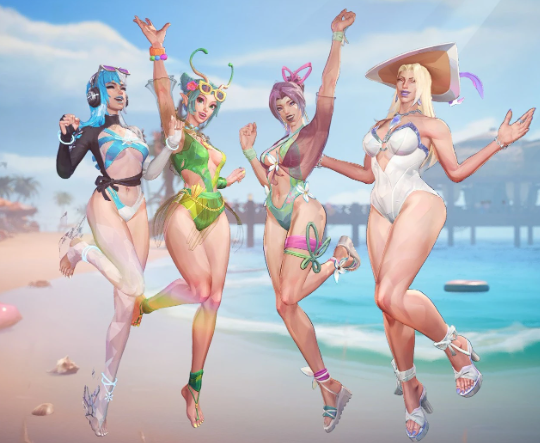
Find Every Summer Special Page
Start from the main event banner, then inspect the mission list, reward track, login or attendance page, event shop, and news button. A red notification may open one page while leaving another page untouched.
Look for three states: incomplete, completed but unclaimed, and already collected. The second state is the most dangerous because match progress can be finished without transferring the reward to your account.
Take a screenshot of the event hub and the deadline. If a reward is selectable, capture the selection screen before confirming it. A seasonal page can move to a different menu after a hotfix or daily reset.
Do not rely on the battle pass page alone. A summer event can use its own task counter even when the missions involve ordinary matches.
Mission Types and Overlap
Summer missions usually fall into several practical groups: play matches, win matches, use specific roles or heroes, complete objectives, deal damage, earn assists, or log in on separate days. The exact live requirements should be read from the current event page.
Prioritize missions that overlap with your normal goal. If you are practicing a hero, choose a mission that counts ordinary match progress rather than switching to a character you dislike solely for a small reward.
Group missions by match. One game can contribute to play count, assists, objective progress, and hero-specific conditions at the same time. Create a short route before queueing.
Do not chase a damage number by ignoring the objective. A completed event task is not worth losing every match if the behavior makes normal progress worse.
Reward Track Priority
The first priority is any reward that has a separate claim button and a clear closing date. The second is an item that improves the battle pass or event currency route. The third is a cosmetic or profile reward that matches your collection goal.
Reward category | What to check | Priority rule |
|---|---|---|
Free costume or hero cosmetic | Permanent ownership and claim location | Claim before event closure |
Event currency | Expiration and shop exchange | Spend only after checking shop |
Boost or progression item | Where it applies and duration | Use during a planned session |
Profile item | Whether it is permanent or selectable | Claim and verify in profile |
Common material | Alternative sources | Take after limited rewards |
Do not assume a free reward is automatically delivered. Return to the event page after completing the task and press the claim button if one appears.
Free Reward Verification
After claiming a cosmetic, check the hero or profile customization page. Some rewards may appear in an inbox, while others unlock directly in a collection menu.
If the reward is a selection item, do not confirm until you have checked every eligible option. A selectable item can be more valuable when saved for a hero you actually play.
If the reward does not appear, restart the client and allow synchronization. Record the event name, reward, account identifier, platform, and claim time before contacting support.
Never send a password or one-time verification code in a support report. Screenshots should hide private account information that is not required.
Season 9 Progress Without Burnout
Players who are also working on ranked progress should combine missions with normal matches when possible. Do not turn every game into a forced event task if it damages concentration or team communication.
Use casual or practice modes for missions that do not require wins. Save ranked sessions for the account's real competitive goal. A seasonal event can be completed without making every match carry two unrelated pressures.
If a mission requires a hero you do not understand, spend a short practice session learning the basic ability cycle before entering a serious match. The goal is to complete the task while still contributing to the team.
Players with limited time should calculate the remaining matches and available days. A small daily route is safer than a final-night marathon.
Event Currency and Shop Decisions
If Summer Special uses event currency, do not spend it immediately. Read the shop, compare limited items, and check whether the currency disappears at the deadline.
Prioritize permanent or hard-to-replace items. Common boosts can wait if they are available through regular play. A cosmetic that matches your collection may be worth more than several small consumables, but only if you will use it.
Keep a currency buffer until all missions are finished. A final task may provide enough for a preferred exchange, and spending early can create an unnecessary shortage.
If the shop includes random bundles, read the odds and duplicate treatment before purchasing. Event currency may be free, but its opportunity cost is still real.
Hero and Role Challenges
A hero-specific challenge should be approached as a learning objective. Choose a mode that allows practice, read the hero's basic win condition, and focus on one behavior at a time.
Do not select a hero only because a reward says to play them if your team needs another role. Check whether the mission counts games played, abilities used, victories, assists, or objective actions.
If a role challenge is uncomfortable, queue with friends and explain the goal before the match. A coordinated team can help without turning the game into a frustrating experiment for everyone else.
A Seven-Day Event Route
Day one: open every event tab, record the timer, and claim any available free reward.
Day two: group missions by match and finish the tasks that overlap with normal play.
Day three: practice any unfamiliar hero or role in a low-pressure mode.
Day four: check event currency, shop prices, and remaining limited rewards.
Day five: finish win or objective requirements while keeping ranked goals separate.
Day six: inspect every page for completed but unclaimed rewards.
Day seven: use the final day only for remaining claims and synchronization, not for starting the entire route.
Adjust the schedule to the live event length. The game timer remains the final authority.
Ranked, Casual, and Community Play
Ranked matches are useful when event missions overlap naturally, but they should not become a place to test an unfamiliar hero under pressure. Use casual, practice, or custom games for experimentation when the task allows it.
Community groups can make event missions faster, especially for assists, objectives, or role combinations. Use private party communication and do not share account credentials to join an event group.
If a mission encourages behavior that harms the match, prioritize the team and choose another route. The event is temporary; negative match habits can remain longer.
Topuplist and Marvel Rivals Spending
The Summer Special event should be completed with free progress before you consider a purchase. If you decide to buy supported Marvel Rivals services, review the Topuplist official website and the Marvel Rivals top-up page. Confirm the account, platform or region, package, and final price before payment.
Do not buy currency because a mission is close to completion or because an event cosmetic creates urgency. Set a separate budget and never provide a password or one-time code to a seller.
Common Event Mistakes
The first mistake is checking only the main banner. The second is completing a mission without claiming its reward. The third is spending currency before reading the shop. The fourth is using ranked matches to experiment with an unfamiliar hero. The fifth is ignoring the event timer. The sixth is assuming all rewards go to the inbox. The seventh is waiting until the final night. The eighth is trusting a third party with account information.
Final Claim Checklist
Before the event closes:
Open every Summer Special page.
Record the live deadline.
Claim completed mission rewards.
Check the login or attendance page.
Review the event shop.
Spend or preserve event currency according to the rules.
Verify cosmetics in the collection menu.
Check inbox and profile rewards.
Save screenshots of important claims.
Keep ranked and event goals separate when necessary.
Not every mission deserves equal effort. Skip or delay a task when it requires a hero you cannot play responsibly, a win condition that would make the team experience worse, or a number of matches that exceeds the remaining time. Check whether the reward is limited, selectable, or replaceable before committing. A mission that overlaps with normal play is usually efficient, while a task that forces repeated behavior outside your role can create hidden costs in losses and frustration. Community events should add variety, not turn every account into the same player.
A final account check should include the collection, inbox, profile, event shop, and battle pass pages. Different reward types can use different destinations. If a friend says the reward is missing, compare the exact item name and claim state before assuming a technical problem. Clear records reduce duplicate claims and support delays.
A final account check should include the collection, inbox, profile, event shop, and battle pass pages. Different reward types can use different destinations. If a friend says the reward is missing, compare the exact item name and claim state before assuming a technical problem. Clear records reduce duplicate claims and support delays. It is also worth checking the event page after a daily reset because a new task tab can appear without changing the main banner.
Before closing the event page for the last time, restart the client once and verify that every claimed cosmetic remains visible after synchronization.
A final claim check is especially useful when the event page contains several reward tabs.
Final Takeaway
Marvel Rivals Summer Special is easiest when treated as a short account audit. Find every page, group overlapping missions, claim rewards manually, check the shop before spending currency, and use the live timer instead of an old announcement.
Season 9 progress and event progress can coexist, but they do not need to compete in every match. Choose the route that protects team play, avoids last-minute pressure, and leaves no completed reward behind.
FAQ
When does the Summer Special event end?
Use the live in-game event timer because regional schedules and maintenance can change the exact final hour.
Are the event rewards free?
The event includes free mission and participation rewards. Check each item for its claim condition and whether it requires a separate page.
Do completed missions claim automatically?
Do not assume so. Return to the event page and press the claim button when required.
Should I use ranked matches for event missions?
Only when the mission naturally overlaps with your ranked goal. Use casual or practice modes for unfamiliar heroes and experiments.
Does event currency expire?
Check the live shop and event rules. Some seasonal currencies disappear or become unusable after closure.
What if a cosmetic is missing after claiming?
Restart the client, allow synchronization, check the collection or inbox, and record the claim details before contacting support.
Should I buy currency for the Summer Special?
The event should be completed with free progress first. Purchase only if it fits a separate budget and supports a deliberate goal.
Can I share my account to join an event group?
No. Never share passwords or one-time verification codes.
