


Marvel Rivals Explore Thebes Event Guide: Photo Tasks, Hidden Locations, and Free Units
Explore Thebes is a Marvel Rivals community photo event running from July 24 through July 30, 2026. Ten winners are scheduled to receive 1,000 Units and five winners are scheduled to receive 1,500 Units. This guide explains how to verify the official event post, plan recognizable Thebes screenshots, capture clean images, submit in the required format, avoid invalid-entry mistakes, preserve evidence, verify winner contact, and protect an account from fake prize messages.
Explore Thebes turns the new map into a photography assignment rather than a normal combat objective. The community event began on July 24, 2026, remains active on July 27, and is scheduled to close on July 30. It asks players to explore Thebes, create an eligible image, and submit it through the official event route for a chance to receive Units.
The announced prize structure contains two winner groups: 10 winners are scheduled to receive 1,000 Units, while 5 winners are scheduled to receive 1,500 Units. That makes the event attractive, but a visually impressive screenshot is only useful when the entry also follows the current rules. The most common failures in community photo events are simple: using the wrong post, missing a required tag, hiding the player identifier, submitting after the cutoff, or trusting an impersonator after the event ends.
This guide treats the task as a small production workflow. First verify eligibility, then scout Thebes, capture a readable image, audit the submission, preserve proof, and monitor only the official winner-contact route.
Event Snapshot
Item | Confirmed Event Detail |
|---|---|
Event | Explore Thebes community photo event |
Start date | July 24, 2026 |
End date | July 30, 2026 |
Prize group 1 | 10 winners receive 1,000 Units each |
Prize group 2 | 5 winners receive 1,500 Units each |
Core task | Explore Thebes and submit an eligible photo |
Final authority | Current official event post and its latest edits |
The July 30 date is still in the future as of July 27. Do not delay submission until the final minutes, because upload failures, timezone interpretation, or an incomplete form can turn a finished screenshot into an invalid entry.
Start With the Original Event Post
Open the official Marvel Rivals community post that announces Explore Thebes. Avoid starting from a reposted image, a cropped creator screenshot, or a comment that summarizes the rules. Read the full text and inspect any attached graphic, form, reply, or updated note.
Record the required platform, account eligibility, submission channel, deadline and timezone, image count, accepted file format, caption format, required hashtags, player identifier requirements, and regional restrictions. Also check whether the event requires a fresh screenshot, allows editing, limits one entry per person, or prohibits entries that include other players’ names.
Community event rules can be clarified after launch. If an official edit conflicts with an early guide, the current official wording wins.
Check Eligibility Before Taking Photos
A five-minute eligibility check saves a long photography session from being wasted. Confirm that your account and region can participate, that you can receive Units on the relevant platform, and that your community account can publish or submit content through the specified route.
If the post requires a visible in-game identifier, copy it directly from the profile rather than typing it from memory. If it asks for a server, platform, or region, use the labels displayed in the client. Do not publish passwords, verification codes, receipts, login emails, or information beyond the required identifier.
Players below the age of majority should also read any guardian or jurisdiction language in the official rules. Prize eligibility may be narrower than general game access.
Build a Thebes Shot List
Do not wander through the map hoping that one random frame will look good. Create a short shot list before entering a match or exploration opportunity. The strongest locations usually have at least two of these qualities:
A landmark that immediately identifies Thebes.
Strong depth with foreground, middle distance, and background.
A clean route that lets the subject stand without blocking combat.
Lighting that separates the hero from the architecture.
A recognizable environmental story, such as monumental structures, elevated paths, or interior mechanisms.
Plan three concepts: a wide establishing image, a character-focused portrait, and an action-oriented frame. Capturing alternatives reduces the temptation to submit the first usable screenshot.
Find Recognizable Thebes Landmarks
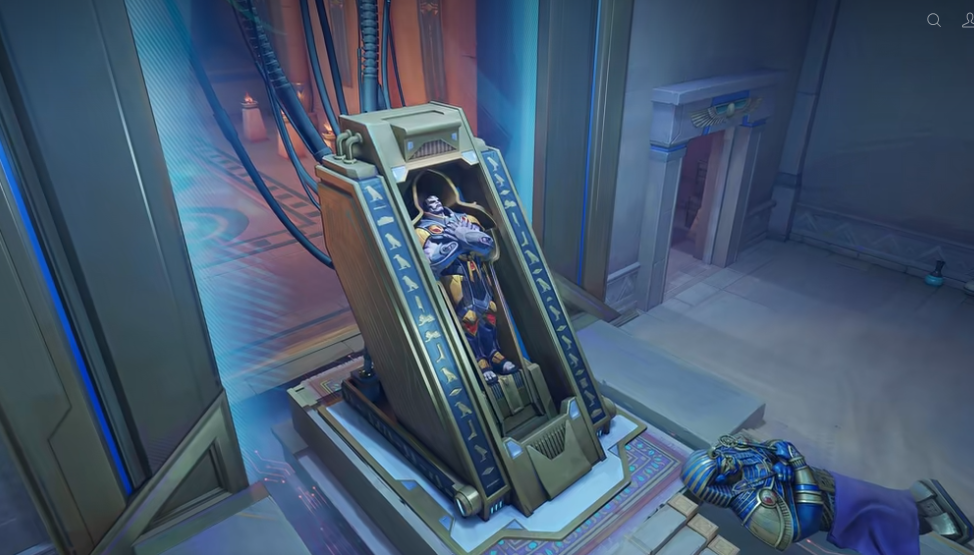
The central pyramid is an obvious anchor because its monumental geometry communicates the map identity quickly. Approaches, elevated platforms, interior passages, and the golden elevator area can create distinct compositions. Other valuable backgrounds include long sightlines, ceremonial architecture, sculptural details, layered rooftops, and spaces where warm stone contrasts with hero colors.
A “hidden” photo location does not need to be inaccessible. It can simply be a viewpoint that most players rush past. Look behind the normal combat direction, inspect elevated ledges reached through standard movement, and turn around after entering a major room. The safest creative spots are legitimate map spaces that do not require exploits, clipping, or leaving the playable area.
Never risk a match or violate game rules to obtain a screenshot. A clean, legal viewpoint is more useful than a dramatic image created through a bug.
Use Composition Instead of Heavy Editing
Good composition carries more value than aggressive filters. Use architectural lines to lead the eye toward the hero. Leave breathing room around weapons, capes, effects, and the top of the model. Keep the most important landmark visible rather than covering it with the interface or a large particle burst.
Try the rule of thirds for portraits, central symmetry for pyramid interiors, and diagonal movement for action scenes. A lower camera angle can make a hero appear powerful, while a higher viewpoint can emphasize map scale. Avoid placing the subject directly against a similarly colored wall.
If editing is allowed, keep changes modest: crop, exposure, contrast, and color correction. Do not add misleading elements, remove required identifiers, or transform the screenshot so heavily that it no longer represents the game.
Select a Hero That Reads Clearly
Choose a hero whose silhouette and colors remain readable against the chosen location. A dark costume may disappear in a shadowed interior, while a very bright costume may lose detail against sunlit stone. Test several heroes if possible.
The best hero is not automatically the newest or rarest. A familiar silhouette, a pose that fits the scene, and a color palette that separates from the environment often create a stronger image. If the event focuses on Thebes rather than a specific hero, make sure the map remains a major subject instead of becoming an indistinct background.
Team-based shots can be effective if they are permitted, but they introduce coordination, name-display, and consent issues. Review the rules before including other players.
Capture Clean Screenshots on PC
Use the highest stable image quality your system can handle without disrupting the scene. Confirm the screenshot key, output folder, resolution, interface options, and whether the platform adds compression. If a photo mode or interface toggle is officially available, use it; do not assume external tools are allowed.
Capture bursts rather than single images. Particle timing, facial direction, cape movement, and teammate positioning change quickly. After the session, inspect the original files at full size. Reject frames with motion blur, notification overlays, chat messages, loading artifacts, or compressed previews.
Do not upscale a tiny social-media preview when the original full-resolution file is available.
Capture Clean Screenshots on Console
Console capture systems may save images locally, upload them to a mobile app, or share them through the platform network. Test the route before the final day. Make sure the transferred file remains an image rather than a screenshot embedded inside another screenshot.
Disable unnecessary notifications where appropriate and wait for interface banners to clear. Review the image on a larger screen if possible. Cropped edges, television overscan, or automatic high-dynamic-range conversion can alter the result after transfer.
If the event accepts links rather than uploads, verify that the shared image is publicly viewable under the required privacy settings.
Improve Mobile Submission Quality
Many players capture on PC or console but submit from a phone. Transfer the original file through a method that does not heavily compress it. Messaging applications may reduce resolution, rename files, or strip metadata. Cloud storage or the platform’s official capture application is often more reliable.
Before uploading, open the actual file and zoom in. Check that the hero, landmark, text, and player identifier remain readable. Confirm orientation and crop. Do not submit a thumbnail merely because it looks acceptable on a small screen.
Keep a second copy outside the app used for submission.
Screenshot Quality Audit
Judge the final candidates with five tests:
Recognition: Can a viewer identify Thebes quickly?
Subject: Is the intended hero or scene obvious?
Clarity: Are important details sharp and unobstructed?
Compliance: Does the image satisfy every current rule?
Originality: Does the viewpoint or timing add something beyond a routine match screenshot?
Choose the image that passes all five, not merely the one with the brightest effects. Technical eligibility comes before style.
Write the Submission Caption
Follow the required caption format exactly. Include only the requested event tag, player identifier, server or platform, and any brief description permitted by the rules. Preserve spelling and punctuation where a hashtag must be machine-readable.
A short descriptive sentence can add context if allowed: identify the landmark, hero, or moment without burying the required fields. Do not place required information only inside the image unless the rules say that is acceptable.
If you are submitting through a form, review every field after attaching the image. Some forms clear text when an upload fails or when the page reloads.
Avoid Invalid Entry Risks
Entries can fail because they are late, private, inaccessible, duplicated, edited beyond permission, missing a tag, attached to the wrong post, or submitted with an incorrect identifier. A broken image link may also prevent review.
Do not spam the event with many near-identical entries unless multiple entries are explicitly allowed. Do not copy another creator’s image, caption, or edit. Do not use an unauthorized account to impersonate the owner of an in-game identifier.
If you notice a mistake, check the rules before deleting and reposting. Some events count the first entry, while others permit correction. When the rule is unclear, use the official support or event contact route rather than guessing.
Submit Before July 30
Aim to finish by July 29. This leaves time to fix a failed upload, privacy setting, identifier error, or unreadable image. The displayed deadline may use a timezone different from yours, so convert it carefully and keep a margin.
After submission, open the public post or confirmation page from a signed-out browser when possible. If the image or text is not visible to another viewer, organizers may not be able to access it either.
Save the submission time, link, confirmation screen, original image, and a screenshot of the rules used.
Preserve an Evidence Folder
Keep a small folder containing the original screenshot, submitted version, caption text, event rules, submission confirmation, and public link. Name files clearly and avoid editing the original after submission.
This evidence helps if a post is hidden, a form confirmation disappears, or a winner request needs verification. It does not guarantee eligibility, but it gives support staff a coherent record.
Do not publish the evidence folder because it may contain account identifiers.
Understand the Prize Structure
The announced distribution is 1,000 Units for 10 winners and 1,500 Units for 5 winners. Do not assume every valid participant receives Units, and do not assume which tier you would receive before official winner confirmation.
Check whether the post explains judging, random selection, tie handling, replacement winners, notification timing, and delivery timing. If those details are not stated, avoid inventing them. Monitor the official account after July 30 for the announcement or next instructions.
The event should be approached as a chance-based or judged community activity, not a guaranteed source of currency.
Verify Winner Contact
A real winner message should align with the contact method stated in the official rules. Check the sender’s handle, account history, verification state, linked official post, and exact event details. Navigate to the official account independently rather than trusting a link inside an unexpected direct message.
Legitimate prize delivery should not require a “release fee,” cryptocurrency payment, gift card, remote access application, password, or one-time verification code. A scammer may copy the event image and contact entrants before the official announcement.
When uncertain, ask through an official support channel without replying to the suspicious sender.
Provide Only Necessary Claim Information
If selected, respond within the stated period and provide only the fields required for delivery. These may include an in-game identifier, platform, server, region, or a confirmation connected to the original submission. Copy details directly from the game profile.
Never disclose login credentials. Units are account currency, and support should not need your password to deliver them. If a request asks for more information than the rules described, stop and verify it.
Take a screenshot of the legitimate claim response and retain the conversation until delivery is complete.
Track Units Delivery
Record the balance before expected delivery. When Units arrive, capture the new balance, inbox notice, or transaction entry available in the client. Delivery can take time if winners must be validated in groups, so follow the official schedule rather than repeatedly messaging unrelated accounts.
If the stated delivery window passes, contact the official event route with the original entry, winner notice, player identifier, and evidence of the current balance. Keep the request concise and factual.
For players who also plan ordinary purchases, Topuplist provides a direct Marvel Rivals top-up page. Verify the account, platform, region, product, and amount before payment. A community-event prize and a paid top-up are separate transactions.
FAQ
When does Explore Thebes end?
The event is scheduled to end on July 30, 2026. Because the official post may specify a timezone, submit early and use the current official deadline rather than relying on a local calendar date alone.
How many winners receive Units?
The announced structure has 10 winners receiving 1,000 Units each and 5 winners receiving 1,500 Units each. Participation does not guarantee a reward.
Where should I take the photo?
Use a legal, recognizable location on Thebes. The central pyramid, elevated approaches, interior mechanisms, and strong architectural sightlines are practical options, provided the current event rules do not require a specific location.
Can I edit my screenshot?
Only within the limits stated by the official rules. If editing is allowed, modest crop and visual correction are safer than adding or removing game elements. Preserve the original file.
Can I submit more than one image?
Check the current event post. Do not assume multiple entries are allowed. Excess entries can create eligibility problems when the rules impose one submission per player.
What makes an entry invalid?
Common reasons include a late submission, missing tag, wrong identifier, inaccessible post, broken image, prohibited editing, duplicate entry, wrong submission channel, or regional ineligibility.
How will winners be contacted?
Use only the method described by the official event rules and verify the sender through the official account. Never pay a fee or reveal a password or verification code.
Are the Units delivered immediately?
Not necessarily. Winner verification and account delivery may follow a stated schedule. Preserve evidence and contact the official route only after the announced window passes.
Final Submission Checklist
Confirm eligibility, use the original Explore Thebes post, choose a recognizable legal location, preserve the full-resolution image, follow the exact caption format, submit before July 30, test public visibility, and save evidence. After the event, monitor official channels and treat unexpected prize messages as suspicious until verified.
A strong entry is not only attractive. It is clear, compliant, accessible, original, and easy for organizers to validate.
