


Marvel Rivals Daredevil Ignite Twitch Drops Guide: Start Time, Account Linking, Watch Requirements, and Reward Checklist
Marvel Rivals plans to run Daredevil - Ignite Twitch Drops from July 29 to August 29, 2026. The confirmed reward set includes the Daredevil - Ignite Costume, MVP animation, Spray, Nameplate, Emote, and Units. Exact watch-time tiers are not listed in the July 23 patch announcement, so this guide focuses on safe account linking, finding eligible streams, verifying live campaign requirements, claiming through Twitch, and confirming delivery in Marvel Rivals.
Marvel Rivals is scheduled to launch a Daredevil - Ignite Twitch Drops campaign on July 29, 2026. The event is planned to remain available until August 29, giving viewers a month to earn a themed reward set by watching eligible Marvel Rivals streams and meeting the campaign requirements.
The confirmed rewards include the Daredevil - Ignite Costume, MVP animation, Spray, Nameplate, Emote, and Units. The July 23 patch notice confirms the items and campaign dates, but it does not list the exact watch-time requirement for each tier. Any guide that currently assigns specific minutes or hours to individual rewards without showing the live Twitch campaign page is adding information that has not been confirmed in that notice.
This guide prepares the account and claim process before the campaign begins. It explains how Twitch Drops normally move through four states—eligibility, progress, Twitch claim, and in-game delivery—and shows how to troubleshoot each state without unlinking accounts impulsively or trusting unofficial reward pages.
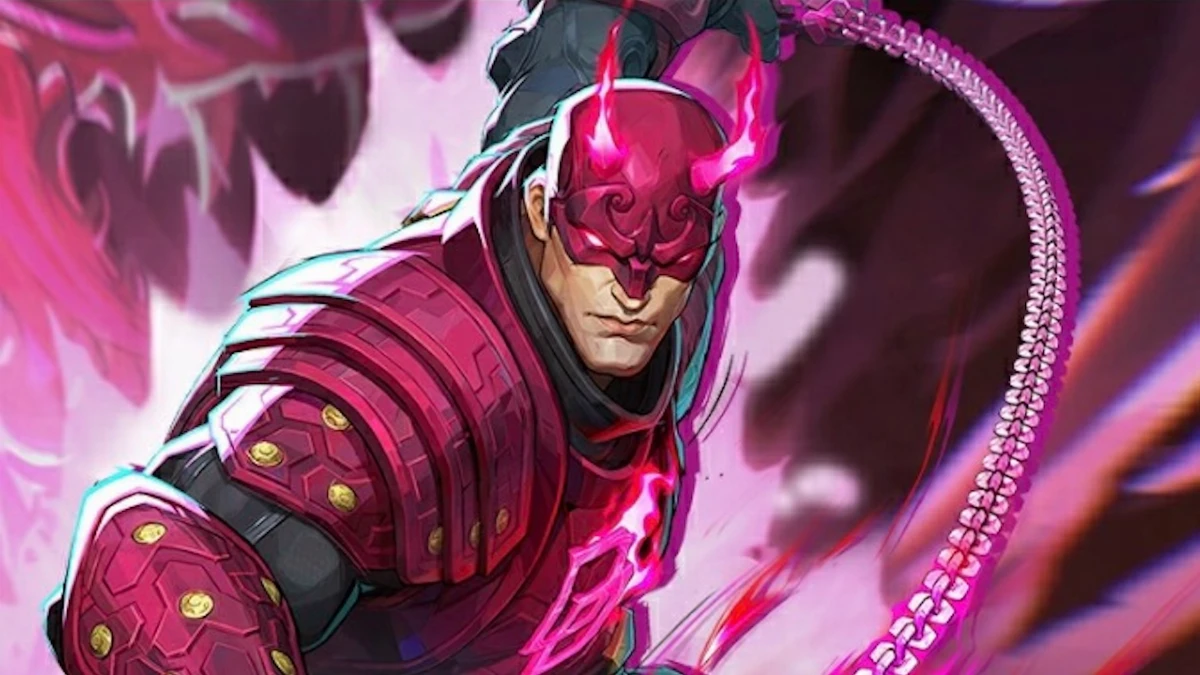
Daredevil Ignite Drops at a Glance
Item | Confirmed information | What remains to be checked after launch |
|---|---|---|
Campaign start | July 29, 2026 | Exact opening hour and regional display |
Campaign end | August 29, 2026 | Exact closing hour and time zone shown by Twitch |
Featured reward | Daredevil - Ignite Costume | Position in the live reward track and required watch time |
Additional cosmetics | MVP animation, Spray, Nameplate, and Emote | Individual tier order and progress requirements |
Currency reward | Units | Quantity and tier requirement as displayed in the live campaign |
Acquisition | Watch eligible Twitch Drops streams and meet requirements | Participating categories, channels, and any region restrictions |
Use the Twitch Drops campaign page after July 29 as the authority for watch times. A promotional image can show the reward set without explaining the complete progression track.
The Four States of a Twitch Drop
Players often say “I watched but got nothing” without identifying which step failed. Separate the process into four states.
Eligibility
The Marvel Rivals game account and Twitch account must be linked through the supported process. The viewer must watch an eligible channel during the campaign window.
Progress
Twitch records qualifying watch time. Progress should appear in the Drops and Rewards inventory or campaign page. Watching a non-participating stream does not advance the bar.
Twitch claim
After a tier reaches its requirement, the viewer may need to press Claim in Twitch. Completing the progress bar does not always send the reward automatically.
In-game delivery
The linked Marvel Rivals account receives the claimed reward. Delivery can be immediate or delayed. The item should be verified in Mail, inventory, costume, or the corresponding customization menu.
Troubleshooting begins by identifying the last completed state. An eligibility problem requires different action from a delivery delay.
Prepare Your Accounts Before July 29
Do not wait until the final campaign day to discover that Twitch is linked to an old or incorrect game account.
Verify the Marvel Rivals account
Launch the official game and confirm the intended platform, player name, account identifier, region, and owned items. If more than one platform profile exists, determine which account will receive the Drops.
Verify the Twitch account
Log in directly through Twitch and confirm the username, email access, two-factor authentication, and active sessions. Remove unfamiliar sessions before linking.
Use the official linking route
Open the Marvel Rivals account-linking page from the official game site, official client notice, or verified Twitch campaign connection. Do not follow a shortened link from an unknown creator or advertisement.
Confirm both sides
After linking, check whether Twitch lists Marvel Rivals or the relevant publisher connection. Then return to the official game account page and confirm that Twitch is connected.
Record non-sensitive evidence
Take a screenshot showing linked status and usernames without exposing passwords, verification codes, recovery keys, or payment information.
A successful connection before July 29 removes one variable when the campaign starts.
How to Link Twitch Safely
The exact page design can change, but a legitimate process follows a recognizable pattern.
Begin from an official Marvel Rivals page or client notice.
Sign in to the intended Marvel Rivals account.
Select the Twitch connection option.
Twitch displays an authorization screen showing the requesting service and permissions.
Review the account name and permissions.
Approve only if the domain and service are correct.
Return to the official page and confirm Connected status.
Check Twitch Connections or Drops inventory for the game relationship.
Do not send a login code to a streamer, chat moderator, seller, or support impersonator. Twitch Drops never require another person to control the account.
If an account is already linked, do not unlink it simply because the campaign has not started. Unlinking can trigger cooldowns, connection delays, or confusion about which profile owns future rewards.
Finding Eligible Streams After the Campaign Starts
A stream displaying Marvel Rivals gameplay is not automatically eligible.
After July 29:
Open the Twitch Drops and Rewards campaign list.
Find the official Marvel Rivals Daredevil - Ignite campaign.
Read the participating channel and category rules.
Use the campaign's link to browse eligible live channels.
Look for a Drops Enabled label where Twitch displays one.
Confirm progress after several minutes before committing to a long session.
Some campaigns allow all channels streaming the correct category after the creator enables Drops. Others use selected partners or official broadcasts. Follow the live campaign wording.
A creator writing “Drops” in a stream title does not prove eligibility. Twitch progress is the proof.
Watch Requirements: What Is Confirmed and Unknown
The confirmed instruction is to watch eligible streams and meet the campaign requirements. The exact duration for the Costume, MVP animation, Spray, Nameplate, Emote, and Units is not specified in the July 23 patch announcement.
When the campaign opens, record:
Reward tier | Required watch time | Progress | Claimed | Delivered in game |
|---|---|---|---|---|
Units | Check live campaign | 0% | No | No |
Spray | Check live campaign | 0% | No | No |
Nameplate | Check live campaign | 0% | No | No |
Emote | Check live campaign | 0% | No | No |
MVP animation | Check live campaign | 0% | No | No |
Daredevil - Ignite Costume | Check live campaign | 0% | No | No |
The actual order may differ. Replace the example tracking order with the live page rather than assuming the Costume is always last.
Reliable Watch-Time Tracking
Twitch generally counts active qualifying watch time, but viewers should not rely on a muted hidden tab for an entire day without checking progress.
Use this routine:
Start one eligible live channel.
Keep the Twitch account signed in.
Disable extensions that interfere with playback if progress fails.
Avoid playing several Drops streams simultaneously because campaigns usually count one eligible stream at a time.
Open Drops inventory after 10 to 15 minutes and confirm the bar moved.
Continue watching until the tier completes.
Press Claim immediately if the button appears.
Refresh the next tier and verify new progress.
Twitch can pause progress when a stream ends, changes category, loses eligibility, or the viewer's session expires. Periodic checks are more reliable than leaving the browser unattended until the final day.
Claim Each Tier as Soon as It Completes
Some Drops campaigns require the previous tier to be claimed before progress begins on the next one. Even when tiers can progress independently, early claiming reduces confusion.
After a bar reaches 100 percent:
Press Claim in Twitch Drops inventory.
Confirm the tier changes to Claimed.
Note the claim time.
Open Marvel Rivals and check delivery.
Return to Twitch and confirm the next tier is active.
Do not wait until after August 29 to press every Claim button unless the live campaign explicitly provides a longer claim period. Campaign viewing and claim deadlines can differ.
Where to Find the Rewards in Marvel Rivals
The reward set contains several item types, so they will not all appear in the same menu.
Daredevil - Ignite Costume
Open Daredevil's hero customization or costume collection. Sort by owned or newly acquired items.
MVP animation
Check Daredevil's MVP or hero presentation customization area. Owning the animation does not necessarily equip it automatically.
Emote
Open Daredevil's emote or communication-wheel customization and assign the reward to an available slot.
Spray
Check the Spray collection and active wheel or loadout. A newly owned Spray may remain unequipped.
Nameplate
Open account profile or nameplate customization. Look for a new-item notification.
Units
Compare the account balance before and after delivery. Currency can arrive without a cosmetic notification.
Also inspect in-game Mail if a reward is not visible. Some campaign deliveries use a message with attachments.
Campaign Time Zones and the July 29 Start
The patch announcement provides campaign dates but not a universal local opening hour in the summarized notice. Twitch should display the campaign time in the viewer's region once it is active.
Do not assume the event begins at 00:00 local time. July 29 can begin at different moments depending on the source time zone. If the campaign is not visible early in the day, wait for the official page rather than unlinking accounts.
The same rule applies on August 29. Treat the live countdown as more authoritative than the calendar date alone. Finish viewing and claiming at least one day early to avoid conversion mistakes or last-hour stream availability problems.
A Three-Session Completion Plan
Once the watch requirements are published, divide the total into three sessions.
Session 1: Verify eligibility
Watch enough to prove progress. Claim the first available tier and confirm one in-game delivery. This validates the complete account pipeline.
Session 2: Complete middle rewards
Choose a stable eligible channel and work through several tiers. Check after every stream category change or interruption.
Session 3: Finish and audit
Complete the remaining watch time, claim all tiers, and verify every item type in Marvel Rivals. Do this before the final 24 hours.
This plan is safer than one long final-day session. If a link or delivery problem appears during Session 1, there is still time to contact support.
Drops Progress Not Increasing
Check the problem in order.
The channel is not eligible
Return to the campaign page and select a participating live channel. Stream-title claims are not enough.
The wrong Twitch account is active
Check the profile icon and Drops inventory. A browser can remain logged into a secondary account.
The game category changed
If the creator switches away from Marvel Rivals, progress may stop.
Multiple streams are open
Close extra Twitch streams and keep one eligible channel active.
The browser session is stale
Refresh, sign in again, or use the official Twitch application. Then verify the progress bar.
The campaign has not started in its source time zone
Check the official Twitch schedule and live countdown.
Do not unlink the Marvel Rivals account as the first troubleshooting action. Progress tracking occurs on Twitch before in-game delivery.
Claimed on Twitch but Missing in Game
A claimed reward can still be waiting in the delivery stage.
Confirm the Twitch tier says Claimed, not merely 100 percent.
Verify Twitch remains linked to the intended Marvel Rivals account.
Restart the game and return to the main menu.
Check Mail and the correct customization category.
Allow for the delivery delay stated by the campaign.
Record Twitch claim status, account ID, platform, and time.
Contact official Marvel Rivals support if the published delivery window passes.
Do not claim the same reward through a second game account unless the campaign explicitly allows it. Most Drops attach to the account linked at the time of claim.
Unlinking and Relinking Risks
Players sometimes unlink accounts during a delivery delay. This can make the destination less clear.
Before unlinking:
Confirm the intended account was not already connected.
Check whether Twitch or Marvel Rivals applies a relink cooldown.
Save screenshots of claimed rewards and current connection.
Read whether rewards already claimed remain bound to the original link.
Contact support when the correct account is linked but delivery is delayed.
Relinking is appropriate when the wrong account is genuinely connected, but it should be done before accumulating watch progress whenever possible.
Avoid Fake Drop Pages and Reward Generators
A month-long cosmetic campaign attracts scams.
Warning signs include:
A page asks for the game password directly instead of using official authorization.
A “Drop generator” promises instant completion without watching.
A seller asks for a two-factor authentication code.
A browser extension claims to multiply watch time.
A site promises an exclusive reward not listed in the campaign.
A shortened link hides its domain.
Use official Marvel Rivals and Twitch pages. Drops are earned through eligible viewing and claimed through Twitch inventory. No streamer needs the player's password.
Purchases Are Separate From Twitch Drops
The Daredevil - Ignite rewards are part of a Twitch viewing campaign. The confirmed path does not require Lattice or a costume purchase.
Players making other supported Marvel Rivals purchases can review options through Topuplist. Use the dedicated Marvel Rivals top-up page, verify platform, account, region, product, and final price, and do not purchase currency because an unofficial page claims it unlocks Twitch watch progress.
A top-up and a Twitch Drop are separate delivery systems. Buying currency cannot replace linking, eligible viewing, Twitch claiming, or in-game reward verification.
Complete Reward Audit
After finishing the campaign, create a final checklist.
Daredevil - Ignite Costume shows as owned.
Daredevil - Ignite MVP animation shows as owned.
Daredevil - Ignite Emote shows as owned.
Daredevil - Ignite Spray shows as owned.
Daredevil - Ignite Nameplate shows as owned.
Units were added to the account balance.
Every Twitch tier says Claimed.
The correct Marvel Rivals account remains linked.
Equip each cosmetic only if desired. Ownership does not require immediate activation.
Frequently Asked Questions
When do the Marvel Rivals Daredevil Ignite Twitch Drops start?
The campaign is scheduled to start on July 29, 2026, and run until August 29. Check the live Twitch campaign for exact hours and time zone.
What rewards are confirmed?
The confirmed set includes the Daredevil - Ignite Costume, MVP animation, Spray, Nameplate, Emote, and Units.
How many hours do I need to watch?
The July 23 patch announcement does not list the exact time for each reward. Use the live Twitch Drops campaign after July 29.
Do I need to link Twitch to Marvel Rivals?
Yes. Link the intended accounts through the official process and verify the connection before accumulating watch progress.
Does every Marvel Rivals stream count?
No. Watch a channel identified as eligible by the official Twitch campaign and confirm that the progress bar moves.
Do rewards arrive automatically after watching?
Players may need to press Claim in Twitch inventory. After claiming, verify delivery in the correct in-game category.
Can I earn progress from several streams at once?
Twitch campaigns generally count one eligible stream at a time. Keep one qualifying stream active and verify progress.
What if a claimed Costume does not appear?
Confirm the linked account, restart the game, check Mail and Daredevil's costume collection, wait for the published delivery period, and contact official support with evidence if necessary.
Final Pre-Launch Checklist
Before July 29, confirm the correct Marvel Rivals and Twitch accounts, enable two-factor authentication, use the official linking route, and save non-sensitive proof of the connection.
After the campaign opens, read the exact watch-time tiers and closing hour from Twitch. Start one eligible stream, verify progress early, claim each completed tier, and check delivery in the game. Finish before August 29 rather than relying on the last night.
The campaign has enough time for a careful process. The only numbers players should trust are the dates and reward set already confirmed, plus the watch requirements displayed by the live Twitch campaign once it begins.
