



Higo Coins are usually credited within minutes after payment confirmation. If your balance has not updated, refresh or restart the Higo app and check again.
Higo Coins (MENA)
Higo recharge service is only available in the MENA region.
Fast
24/7
Secure
-20%

3400 Coins
$0.40$0.50
-22%
39000 Coins
$4.56$5.79
-21%
79000 Coins
$9.25$11.59
-21%
119000 Coins
$13.93$17.49
-21%
160000 Coins
$18.73$23.49
Description
What Is Higo?
Higo, also known as Higo-Live & Enjoy Party, is a social app that connects users through text chat, voice chat, live streaming, photos, and videos.
You can meet new people, join lively voice-room parties, interact with hosts, and participate in social activities with users from different communities.
What Are Higo Coins?
Higo Coins are the virtual currency used within the Higo app. They can be used to:
Send virtual gifts to hosts and other users
Show support for your favorite people during live sessions
Participate in voice-room parties and interactive activities
Access eligible profile decorations, badges, and special effects
Enhance your overall social experience on Higo
Recharge Higo Coins on Topuplist using your Higo UID, without providing your account password.
Important Regional Notice
This Higo Coins recharge service is only available for Higo accounts registered in the MENA region, including supported countries in the Middle East and North Africa.
Accounts registered outside the supported MENA region may not be compatible with this recharge service. Please confirm your Higo account region before placing an order.
Available Higo Coin Packs
Topuplist offers several Higo Coin recharge options for different budgets and usage needs. Available denominations may include:
3,400 Coins
39,000 Coins
79,000 Coins
119,000 Coins
160,000 Coins
Available denominations and prices may change. Please check the product page for the latest recharge options before placing your order.
How to Top Up Higo Coins on Topuplist
Select your preferred Higo Coin pack.
Enter your Higo UID.
Check that your account is registered in the MENA region.
Click Buy Now.
Choose an available payment method and complete the payment.
After payment is confirmed, the Coins will be credited directly to your Higo account.
How to Find Your Higo UID
Open the Higo app and log in to your account.
Go to the Profile or Me section.
Find the User ID displayed on your profile page.
Copy your Higo UID and paste it into the required field on Topuplist.
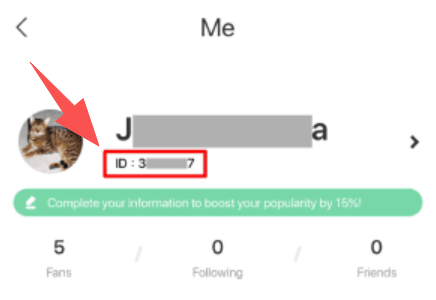
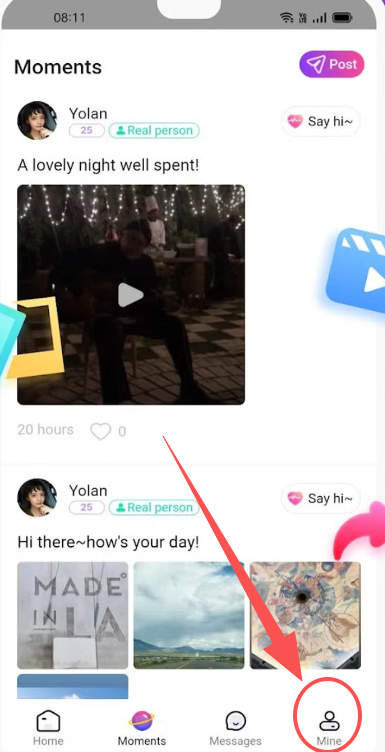
Always check your Higo UID carefully before completing payment. Entering an incorrect UID may result in the Coins being delivered to the wrong account.
FAQ
Higo Coins (MENA)
No reviews yet
Reviews for this product will appear here once customers share their experience.

Higo Coins (MENA) 3400 Coins
Direct top-up Total$0.40





Why Choose Topuplist?

Fast Delivery
Enjoy quick and efficient top-ups with a smooth process and minimal waiting for your purchase.

Secure Payment
Your payment and account information are protected with secure and trusted payment measures.

24/7 Support
Our support team is available 24/7 to assist you with questions whenever you need help.