


Zenless Zone Zero Steam Points Shop Guide: Profile Items, Steam Points, and What Carries Into the Game
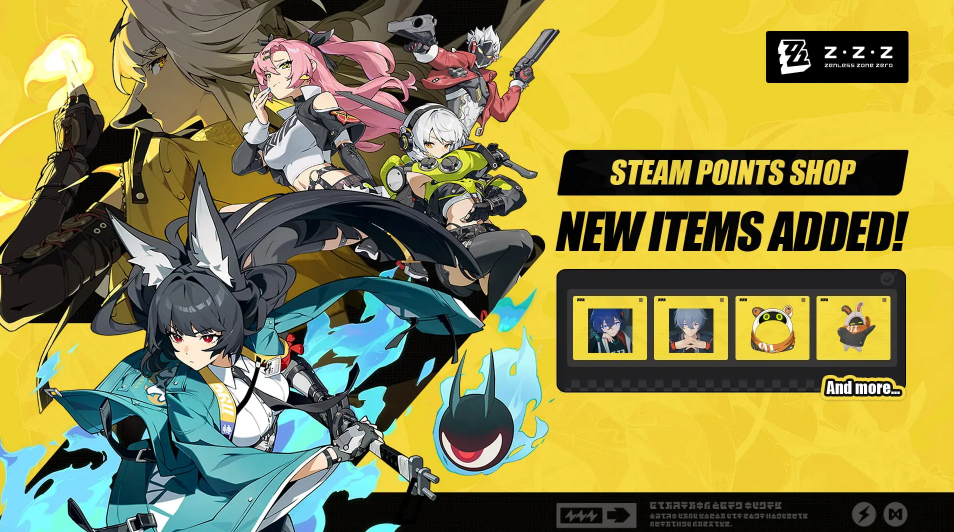
Zenless Zone Zero profile items arrived in the Steam Points Shop on July 30, 2026. This guide explains what Steam profile cosmetics do, how Steam Points are earned and spent, what does not transfer into New Eridu, and how to choose items that fit an actual Steam profile instead of confusing platform decoration with in-game rewards.
Zenless Zone Zero added official profile items to the Steam Points Shop on July 30, 2026. That sounds like a small platform update, but it creates several useful questions: Are the items permanent? Do they unlock anything inside Zenless Zone Zero? Can Polychromes buy them? Are Steam Points refundable? Which profile decoration is worth taking first?
The short answer is that Steam Points Shop items decorate a Steam profile. They do not grant Agents, W-Engines, Polychromes, Inter-Knot progress, combat power, or an advantage inside New Eridu. Their value is presentation. For players who use Steam as a social profile, that presentation can still matter, but it should be evaluated as platform customization rather than game progression.
What the July 30 Addition Actually Changes
Before the addition, a Zenless Zone Zero player could own the game on Steam without having a matching set of official profile decorations available through the Points Shop. The July 30 release gives fans a way to carry the game's visual identity onto their Steam profile.
The available category can include items such as animated avatars, avatar frames, profile backgrounds, mini-profile backgrounds, stickers, or chat effects depending on the live Points Shop listing. Do not assume every category exists because another game offers it. Open the Zenless Zone Zero Points Shop page and read the item type shown beneath each preview.
These items belong to the Steam account that redeems them. They are not tied to the HoYoverse account, server, or character roster. Changing the linked game account does not move a Steam profile background to another Steam account.
The addition also does not mean Steam Points can be converted into in-game currency. Steam Points and Polychromes are separate systems with separate balances and purposes.
How Steam Points Are Earned
Steam Points are normally earned through eligible purchases on Steam. The exact number reflects the amount spent in the account's local currency under Steam's current conversion rules. The Points balance can be viewed in the Points Shop.
Buying a Zenless Zone Zero profile item does not charge the player's bank card again when enough Steam Points are already available. The purchase deducts Points from the platform balance. However, earning the Points originally required eligible Steam spending, so they should not be treated as an unlimited free currency.
Steam can also award community recognition through its own systems, but profile shopping should be planned around the balance actually visible on the account. Do not use a third-party calculator when the Points Shop already displays the cost and available amount.
The important distinction is origin versus use. Points may have been earned while buying another game, downloadable content, or an eligible Steam product, yet they can still be used on Zenless Zone Zero profile decoration.
What You Receive and What You Do Not
A profile background changes the large visual area behind the Steam profile. A mini-profile background appears when another user opens the compact profile preview. An avatar changes the account's visible portrait, while an avatar frame surrounds the selected portrait. Stickers or chat items appear in Steam communication where supported.
None of these items changes the Proxy's account inside Zenless Zone Zero. They do not appear in the in-game namecard collection unless the game separately grants an item with the same artwork. They do not unlock a costume, increase Signal Search odds, or provide battery charge.
They also should not be confused with Steam Trading Cards, badges, or Community Market items. Points Shop cosmetics are generally account-bound platform decorations. Check the item page before purchase for the current restriction and refund wording.
This boundary makes the decision easier. A player who wants combat or account progress should save money and resources for the appropriate in-game system. A player who wants a Steam profile themed around New Eridu can evaluate the Points items on their visual merits.
Choose the Profile Layer With the Largest Impact
Start by opening the Steam profile as another visitor would see it. Identify the largest empty or mismatched area. For most users, a background creates the most immediate change because it affects a broad area. An avatar frame produces a smaller but highly visible accent. A mini-profile item matters most to users who interact frequently through the friends list.
Do not redeem several items before checking compatibility. A bright animated avatar may fight with a detailed background. A restrained frame can unify an existing avatar without replacing it. Preview the combination whenever Steam provides that option.
Consider text readability. Profile showcases, recent activity, and custom information still need to remain legible over the background. The most dramatic artwork is not automatically the best profile design if it obscures everything placed above it.
If the account changes themes often, choose a flexible item that can work with several backgrounds. If the goal is a complete Zenless Zone Zero identity, choose a coordinated set and accept that it will be more specific.
A Simple Priority Order for Different Steam Users
A player who rarely visits Steam profiles should skip the redemption unless the art has personal value. Points do not expire simply because a new game collection appears, and an unused decoration provides little benefit.
A social player who uses chat and the friends list should prioritize an avatar, frame, mini-profile background, or chat item that appears during frequent interactions. These assets receive more exposure than a full background hidden behind an infrequently opened profile.
A profile designer should begin with the background, then match the avatar and frame. Build from the largest visual layer to the smallest. This prevents spending Points on an accent that no longer fits after the main background changes.
A dedicated Zenless Zone Zero fan can collect the full set, but should still compare the total Points cost with other franchises they plan to use. Platform currency has opportunity cost even when it cannot be withdrawn as cash.
Steam Points Are Not Polychromes
Steam Points are spent in the Steam Points Shop. Polychromes are used within Zenless Zone Zero's economy. Monochrome, Encrypted Master Tapes, Boopons, and other game resources also have their own roles. The names, icons, and balances should never be combined in a budget.
Redeeming a Steam background will not reduce the number of Polychromes available for Signal Searches. Purchasing Monochrome does not directly add Steam Points unless the transaction itself is processed as an eligible Steam purchase under Steam's current rules. Check the transaction path rather than assuming every payment linked to the game behaves identically.
This distinction also matters for customer support. A missing Points Shop item is a Steam inventory or profile issue. A missing in-game purchase belongs to the game account and payment route. Recording which account and storefront completed the transaction saves time.
Before You Redeem an Item
Open the item at full preview size. Confirm its category, animation, dimensions, Points cost, and account restriction. Check the current Steam refund language, because Points Shop redemptions should be treated as final unless the platform explicitly says otherwise.
Compare the available Points balance with the full set. If one background consumes most of the balance, decide whether it creates more value than several smaller items. There is no universal correct answer because visibility depends on how the profile is used.
Check whether a desired design is already owned through a bundle or previous redemption. The Points Shop should mark owned items, but a manual inventory check prevents duplicates in planning.
Finally, confirm that the correct Steam account is signed in. Steam profile cosmetics do not transfer merely because two accounts use the same computer or share a Zenless Zone Zero login.
After Redemption: Apply and Inspect
Redeeming an item and applying it are separate actions. Open the Steam profile editor, select the relevant category, choose the new Zenless Zone Zero asset, and save the profile.
View the full profile and mini profile. Check dark and light text areas, avatar visibility, and how the design appears behind showcases. Animated items should be inspected for several seconds because a later frame may be brighter or busier than the first.
Ask a friend to view the profile if the social presentation matters. Cached previews can delay an update, so a second account provides a useful check. If the item appears in inventory but not in the editor, restart Steam before assuming the redemption failed.
In-Game Spending Remains a Separate Decision
The Points Shop launch may put Zenless Zone Zero back in a player's attention, but it does not create a reason to pull an Agent or buy Monochrome. Open the current Signal Search and store pages separately, review their dates, and decide based on the actual account plan.
Players who have already decided on an in-game purchase can compare supported services at Topuplist and use the Zenless Zone Zero top-up page. Verify the HoYoverse account, server, product, currency, and final amount before payment. Steam profile items and in-game purchases remain independent.
Design a Coherent Profile Instead of Collecting Icons
A profile is read as one composition. Begin with a dominant image, one supporting accent, and a restrained color relationship. If the Zenless Zone Zero background already contains several characters and bright effects, a simple avatar frame may work better than another animated layer. If the background is quiet, the avatar can carry more personality.
Check the crop at several window sizes. Steam can show the same asset in a full profile, compact preview, friends list, and mobile interface. Character faces or logos near an edge may disappear in smaller crops. An item that looks ideal in the shop preview can communicate poorly in the places where friends actually see it.
Use showcases intentionally. Achievement, artwork, screenshot, and review showcases introduce their own colors and movement. Temporarily hide or reorder them while testing the new background. The correct Points Shop choice may be the one that supports existing showcases rather than the most elaborate standalone animation.
Take a screenshot of the finished profile and leave it for a day. When revisiting, check whether the focal point is clear and whether text remains comfortable to read. Steam Points cannot buy combat power, but thoughtful composition can make a modest redemption feel more valuable than a complete collection applied without editing.
The Points Shop page can change as more assets are added, so avoid treating the July 30 selection as the only possible Zenless Zone Zero collection. Redeem what improves the profile now and leave spare Points for later additions. A partial profile with a clear visual idea is more complete than a crowded page built only because every launch item was available.
Before redeeming, remember that Steam profile ownership is public-facing but optional. A player can enjoy Zenless Zone Zero fully without displaying the fandom on every platform. Choosing no item preserves Points and is as valid as collecting the set.
Frequently Asked Questions
When were the Zenless Zone Zero Steam Points Shop items added?
The new official profile items were announced as available on July 30, 2026.
Do Steam profile items give Polychromes?
No. They customize the Steam account and do not grant Polychromes, Agents, W-Engines, or combat progress.
Can I buy the items with Monochrome?
No. The Steam Points Shop uses Steam Points. Monochrome belongs to the in-game economy.
Do the items transfer to another Steam account?
Treat them as bound to the Steam account that redeemed them. Shared computers or linked game accounts do not create automatic transfer rights.
Which item should I redeem first?
Choose the layer you see most. Profile designers often gain the largest visual change from a background, while social users may see more value from an avatar, frame, or mini-profile item.
Where can I make a separate Zenless Zone Zero in-game purchase?
After confirming the live in-game product, players can use Topuplist and the Zenless Zone Zero recharge page. Check the receiving account and server before payment.
