


Whiteout Survival State Transfer Guide 2026: Groups, Cost & Beginner vs Advanced
State Transfer guide 2026 — groups, cost, Beginner vs Advanced, and how to choose a state.
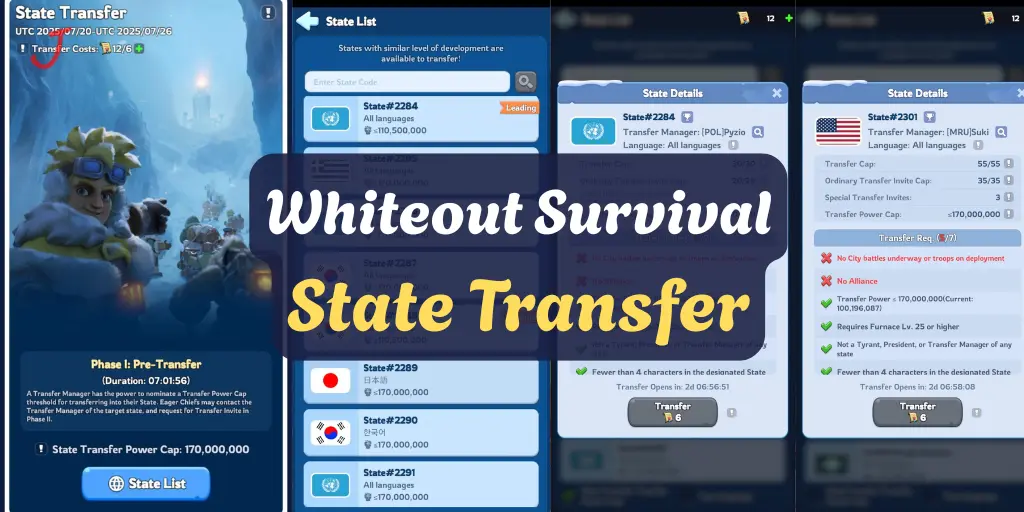
What Is State Transfer in Whiteout Survival?
State Transfer is the system that lets you relocate your account from one state to another. Because the matchmaker pairs states by maturity, a Day-12 player and a Day-3700 player are worlds apart in meta, event schedule, and power ceiling — letting them swap freely would wreck competitive balance. Transfer exists to let players move to states that fit their progression and playstyle, within tightly controlled rules.
Want to fast-track your move? Top up Whiteout Survival safely at Topuplist, and check Topuplist for the latest bundle deals and event top-ups.
Why Players Transfer States
Players transfer for many reasons: to join a more active or better-organized state, to escape a dead or toxic leadership, to find a competitive-but-not-brutal SvS lobby, or to reunite with friends. Newer states often offer more opportunity and less entrenched leadership, while older states offer deeper progression but fiercer competition. The right move depends entirely on your goals.
How Transfer Groups Work
Reading the Official Transfer Group Chart
Your State ID sits at the top of your map screen. Find it in the chart and every state in that row is a legal target. The system groups states into bands by maturity so you only see compatible destinations. Always confirm the in-game chart — community-compiled group lists can differ slightly from the official one.
Hot Groups for Mid-2026
Community recruitment threads in mid-2026 clustered FC8-era players around states 2784–3315 (Groups 13–14), chasing active SvS lobbies. The consensus calls these the go-to groups for players who want competitive-but-not-brutal states. If you are in that power band, those groups are where the action is.
Short on Frost Stars for that extra build queue? Grab a quick Whiteout Survival top-up through Topuplist, or browse all offers on Topuplist.
Beginner vs Advanced Transfer
This is the single most misunderstood part of the system, and confusing the two is how people waste Crystals.
Beginner Transfer is free (or near-free) for early-game accounts. It targets new players moving to emerging states — typically low FC, freshly past FC5 (the unlock threshold), who haven't sunk months into their state. Community advice is blunt: new players should ride Beginner Transfer and avoid overpowered "Leading" states where you will just get farmed.
Advanced Transfer is the paid, high-level mode most active players use. It requires the Transfer Item plus Crystals, and the cost scales sharply if your power exceeds the target state's cap. Exceeding the cap also means you need a Phase II invite. This is the mode for established FC15+ accounts.
Avoiding a Wasted Crystal Spend
Before spending a single Crystal, confirm which mode the game actually offers you on the event screen. A surprising number of borderline accounts qualify for Beginner and never check. That two-second check can save a real chunk of premium currency.
Eligibility and Requirements
FC Level and Power Cap Rules
Core eligibility gates: FC level ≤ 30, power below the target cap, not in an alliance, no active marches or combat, 25+ days since your last transfer, and you cannot be a current or former president/tyrant. Fail any one and the button stays grayed out.
Costs and the Crystal Trap
Advanced Transfer scales with how far above the target cap your power is. The further over, the more Crystals — and if you are over the cap you also need a Phase II invite from the destination. Plan your transfer during a window where your power sits comfortably under the target cap to minimize cost. Never transfer mid-SvS season into a state already deep into its cycle; you can lose reward eligibility.
Planning your transfer? Stock up resources with a Whiteout Survival top-up from Topuplist, and see current promos at Topuplist.
The July 2026 Transfer Window
The July 2026 State Transfer window runs July 19 to 25 (UTC). The Transfer Channel requires Furnace Level 20+. Because windows are infrequent, plan well ahead: clear your alliance, finish active marches, and line up your destination state before the 19th. Use the in-game /timeline command to compare event schedules between candidate states.
Using the /timeline Command
The /timeline command shows a candidate state's event schedule. Compare it against your current state before committing — landing mid-SvS or mid-anniversary can cost you reward eligibility and progression momentum. Veterans swear by this check.
How to Pick the Right State
Know your band. Find your State ID, locate its group, and only consider legal targets.
Define your goal. Competitive SvS? Social alliance? Fresh start? Different goals point to different groups.
Check activity. Look at alliance rankings, SvS history, and recruitment threads for the group.
Compare schedules with /timeline to avoid mid-event landings.
Confirm mode. Verify Beginner vs Advanced on the event screen before spending.
Don't let a stalled Furnace hold back your heroes. Secure a Whiteout Survival top-up via Topuplist, and explore more at Topuplist.
Step-by-Step Transfer Process
Wait for the transfer window (e.g., July 19–25, 2026).
Leave your alliance and clear all marches/combat.
Open the transfer event and confirm your offered mode (Beginner/Advanced).
Pick a legal target state from your group.
Pay the cost (free/near-free for Beginner; Item + Crystals for Advanced).
Confirm and relocate; rejoin an alliance in the new state.
Common State Transfer Mistakes
Confusing Beginner and Advanced and wasting Crystals.
Transferring with active marches — the button stays locked.
Landing mid-SvS season and losing reward eligibility.
Ignoring the group chart and picking an incompatible state.
Going over the power cap without a Phase II invite — blocked or overcharged.
Not checking /timeline before committing.
Transfer Etiquette and Alliance Planning
State Transfer is not just a personal move. It reshapes alliances on both ends. Good transfers are planned; bad ones fracture states.
Leaving Your Old State
Coordinate your departure with alliance leadership. Abruptly leaving during SvS prep or an anniversary event hurts the state you leave and can burn bridges you may want later. Give notice, finish your commitments, and transfer cleanly.
Joining Your New State
On arrival, do not immediately demand a leadership role or criticize the existing order. Learn the state's culture, event schedule, and power balance first. States that absorb transfers well are the ones with clear onboarding and patient leadership.
Transfer Timing Relative to Events
The worst time to transfer is mid-event. Land during a quiet window so you can participate in the next full cycle from day one. The July 19 to 25 window is convenient because it precedes the late-summer event cadence, giving you time to settle.
The 25-Day Cooldown
After a transfer, you cannot transfer again for 25 plus days. This locks your decision, so confirm the destination is right before committing. A hasty move during a hype cycle often leads to a second, costlier move a month later.
Transfer for Competitive Goals
Many players transfer specifically to find a better SvS band. If your goal is competitive-but-not-brutal, the Groups 13 to 14 range, states roughly 2784 to 3315, has been the mid-2026 sweet spot per community recruitment threads. If your goal is a fresh start with low competition, look at newer-state groups instead.
Avoiding the Leading State Trap
New players are often tempted by powerful Leading states, but entering an entrenched top state usually means getting farmed by accounts far ahead of you. Beginner Transfer is better aimed at emerging states where you can grow into a leadership role.
Verification Before You Spend
Before spending a single Crystal:
Confirm your offered mode, Beginner versus Advanced, on the event screen.
Confirm your State ID group and legal targets.
Run the in-game timeline command on candidate states.
Verify FC level 30 or below and power under the target cap.
Ensure you are out of your alliance with no active marches.
Skipping any step risks a blocked transfer or a wasted Crystal spend. Community strategy hubs such as Whiteout Survival Handbook publish group charts that complement the in-game chart, but always trust the official in-game list for legality.
State Transfer Group Charts Explained
The official transfer group chart bins states into maturity bands so you only see compatible destinations. Your State ID, shown at the top of the map, determines your row. Community-compiled charts circulate each cycle and are useful for planning, but the in-game chart is the only legally binding source: a state listed as compatible by a fan chart but not by the game is not a valid target. Always confirm in the event screen before committing.
How to Negotiate a Transfer With Your New State
Top states often require an application or interview before accepting transfers, especially strong accounts. Before you move, message the target state's leadership (through official channels) and explain your goals. A polite, specific introduction dramatically improves your odds of landing in a state where you actually fit, rather than arriving unannounced and getting ignored.
Transfer Taxes and Hidden Costs
Beyond the obvious Crystal or Item cost, transfers carry hidden costs: you lose alliance-built momentum, you may forfeit in-progress event rewards, and you start with zero social capital in the new state. Weigh these against the benefits. A transfer that solves a toxicity problem is worth it; a transfer made on a whim to chase a "better" state often disappoints because every state has its own flaws.
Real Transfer Lessons From the Community
Recurring community wisdom: do not transfer mid-SvS season, do not exceed the power cap without a Phase II invite, and always verify Beginner versus Advanced before spending. The most expensive mistakes are the avoidable ones, and nearly every transfer regret traces back to skipping one of those three checks. A two-minute verification step prevents a multi-Crystal, multi-week mistake.
Transfer and Long-Term Planning
Think of transfer as a tool in your long-term progression, not a panic button. The best players plan transfers around their hero generation and event calendar, moving when the timing aligns with a quiet window and a compatible state. Treating transfer as strategy rather than reaction is the difference between a successful relocation and a regretted one.
State Transfer Group Charts Explained
The official transfer group chart bins states into maturity bands so you only see compatible destinations. Your State ID, shown at the top of the map, determines your row. Community-compiled charts circulate each cycle and are useful for planning, but the in-game chart is the only legally binding source: a state listed as compatible by a fan chart but not by the game is not a valid target. Always confirm in the event screen before committing. The game decides, not the forum. For the official eligibility chart and exact dates, verify inside the event itself, and cross-check the Whiteout Survival Wiki for community-verified transfer group lists.
How to Negotiate a Transfer With Your New State
Top states often require an application or interview before accepting transfers, especially strong accounts. Before you move, message the target state's leadership through official channels and explain your goals. A polite, specific introduction dramatically improves your odds of landing in a state where you actually fit, rather than arriving unannounced and getting ignored. First impressions in a new state are hard to redo, so invest in the conversation before you invest the Crystals.
Transfer Taxes and Hidden Costs
Beyond the obvious Crystal or Item cost, transfers carry hidden costs: you lose alliance-built momentum, you may forfeit in-progress event rewards, and you start with zero social capital in the new state. Weigh these against the benefits. A transfer that solves a toxicity problem is worth it; a transfer made on a whim to chase a better state often disappoints because every state has its own flaws. Count the unseen costs before you pay the seen ones, and you will make fewer regrettable moves.
Real Transfer Lessons From the Community
Recurring community wisdom: do not transfer mid-SvS season, do not exceed the power cap without a Phase II invite, and always verify Beginner versus Advanced before spending. The most expensive mistakes are the avoidable ones, and nearly every transfer regret traces back to skipping one of those three checks. A two-minute verification step prevents a multi-Crystal, multi-week mistake. The cost of care is tiny; the cost of carelessness is not.
Transfer and Long-Term Planning
Think of transfer as a tool in your long-term progression, not a panic button. The best players plan transfers around their hero generation and event calendar, moving when the timing aligns with a quiet window and a compatible state. The Whiteout Survival Help Center publishes the schedule and rules you should confirm before every move. Treating transfer as strategy rather than reaction is the difference between a successful relocation and a regretted one. Move with a plan, not a mood.
Beginner vs Advanced Transfers
Transfers split into Beginner and Advanced brackets, and picking the wrong one wastes the attempt. Beginner transfers are for newer accounts below a power threshold and move to other beginner-compatible states; Advanced transfers are for established accounts and require meeting the target state's group-chart eligibility. Always confirm which bracket your account qualifies for before spending, because the rules, costs, and valid destinations differ between the two. Reading the bracket label in the event screen takes ten seconds and prevents a mistake that can cost Crystals and weeks of progress.
FAQ:
Q: What is State Transfer in Whiteout Survival?
A: It lets you relocate your account to a compatible state within your maturity group, under strict eligibility and cost rules.
Q: When is the July 2026 transfer window?
A: July 19 to 25, 2026 (UTC). The Transfer Channel requires Furnace Level 20 or higher.
Q: What is the difference between Beginner and Advanced transfer?
A: Beginner is free/near-free for early accounts; Advanced is the paid mode for established FC15+ players requiring an Item plus Crystals, with cost scaling by power cap.
Q: How do I know which states I can transfer to?
A: Find your State ID at the top of the map, locate its row in the official transfer group chart — every state in that row is a legal target.
Q: Why shouldn't I transfer mid-SvS season?
A: Landing in a state already deep into its SvS or anniversary cycle can cost you reward eligibility and progression momentum.
Q: What are the basic eligibility rules?
A: FC level ≤ 30, power under the target cap, not in an alliance, no active marches, 25+ days since last transfer, and not a current/former president or tyrant.
