


StarMaker Coins Not Received After Payment? Complete Fix Guide, Causes & Solutions (2026)
Paid for StarMaker Coins but didn't receive them? Learn the most common causes, proven fixes, refund options, and how to safely buy StarMaker Coins in 2026.
Buying StarMaker Coins is usually a quick and seamless process. However, many users occasionally encounter a frustrating situation: the payment is completed, but the Coins never appear in their account.
If you've recently paid for StarMaker Coins and haven't received them, don't panic. In most cases, the issue can be resolved by checking your transaction status, refreshing your account, or contacting support with the correct information.
This guide explains the most common reasons why StarMaker Coins may not arrive after payment and provides step-by-step solutions to help you recover your Coins or refund as quickly as possible.
Why Are My StarMaker Coins Not Showing Up After Payment?
StarMaker Coin delivery is typically instant or completed within a few minutes after payment verification. However, delays can occur due to payment processing, server synchronization issues, incorrect account information, or app-related problems.
The most common scenarios include:
Payment completed but Coin balance remains unchanged
Money deducted from your bank account but Coins not received
Google Play or App Store confirms payment but no Coins appear
Order status stuck on Pending or Processing
Recharge confirmation received but balance not updated
Common Causes of Missing StarMaker Coins
According to user reports and top-up service providers, most delayed Coin deliveries are resolved automatically within a few minutes to 24 hours.
How Long Does StarMaker Coin Delivery Usually Take?
Many users worry immediately after making a purchase, but a short delay is often normal.
Typical Delivery Time
Most transactions are completed within minutes, while payment verification may occasionally extend processing times.
When Should You Start Worrying?
You should investigate further if:
More than 30 minutes have passed without delivery
Your payment is marked as Completed
The Coin balance remains unchanged after refreshing the app
No delivery notification has been received
How to Check Whether Your StarMaker Top Up Is Still Processing
Before attempting another purchase, verify your transaction status.
Step 1: Check Payment Status
Look for one of the following:
Pending
Processing
Completed
Failed
Step 2: verify Payment Through Your Provider
Depending on your payment method:
Google Play Purchase History
Apple App Store Purchase History
PayPal Transaction Records
Credit/Debit Card Statement
A successful bank charge does not always mean the merchant has completed confirmation. Payment gateways may still be processing the transaction.
Step 3: Review Your StarMaker Wallet
Open:
Profile → Wallet → Coin History
Check whether the coins were credited but not reflected on the main balance page.
7 Provenfixes for Missing StarMaker Coins
If your payment has already gone through, try these solutions before contacting support.
Fix #1: Restart the StarMaker App
Many synchronization issues are resolved simply by:
Closing the app completely
Reopening it
Refreshing your wallet balance
Fix #2: Log Out and Log Back In
This forces StarMaker to refresh account data from the server.
Fix #3: Update StarMaker to the Latest Version
Older versions can occasionally fail to display updated balances correctly.
Fix #4: Clear App Cache
For Android users:
Settings → Apps → StarMaker → Storage → Clear Cache
This removes outdated balance information.
Fix #5: Verify Your StarMaker UID
One of the most common causes of missing Coins is entering the wrong UID during recharge. Even a single incorrect digit can send Coins to another account.
Fix #6: Wait for Payment Verification
Certain transactions require manual or automated verification checks.
In these cases:
Do not make another purchase immediately
Wait up to 24 hours
Monitor transaction status
Fix #7: Check for Server Issues
Temporary server overloads during promotions or high-traffic events may delay delivery. User reports indicate that server-side issues can affect Coin synchronization and recharge processing.
Money Deducted but StarMaker Coins Not Added
This is one of the most frequently reported recharge issues.
Why It Happens
Common causes include:
Payment gateway timeout
Banking authorization delays
Interrupted network connection
Merchant confirmation failure
What You Should NOT Do
Avoid:
Repeated purchases
Multiple payment attempts
Rapidly switching payment methods
Repeated failed payments may trigger temporary security restrictions on your account.
Recommended Timeline
Safe & Instant StarMaker Coin Top Up
If you're looking for a reliable way to recharge StarMaker Coins globally, Topuplist offers secure payments, fast delivery, and direct UID-based top-ups.
Why Choose Topuplist?
✓ Instant delivery for most orders
✓ Secure payment processing
✓ Multiple payment methods
✓ Transparent pricing
✓ Dedicated customer support
Top Up StarMaker Coins Here:
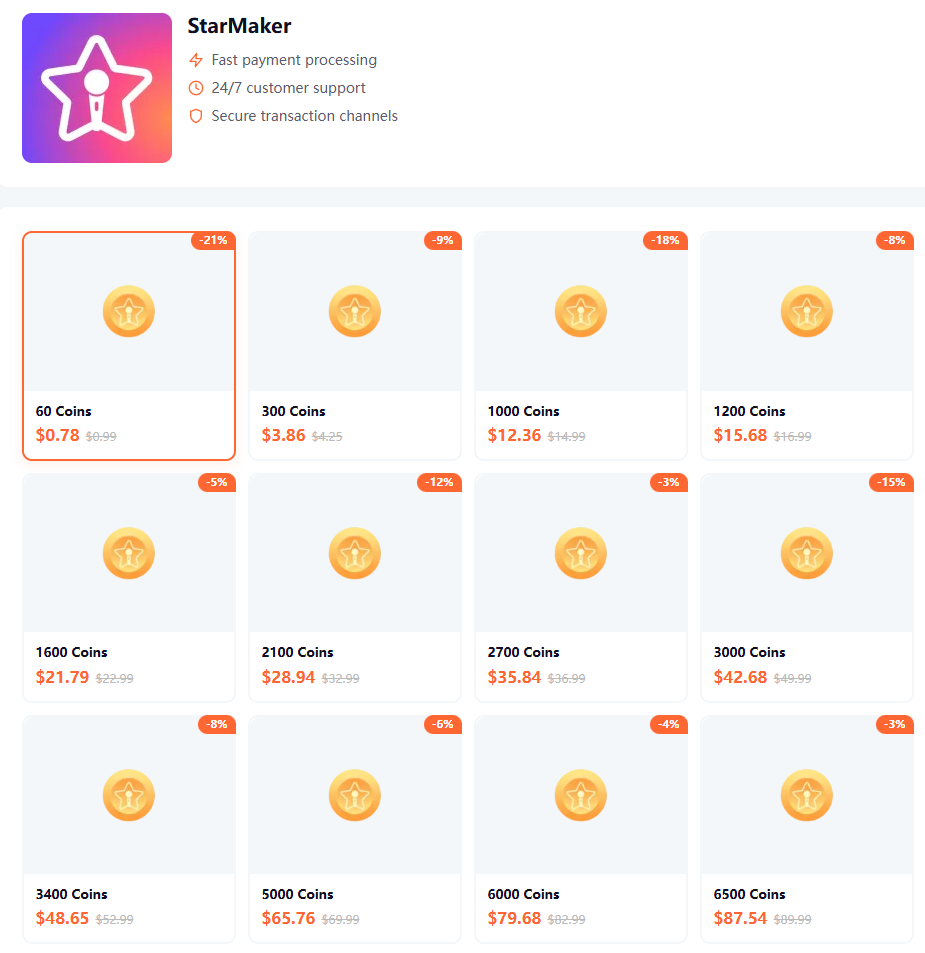
Before completing your order, always double-check your StarMaker UID to avoid delivery issues.
Entered the Wrong StarMaker UID? Here's What Happens
Incorrect account information remains one of the leading causes of missing Coin complaints.
Common UID Mistakes
Typing errors
Copying an outdated ID
Switching between multiple accounts
Entering another user's UID
Can Coins Be Recovered?
Recovery depends on:
Whether the Coins have already been credited
The recipient account status
Support team verification
For this reason, always verify your UID before payment.
How to Contact StarMaker Support for Missing Coins
If your Coins still haven't arrived after 24–48 hours, prepare the following information:
Support Request Template
You can send:
Hello StarMaker Support,
I successfully completed a Coin purchase, but the Coins have not been credited to my account.
UID:
Transaction ID:
Purchase Amount:
Purchase Date:
Attached is my payment receipt.
Please investigate this transaction and assist with Coin delivery or refund.
Providing complete information can significantly speed up the investigation process.
Additional Resources
For payment verification and consumer protection information, you can also refer to:
These official resources can help verify transaction status and payment confirmations.
Frequently Asked Questions
How long does StarMaker Coin delivery take?
Most deliveries are completed instantly or within a few minutes. Verification reviews may take up to 24 hours.
Should I buy Coins again if they don't appear?
No. Wait for the current transaction to complete first. Duplicate purchases can complicate refunds and support requests.
Can I get a refund if Coins never arrive?
In many cases, payment providers and recharge platforms offer refund procedures for failed transactions. Processing times vary depending on the payment method.
What is the most common reason for missing Coins?
Incorrect StarMaker UID entry and payment verification delays are among the most frequently reported causes.
Final Thoughts
If your StarMaker Coins were not received after payment, the issue is often temporary and can usually be resolved through account refreshes, payment verification checks, or support assistance.
Always remember to:
Verify your UID before purchasing
Save payment receipts
Avoid duplicate payments
Use trusted recharge platforms
Contact support if delays exceed 24–48 hours
For a safer and faster recharge experience, you can use:
Topuplist StarMaker Top Up Store
With secure payment options and direct StarMaker Coin delivery, Topuplist helps reduce the risk of recharge issues and keeps your singing experience uninterrupted.
