2026 Latest Likee Top Up Guide: Fast & Safe Ways to Buy Diamonds
Learn how to top up Likee Diamonds in 2026 with this complete guide. Discover official recharge methods, common payment issues, UID tips, troubleshooting steps, and the best top-up plans for different types of users.
Likee Diamonds are the premium currency used on the Likee platform for sending gifts, supporting creators, and unlocking interactive live-stream experiences. Whether you're a casual viewer or a heavy supporter of your favorite streamers, knowing how to recharge safely can save both time and money.
This guide covers everything you need to know about Likee top up in 2026, including official recharge methods, common payment problems, troubleshooting tips, and recommended diamond packages for different user types.
Before You Top Up: What You Need to Prepare
Before purchasing Likee Diamonds, make sure you have the following information ready:
Find Your Likee ID
Most recharge platforms require your Likee ID to process the top up.
To locate your Likee ID:
Open the Likee app.
Tap your profile picture.
Visit your profile page.
Your Likee ID will appear below your username.
Prepare a Supported Payment Method
Common payment options include:
Avoid VPNs During Payment
Many payment failures occur because the account region, payment card region, and IP address do not match. VPN usage is one of the most common reasons for rejected transactions.
How to Buy Likee Diamonds Step-by-Step
There are two main methods to recharge Likee Diamonds:
Method 1: Official In-App Recharge
Open Likee.
Go to Wallet or Diamond Purchase.
Select your desired Diamond package.
Complete payment through Google Play, Apple Pay, or card payment.
Wait for the Diamonds to appear in your account.
Most transactions are completed within 5–30 minutes, although first-time purchases may require additional verification.
Fast Recharge Alternative: Topuplist Likee Top Up
For users looking for a quick and straightforward recharge process, Topuplist offers direct Likee Diamond top-ups.
Why Many Users Choose Topuplist
Fast payment processing
Direct UID top-up method
Multiple payment options
24/7 customer support
International server support
Official Recharge Page:
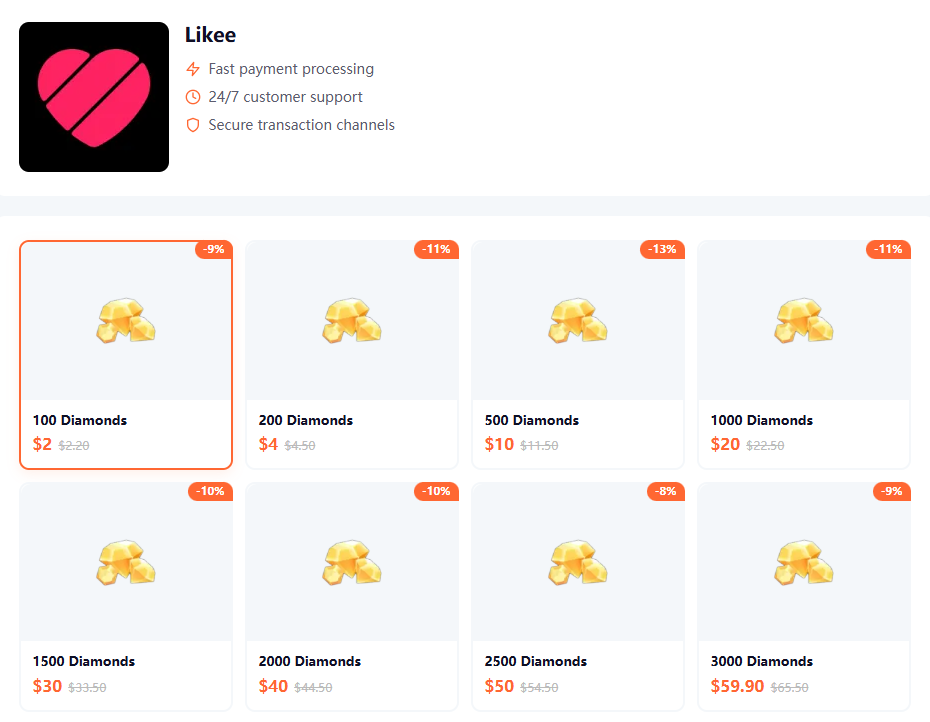
According to the platform, users only need to provide their Likee ID, select a Diamond package, complete payment, and the Diamonds are usually delivered within minutes.
Recommended Likee Diamond Packages for Different User Types
Just like gaming recharge guides, choosing the right package can improve your value-for-money experience.
Casual Users
Suitable for:
Watching streams occasionally
Sending gifts a few times per week
Active Fans
Suitable for:
Following multiple creators
Participating in live events regularly
VIP Supporters & Power Users
Suitable for:
Frequent gift sending
Supporting top creators
Participating in platform campaigns
Topuplist currently offers packages ranging from 100 Diamonds up to 20,000 Diamonds.
Why Your Likee Top Up Might Fail
Many users search for:
"Likee top up failed"
"Likee payment failed"
"Likee diamonds not received"
These are some of the most common causes.
Region Mismatch
Your account region, payment card region, and network location must generally align.
A mismatch may trigger payment verification or automatic rejection.
Incorrect UID
Studies from multiple recharge troubleshooting reports show that UID errors are among the leading causes of delivery failures. Always double-check your Likee ID before payment.
Payment Verification Hold
First-time purchases often require additional security checks.
Verification may take:
Likee Diamonds Not Received? Here's What To Do
If payment succeeds but Diamonds do not appear:
Step 1: Check Transaction Status
Look for:
Pending
Processing
Completed
Pending orders can remain active for up to 48 hours during verification.
Step 2: Refresh Your Account
Try:
Closing and reopening the app
Logging out and back in
Updating Likee
Clearing cache
These methods resolve a large percentage of synchronization issues.
Step 3: Verify Your UID
Incorrect account information remains one of the most frequent reasons for missing Diamonds.
Step 4: Contact Support
Prepare:
Payment receipt
Order number
Likee ID
Recharge amount
This information will help customer support investigate the transaction faster.
Safety Tips When Buying Likee Diamonds
Use Trusted Recharge Platforms
When choosing a third-party recharge service:
Verify platform reputation
Check customer support availability
Confirm secure payment channels
Avoid sharing unnecessary account credentials
Community discussions across gaming recharge platforms often highlight the importance of using reputable services and protecting account information when purchasing virtual currency.
Keep Payment Records
Always save:
Screenshots
Transaction IDs
Email receipts
These records are essential if a recharge issue occurs.
Avoid Multiple Recharge Attempts
If an order shows "Pending," avoid making repeated purchases until the transaction is confirmed.
Helpful Resources
For additional account and payment guidance, you can also review:
These official resources provide payment and account troubleshooting information directly from the platform providers.
Final Thoughts
Buying Likee Diamonds in 2026 is generally straightforward, but most issues arise from incorrect UID information, VPN usage, payment verification holds, or regional restrictions. By preparing your account information carefully and using trusted recharge channels, you can significantly reduce the chance of failed transactions.
For users looking for a quick recharge experience, the official Likee payment system and trusted third-party platforms such as Topuplist can provide convenient options for purchasing Diamonds and supporting your favorite creators.