


Mobile Legends: Bang Bang Free Random Skin Chest Guide
The 2026 Rank Party in Mobile Legends: Bang Bang separates its free rewards into several exchange-coin tracks. This guide focuses on the Starter Exchange Coin path that opens the Random Skin Chest, explains how it differs from the Premium, Advanced, and Select tracks, and gives players a practical redemption routine that does not depend on unconfirmed task totals or guessed drop rates.
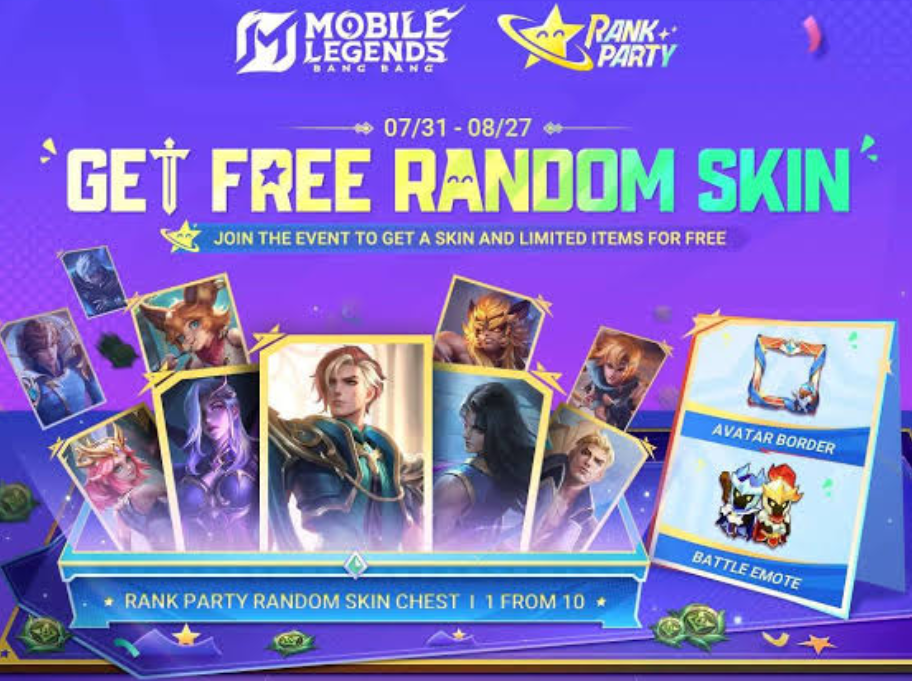
The latest Mobile Legends: Bang Bang Rank Party gives every eligible player a reason to check the event hub even without plans to spend Diamonds: Starter Exchange Coins can be traded for a Random Skin Chest, an exclusive Battle Emote, an Avatar Border, and other rewards. Players who later decide to buy a separate cosmetic can prepare Diamonds through Topuplist and the dedicated Mobile Legends: Bang Bang top-up page, but the Starter route itself should be treated as a free event objective first.
The most important detail is that Rank Party does not use one universal currency. Several coin types appear across the event, and each belongs to a different reward track. A player can participate regularly, see multiple coin icons, and still miss the intended chest by checking the wrong exchange page. The safest approach is to identify the Starter track, inspect its live requirements, and build the week's play around tasks that award the correct coin.
What the Free Reward Path Includes
The Starter Exchange Coin route became available from July 31, 2026, server time. Its headline reward is a Random Skin Chest. The same route also advertises the Rank Party-exclusive Battle Emote, an Avatar Border, and additional materials or event rewards shown in the live client.
That wording matters. The chest is random, so players should not treat it as a selector that guarantees one chosen hero's cosmetic. The permanent reward can still be valuable, especially for a newer account with a small collection, but the decision differs from saving for a fixed skin.
Rank Party also contains other free-skin routes that unlock on different dates. Premium Exchange Coins are tied to a choice among five Special skins, including a GOLDEN MONTH Hanabi skin. Advanced Exchange Coins support the new Gloo skin route from August 7, while Select Exchange Coins are used for the new Kadita skin route from August 14. These tracks sit beside the Starter chest rather than replacing it.
Currency | Main Reward Direction | Announced Start |
|---|---|---|
Starter Exchange Coins | Random Skin Chest, exclusive Battle Emote, Avatar Border, and other rewards | July 31, 2026 |
Premium Exchange Coins | One of five Special skins, including a GOLDEN MONTH Hanabi skin | July 31, 2026 |
Advanced Exchange Coins | New Gloo skin and exclusive Spawn Effect | August 7, 2026 |
Select Exchange Coins | New Kadita skin | August 14, 2026 |
The live event page remains the final authority for the number of coins required, tasks available to a particular account, regional timing, and exact contents or odds of the Random Skin Chest. Read those details before committing coins because an event overview cannot replace the confirmation panel shown before redemption.
Find the Correct Rank Party Page
Open Mobile Legends: Bang Bang after the server has refreshed, enter the Events area, and locate Rank Party. Do not stop at the first free-skin banner. The event contains several connected pages, and promotional art may emphasize a future reward rather than the Starter chest available now.
Look for the page that displays Starter Exchange Coins as the earnable and spendable currency. Confirm the icon and full item name by tapping the currency description. Then inspect three things before playing: the current balance, remaining tasks and their reset timing, and the exchange cost and claim deadline displayed for the chest.
Take a screenshot if the interface lists a separate task period and redemption period. Some events stop granting currency before the shop closes, while others close both functions together. A screenshot prevents reliance on a social post written for another server.
If Rank Party does not appear, update the client, restart it, and verify that the account is connected to the expected region. Avoid changing region settings or installing an unofficial package to force access. Event eligibility and server timing can differ, and the legitimate client should decide what the account can claim.
Build a Starter Coin Routine
Once the correct page is open, turn the event into a short routine instead of a last-day grind. Check Rank Party after the daily reset, claim completed objectives, and identify which unfinished objectives award Starter Exchange Coins. A task that grants Premium, Advanced, or Select coins may be useful elsewhere, but it does not move the Random Skin Chest meter.
Prioritize objectives that fit matches you already intended to play. If the live list includes login, match completion, team play, or another ordinary activity, combine them where possible. One match advancing several objectives is more efficient than entering separate modes without checking the conditions.
Read whether a task requires Ranked, Classic, Brawl, or a specific team condition. Play and win are not interchangeable, and team up may require another player in the lobby rather than random matchmaking teammates. Check progress after the first match. If the counter does not move, correct the mode or party setup before spending more time.
Claim finished tasks immediately. Event progress sometimes awards the coin only after the player taps Claim, so leaving a completed task unopened can make the exchange balance look lower than expected.
Weekend play deserves attention because Rank Party Battle Privileges are announced for Fridays through Sundays from July 31 to August 30. These privileges are a separate benefit, but the period is convenient for teaming up and completing eligible battle objectives. Treat them as a bonus, not proof that every weekend match automatically grants Starter Exchange Coins.
Keep a Simple Coin Ledger
Players do not need a spreadsheet, but they should record three figures: current Starter coins, chest cost, and remaining guaranteed task income visible in the client. This prevents the most common error, spending early and later discovering that the chest is unreachable with the remaining tasks.
Suppose the shop offers the chest plus several lower-cost cosmetics. The correct question is not whether the emote is affordable today. It is whether the remaining visible Starter tasks can still cover the chest after buying that emote. If the answer is uncertain, hold the coins.
Do not include Premium, Advanced, or Select coins in that calculation. Separate currencies are not interchangeable unless the live event explicitly provides a conversion feature. Never assume unused coins from one track will automatically become Starter coins later.
The ledger also helps late starters. Count only tasks that remain available. Do not add expired login days, past weekly objectives, or promotions the account cannot access. A live remaining-income estimate is more useful than the event's theoretical maximum.
What to Redeem First
For most players, the Random Skin Chest should be protected before optional profile cosmetics. A permanent skin expands the usable collection and usually has more lasting account value than an Avatar Border or Battle Emote. That priority is strongest for new and returning players who own few skins.
There are exceptions. A collector may value a Rank Party-exclusive emote more than a random skin for an unused hero. A player with a large collection may also face a higher chance of receiving an item with low personal value, depending on the chest pool and duplicate rules displayed in the client. In those cases, exclusivity can matter more than nominal skin value.
Player Situation | Recommended First Check |
|---|---|
Small skin collection | Secure the Random Skin Chest before optional cosmetics |
One favorite hero only | Inspect the chest pool; do not assume that hero is included |
Large collection | Read duplicate handling and owned-item exclusions |
Exclusive cosmetic collector | Compare the emote or border with the chest's practical value |
Late event starter | Calculate reachable coins before choosing any reward |
Decide before spending. Random rewards feel worse when the player expected a selector. Read the chest description, preview the pool if available, and accept that the result may be a skin for a hero outside the current ranked roster.
Set the Right Expectations for the Chest
A Random Skin Chest is not automatically a bad reward. It can introduce a player to a new hero, fill an empty cosmetic slot, or add collection progress without Diamond spending. Its value comes from permanent ownership and zero direct purchase cost when the event is completed through ordinary play.
However, randomness changes how it should be judged. Do not assign the chest the shop price of its best possible result. Judge it by the minimum result the official pool permits and by whether any eligible outcome would be useful to the account.
Before opening, check whether the interface lists owned-skin protection, duplicate conversion, trial items, or a restricted rarity pool. If the game presents probabilities, read them in the client. If it does not, do not trust an unofficial guaranteed result. The announcement confirms a Random Skin Chest, not a chosen Special skin or a named cosmetic.
Open it only after confirming the account and server. Support may not move an accidentally claimed cosmetic between accounts. Players managing multiple profiles should verify the nickname, account ID, and collection first.
Separate Free Rewards From Paid Events
August contains overlapping Mobile Legends: Bang Bang promotions, including returning collaborations, Collector content, StarLight rewards, direct skin discounts, and recharge missions. Their banners may appear beside Rank Party, but their payment rules do not change the Starter track.
Complete free Rank Party tasks first and evaluate paid offers separately. A recharge mission can award items for another event, yet it should not be described as necessary for the Starter chest unless the live Starter page explicitly says so. Keeping the budgets separate protects the meaning of free.
If you choose to spend on another August offer, identify the exact Diamond requirement and verify the player ID before payment. A reputable top-up route can be used by players who have already made that purchase decision, but it does not replace the need to inspect the event's live price, region, and eligibility.
Do not recharge merely because two banners overlap. Decide which cosmetic or benefit is being purchased, determine the maximum Diamond cost, and stop when that objective is complete. Free exchange coins, paid draw tokens, and recharge milestones belong in separate plans.
Common Ways Players Lose Event Value
The first failure is tracking the wrong coin. Rank Party's four currencies describe four reward ladders, so visual similarity is not enough. Tap the item and read its name.
The second is leaving completed tasks unclaimed. A finished objective may not increase the spendable balance until its reward is collected. Clear the task page after each session.
The third is buying small items before calculating the chest. Optional cosmetics can be worthwhile, but only after the main target is protected.
The fourth is trusting a deadline from another region. Use the server time shown on the account's event page, then convert it to local time if necessary.
The fifth is waiting for the final minutes. Maintenance, login queues, connection problems, or confusion between task and exchange deadlines can turn sufficient progress into an unclaimed reward. Redeem at least one full server day before the displayed close when possible.
The sixth is assuming the chest contains a chosen or high-rarity skin. Random means the account must accept the published pool. Preview first and redeem with realistic expectations.
Final Redemption Check
Open Rank Party and confirm that the Starter Exchange Coin page remains active. Claim every completed objective, then compare the final balance with the chest cost. If enough coins are available, redeem the chest before spending on any remaining item.
Open the chest from the event page, inventory, or reward interface indicated by the client. Confirm that the permanent skin appears in the hero's skin list. Keep a screenshot of the reward screen until ownership is visible.
Return to the Starter shop and use leftover coins on the exclusive Battle Emote, Avatar Border, or other available rewards according to preference. If the shop displays an expiration warning, do not expect unused event coins to retain value after closure unless an explicit conversion rule appears.
This order turns a crowded event into a manageable process: identify the correct currency, secure the most important reward, and use the remainder only after the chest is safe.
FAQ
Is the Rank Party Random Skin Chest free?
The announced route uses Starter Exchange Coins earned through the event. Check the live tasks and exchange page for your account; do not assume paid draws or recharge missions from nearby August banners are required.
When did the Starter Exchange Coin route begin?
It became available from July 31, 2026, server time. Confirm the exact task and redemption deadline inside Rank Party because regional timing and separate claim windows can matter.
Can I choose the skin from the chest?
The reward is described as a Random Skin Chest, not a selector. Read the preview, eligible pool, duplicate rules, and any displayed probabilities before opening it.
Are Starter and Premium Exchange Coins the same?
No. Starter coins belong to the Random Skin Chest route. Premium coins connect to the five-Special-skin selection route, while Advanced and Select coins support the Gloo and Kadita tracks.
Should I redeem the emote or chest first?
Most players should protect enough coins for the permanent skin chest first. An exclusive-cosmetic collector or an account with many skins may choose differently after checking the pool and duplicate handling.
Do I need Diamonds for the free chest?
The free Starter route is based on event coins. If you separately choose another cosmetic, verify the live cost and account details before using Topuplist or the Mobile Legends: Bang Bang top-up page. Never treat an unrelated recharge as a requirement for the free chest.
What if task progress does not increase?
Read the objective again, confirm the required mode and party condition, complete one eligible match, and refresh the event page. If progress still fails, capture the task and match record before contacting in-game support.
When should I claim the reward?
Claim it as soon as the required Starter coins are available. Waiting until the final minutes adds risk without improving the chest.
