MLBB Follow Rank Party Last-Day Guide: Trial Emote, Lucky Ticket, Hero Fragments, and July 30 Claim Checklist
July 30, 2026 is the final day of the Mobile Legends: Bang Bang Follow Rank Party pre-launch period before the main Rank Party begins July 31. The pre-launch reward presentation includes a trial emote, Lucky Ticket, and Hero Fragments, but exact quantities and task conditions should be verified in the live client. This guide gives players a last-day workflow for completing actions, claiming items, checking mail and inventory, preserving evidence, and avoiding reward loss during the event transition.
July 30, 2026 is the final day of the Mobile Legends: Bang Bang Follow Rank Party period. The pre-launch stage has run from July 24 through July 30, and the main Rank Party is scheduled to begin on July 31. Players who followed, checked in, or completed any displayed pre-event action should reopen the page today instead of assuming the reward will transfer automatically.
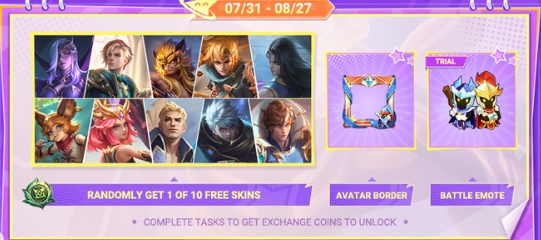
The pre-launch reward presentation includes a trial emote, Lucky Ticket, and Hero Fragments. Exact quantities, eligibility, and claim conditions must be read from the live event page because a promotional preview does not replace the rules shown on an individual account. The most important action is simple: confirm completion, press every valid Claim button, and verify that each item reached the correct inventory location before the pre-launch page changes.
This guide is organized as a last-day account audit. It helps players finish the pre-event stage efficiently, recognize each reward category, document a missing item, and enter July 31 with a clean record.
Why July 30 Requires a Separate Check
Many players treat a “follow” campaign as a passive registration. In practice, the event may separate following, task completion, and reward collection. A completed progress bar can exist beside an unpressed Claim button. If the page closes or changes when the main event begins, an unclaimed item may become harder or impossible to collect.
The July 24-30 period and the July 31 main event should therefore be treated as separate interfaces until the client proves otherwise. Do not assume that a reward visible on July 30 will remain in the same location on July 31. Also do not assume that main-event participation automatically completes a pre-launch task retroactively.
Open the page while there is still time to respond. A last-minute check allows the player to fix an incomplete follow action, clear mailbox space, reopen the app, or contact support with evidence before the countdown reaches zero.
The 10-Minute Last-Day Route
A complete audit does not require a long session. Follow this order:
Log in to the correct MLBB account and server.
Open the event center and locate Follow Rank Party.
Read the displayed deadline and remaining countdown.
Check every task, progress marker, and follow status.
Press each available Claim button once.
Record the reward animation or completion message.
Check the mailbox, Backpack, Fragments area, and event inventory.
Reopen the event page to confirm the reward is marked Claimed.
Save a screenshot containing the page name and completion state.
Note that the main Rank Party starts July 31 and check it after reset.
Do not tap multiple buttons so quickly that the reward names become unreadable. If several items are collected together, open the acquisition history or relevant inventory and compare balances.
Trial Emote: Check the Timer Before Using It
A trial emote is temporary by definition. Its usefulness depends on when the trial starts. Some trial items begin counting when obtained, while others begin after activation. The item description should state the applicable rule.
After claiming, find the emote in the appropriate customization or inventory area. Read its duration and activation status. If manual activation is required, wait until there is enough time to use it. Activating a short trial immediately before a long break wastes most of the available period.
Equip the emote only after confirming that it is active. If it appears locked, the claimed object may still be an unopened trial card in the Backpack. Open the card according to its description, then return to the emote configuration screen.
A trial emote should not be mistaken for permanent collection ownership. A timer, Trial label, or expiration date means the account will lose access after the stated period. Save a screenshot only for records; it does not convert the item into a permanent reward.
Use emotes responsibly during matches. A cosmetic communication tool can be playful, but repeated use aimed at provoking another player may damage team focus or lead to reports. The event reward is most enjoyable when it remains a harmless expression rather than a distraction.
Lucky Ticket: Identify Its Destination and Deadline
A Lucky Ticket is an event-linked item, so its value depends on the page or draw that accepts it. After claiming, tap the item description and look for a Use button, source information, expiration notice, or linked event name.
Do not assume that every item called a ticket belongs to the same draw. MLBB can run several promotions, and similar icons can represent different currencies. Match the exact item name and description to the destination shown in the client.
If the ticket opens a related page, inspect that page’s availability and rules before spending it. Confirm whether one ticket equals one attempt, whether unused tickets expire, and whether a draw result must also be claimed manually. Use only the conditions displayed on the account.
If no destination is visible on July 30, keep the item and check again when the main Rank Party begins on July 31. Do not delete or exchange it through an unrelated system. Record the ticket balance so a later change can be identified.
The word “Lucky” does not guarantee a high-value outcome. Treat the ticket as a free event opportunity, not as a reason to spend extra Diamonds chasing a result. Any paid extension of a draw should be evaluated separately after its rates, prize pool, and budget are understood.
Hero Fragments: Confirm the Correct Fragment Type
Hero Fragments are useful only when the player knows which fragment category was awarded and where it can be spent. MLBB has used multiple fragment-related systems, so icon recognition alone is not enough. Open the item description and read the exact name.
After claiming, compare the balance in the relevant shop or inventory section. If the acquisition animation showed Hero Fragments but the general Backpack balance appears unchanged, the item may be stored in a dedicated fragment interface. Navigate through the Shop or Fragments area rather than assuming delivery failed.
Do not spend fragments immediately just to prove they arrived. Review the current exchange pool, refresh timing, owned heroes, and account needs. A new account may value roster expansion, while an established account may prefer to wait for a more useful exchange option.
Exact fragment quantity should come from the live reward tile or acquisition message. Reposted images can be cropped, outdated, or tied to another region. Record the number shown on the account before and after claiming if the amount matters for a planned exchange.
Fragments earned from a free pre-launch task should remain separate from Diamond spending. Their purpose is to add account value without requiring a purchase.
Follow Status and Task Completion
Check whether the event page displays a Followed state, a completed mission, a progress bar, or another confirmation. Merely opening a promotional post may not satisfy a follow action. If a follow button remains visible, press it through the official page and wait for the state to update.
Some campaigns require more than following, such as returning to the page, checking in, sharing through an in-client control, or completing a listed interaction. Only the current task text can confirm this. Do not perform unrelated actions based on comments from another region.
If the state changes but the reward remains locked, close and reopen the page once. Wait for synchronization and confirm that the account is online. Do not repeatedly unfollow and follow unless the instructions specifically require it; unnecessary state changes can make the timeline harder to document.
Take a screenshot after the task displays completion but before claiming, then another after it displays Claimed. Two clear images provide a stronger record than a long explanation if support is needed.
Where Each Reward May Appear
Rewards do not always share one destination. Use the reward’s own description first, then check the likely storage location.
Reward category | Likely place to inspect | Important confirmation |
|---|---|---|
Trial emote | Backpack, customization, or emote setup | Trial duration, activation state, and expiration |
Lucky Ticket | Event inventory or linked draw page | Exact ticket name, balance, destination, and use deadline |
Hero Fragments | Fragment inventory or exchange shop | Correct fragment type and before-and-after balance |
General pre-event reward | Mailbox or Backpack | Mail expiration, quantity, and manual attachment claim |
A reward animation is evidence that the server accepted a claim, but it is not a substitute for inventory verification. Open the destination and confirm the item.
If the mailbox is full or contains many old notices, clear only messages whose attachments have been collected. Do not delete unread event mail. Record any mail expiration date and claim the attachment immediately.
Account and Server Verification
Before completing the final-day route, verify that the displayed nickname, account identifier, and server are the ones intended for the event. Players with multiple accounts can accidentally follow on one profile and expect a reward on another.
If the game supports account switching, finish the full audit on one account before moving to the next. Save screenshots with enough non-sensitive context to distinguish them. Do not expose passwords, verification codes, linked email addresses, or payment information.
Regional events may not have identical pages or rewards. A screenshot from another server does not guarantee that the same item quantity or deadline applies. Use the page visible on the actual account and respect any eligibility limitation shown there.
Do not create a new account solely because a reward does not appear on the current one. First check timing, server, account level, event rules, and whether the page has already been completed.
How to Document a Missing Reward
If a completed reward cannot be found, gather evidence before the page changes. Useful evidence includes:
The Follow Rank Party title and July 30 countdown.
The task wording and completed state.
The Claim button before collection, if still available.
The Claimed state or acquisition message.
The relevant inventory balance.
The correct account and server identifier.
The time the action was completed.
Wait briefly and reopen both the event page and item destination. Some rewards require a short synchronization period. If the page still shows Claim, press it only once more after confirming the first attempt did not complete.
Use official in-game support if the item remains missing. Describe the reward by its exact in-client name, not a translated nickname from social media. State what action was completed, when it was completed, and where the item was checked.
Never give a support impersonator a password or one-time code. A legitimate investigation can use account identifiers and screenshots without taking control of the account.
What Not to Do on the Final Day
Do not uninstall the game as a first response to a missing event page. The activity may be tied to server timing, eligibility, or a staged transition. Reinstallation can consume time without changing the account state.
Do not spend an unfamiliar Lucky Ticket in a different draw merely because the icon looks similar. Confirm the exact destination.
Do not activate the trial emote until its timer behavior is understood. Do not spend Hero Fragments before reviewing the exchange pool. Do not leave a visible Claim button for July 31.
Do not trust a post that promises an exact reward quantity without matching the live page on the account. The goal of the final-day check is to preserve real value, not to force the account to match an external screenshot.
Do not pay anyone to recover a free event reward. Use official support and keep account security intact.
Preparing for the July 31 Main Event
After the pre-launch page is fully claimed, note the current inventory balances and stop changing event items unnecessarily. When Rank Party opens on July 31, the player can compare the new page with the saved July 30 record.
On the first main-event login, check whether any Follow Rank Party status carries over, but do not assume it will. Read the new start and end times, free-skin format, battle-privilege rules, task list, and claim deadlines.
The main event may present different objectives from the follow stage. A completed pre-launch action is not evidence that Ranked matches, party tasks, or later milestones are already complete. Treat each new task as a separate requirement.
Claim any recognized transition reward before queueing. Then complete one clearly eligible match and confirm that the correct counter advances before committing to a longer session.
Optional Purchases Stay Separate
Nothing in a free follow-reward audit requires an impulsive purchase. Claim the trial emote, Lucky Ticket, Hero Fragments, and any other eligible item according to the live page before considering paid content.
Players who already have a planned Diamond purchase can visit Topuplist and review supported products on the Mobile Legends: Bang Bang top-up page. Confirm User ID, Zone ID, region, denomination, currency, and the final checkout amount. A purchase should not be used to “fix” an unclaimed pre-launch reward, and no third party can legitimately guarantee that it will restore event eligibility.
Keep screenshots of purchases separate from public event posts because receipts may contain sensitive data. If a payment issue occurs, use the order record and the appropriate support channel rather than sharing details in a public comment.
The best last-day result is a fully claimed free page and an unchanged spending plan.
July 30 Final Claim Checklist
Complete this list before the displayed Follow Rank Party countdown ends:
Confirm the correct account and server.
Open Follow Rank Party from the in-game event center.
Read the exact deadline and live task conditions.
Make sure the page displays the required followed or completed state.
Claim the trial emote and inspect its activation timer.
Claim the Lucky Ticket and identify its exact destination.
Claim Hero Fragments and verify the correct balance.
Collect any attached mailbox reward before mail expiration.
Reopen the page and confirm every available reward says Claimed.
Save screenshots of completion and inventory balances.
Check official in-game support if a completed item remains missing.
Return after the July 31 reset to inspect the main Rank Party page.
A final-day audit is successful when it produces certainty: the player knows what was earned, where it was delivered, what remains temporary, and what must be checked after the event transitions.
FAQ
When does Follow Rank Party end?
July 30, 2026 is the final day of the July 24-30 pre-launch period. Use the countdown shown on your account to determine the exact applicable cutoff.
Is the emote permanent?
The reward is presented as a trial emote. Check its item description for the duration and whether the timer begins on acquisition or manual activation.
What should I do with the Lucky Ticket?
Open the exact item description and follow its linked event destination. Confirm its expiration and use rules; do not spend a similar-looking ticket in an unrelated draw.
Where can I find Hero Fragments after claiming?
Check the relevant fragment inventory or exchange-shop balance. Read the exact fragment name because different fragment categories can use different storage or shops.
Will unclaimed pre-launch rewards move to Rank Party automatically?
Do not assume they will. Press every valid Claim button on July 30 and verify delivery before the pre-launch page changes.
Should I buy Diamonds to recover a missing reward?
No. Document the completed task and contact official support. A separate planned purchase can be made through Topuplist and the MLBB recharge page after verifying User ID, Zone ID, region, and product details, but it does not restore an unclaimed event item.