MLBB Rank Party July 31 Event Guide: Start Time, Follow Rewards, Participation Rules, and Claim Checklist
Mobile Legends: Bang Bang is moving from the July 24-30 Follow Rank Party period into the main Rank Party on July 31, 2026. Official promotion highlights free skins, battle privileges, and limited rewards. This guide explains what players can confirm before launch, how to preserve pre-event eligibility, how to inspect live rules without relying on unverified reward lists, and how to prepare a ranked session that does not waste event opportunities.
Mobile Legends: Bang Bang will begin its main Rank Party event on July 31, 2026, immediately after the July 24-30 Follow Rank Party period. The promotion highlights free skins, battle privileges, and limited rewards, making it relevant to active ranked players as well as returning users who want to understand the event before opening the client.
The safest preparation is not to memorize an unofficial reward chart. Exact item pools, quantities, server availability, and task wording can change between promotional posts and the live event page. Instead, players should preserve any completed pre-follow activity, check the event center after the July 31 reset, read each task in the client, and claim rewards before leaving the page.
This guide focuses on the transition into the main event: when to check, what to record, how to distinguish announced benefits from assumptions, and how to organize ranked play around the rules that actually appear on the account.
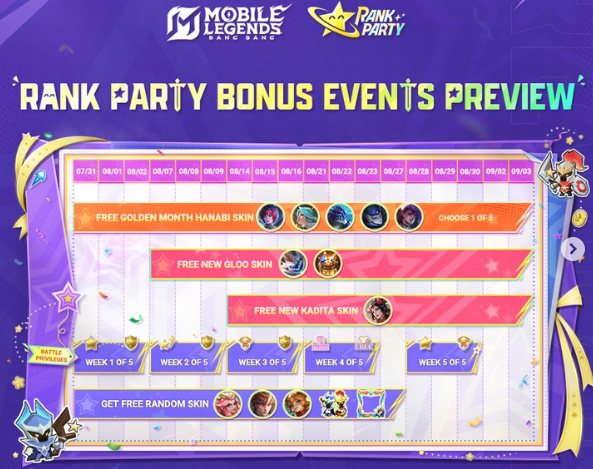
Rank Party Timeline at a Glance
The Follow Rank Party period runs from July 24 through July 30. July 30 is therefore the final pre-launch day. The main Rank Party begins on July 31. Players should treat these as two connected stages rather than assuming every pre-follow reward will remain claimable throughout the main event.
Date | Event position | Recommended action |
|---|---|---|
July 24-29, 2026 | Follow Rank Party period | Complete available follow or pre-launch actions and check whether rewards must be claimed manually |
July 30, 2026 | Final pre-launch day | Reopen the event page, claim completed rewards, and save proof of status |
July 31, 2026 | Main Rank Party begins | Check the live task list, reward pool, battle privileges, time zone, and account eligibility |
After launch | Main-event period | Complete tasks according to the client and claim rewards before their stated deadlines |
A promotional start date does not always reveal the exact local reset minute. MLBB events can display time according to server or account context. Open the event center after the relevant reset and use the countdown shown on the live page as the final authority for that account.
What Has Been Announced for Rank Party
Official promotion centers on three broad benefits: free skins, battle privileges, and limited rewards. These phrases confirm the event’s main value categories, but they do not prove that every player receives the same skin automatically or that every privilege is active for the entire period.
A free-skin promotion may use a selection, trial, task track, draw, exchange, or eligibility condition. A battle privilege may apply only in specified modes or during defined hours. Limited rewards may require manual collection. Players should therefore inspect the exact reward tile and information button before planning around a specific item.
The event page should answer five questions:
What action starts participation?
Which modes and match results count?
Is the skin permanent, time-limited, selectable, or random?
When do battle privileges become active?
Does each reward require a separate Claim action?
If any answer is missing from a repost, wait for the client page instead of filling the gap with an assumption. A precise but invented answer is less useful than a clear live-client check.
Before the July 31 Reset
Players who interacted with Follow Rank Party should revisit the page on July 30. Look for completed tasks, red notification dots, unlocked reward icons, or a claim button. Do not assume that following an event page automatically delivers every item to inventory.
Take a screenshot showing the event name, current date or countdown, and completed state. This is not required for ordinary participation, but it can help if a reward remains missing after launch. Avoid cropping away the account or server context needed by support, while hiding personal information before sharing the image publicly.
Clean up the in-game mailbox and inspect the inventory. Some event items are delivered through mail, while others appear directly in a reward inventory or event currency area. Knowing the pre-launch balance makes it easier to identify what arrived later.
Update the game through the official store if an update is offered, but do not reinstall simply because the event page has not appeared before its scheduled start. Availability can depend on reset time, server rollout, or account eligibility rather than damaged files.
First Login on July 31
Do not tap rapidly through every pop-up. Read the Rank Party entry screen and open its information panel. Record the displayed start and end times, server scope, participation level, task refresh rule, reward expiration, and any mode restrictions.
Then inspect the event in this order:
Open the main Rank Party page and read the rules.
Check whether Follow Rank Party progress is recognized.
Open the reward preview and identify permanent versus trial items.
Review the battle-privilege description and active period.
Read all daily, cumulative, team, and ranked-match tasks.
Claim any reward already available before entering a match.
Return after the match and confirm that progress increased.
This order prevents a common problem: playing several matches before learning that a task requires activation, a particular queue, a party, or another event-specific condition.
Participation Rules to Verify in the Client
Ranked events often use familiar actions, but wording matters. “Play one Ranked match” can differ from “complete one Ranked match,” “win one Ranked match,” or “play with friends.” Surrender, invalid matches, custom rooms, or disconnected games may not count.
Check whether the event requires a minimum account level, unlocked Ranked mode, a specified rank, or a returning-player status. Also inspect whether solo queue and party queue are treated differently. If a task mentions a team, confirm the required party size rather than assuming one invited friend is enough.
Some event pages separate daily tasks from event-long progress. Daily tasks may reset before a player expects, while cumulative milestones can remain. Claim daily rewards before reset even if the main page continues for several days.
If the page uses event currency, note its expiration and exchange location. Do not save currency for an item that is not actually listed on the account. If exchanges are limited, prioritize the desired permanent reward before cosmetics or consumables with lower personal value.
Free Skins: Read the Reward Label Carefully
“Free skins” is the strongest headline, but the reward label determines what the player receives. Look for words indicating Permanent, Trial, Choice, Random, owned-skin conversion, or time-limited use. A skin portrait in promotional art may represent the event theme rather than the exact selectable pool.
Open the reward details and scroll through the complete list. If selection is offered, compare the candidates against owned skins, frequently played heroes, and the likelihood of actual use. If the reward is random, check duplicate handling. If it is a trial card, treat it as a chance to test presentation and effects rather than permanent collection progress.
Do not select immediately if the page allows time. Review the hero’s role and whether the account owns or regularly uses that hero. A visually impressive skin for an unused hero can be less valuable than a simpler skin that appears in every ranked session.
Keep a screenshot of the selection screen before confirming. Many choice rewards are irreversible, and customer support generally cannot treat preference regret as a delivery error.
Understanding Battle Privileges
Battle privileges are promoted as a central part of Rank Party. Their practical value depends on what they affect, when they are active, and whether they apply automatically. The live rules may describe protection, bonus access, team benefits, or another ranked-session advantage. Use only the description shown on the account.
Before queueing, check for an active icon or status marker. Open its tooltip and identify eligible modes, usage limits, expiration, and whether the privilege is consumed on entry or after a result. A privilege that protects one condition should not be treated as permission to play carelessly.
Rank protection cannot replace good drafting, stable communication, or sensible stopping rules. Even when an event reduces one type of ranked risk, poor sessions still cost time and can affect other performance measures.
If a privilege requires claiming or activation, complete that step before entering matchmaking. After one match, return to the page and inspect whether the benefit remains, was consumed, or failed to apply because the mode was not eligible.
Build a Ranked Session Around the Event
Prepare a small hero pool rather than trying an unfamiliar role for the first time. Select two reliable heroes for the preferred position, one backup role, and one flexible pick. Check current emblems, battle spells, equipment presets, and lane assignments before queueing.
A practical session has a target and a stop point. For example, complete the event’s eligible match requirement, then stop after two consecutive losses or when concentration drops. Rank Party rewards should not turn a short task into an uncontrolled losing streak.
Queue with friends only when the event or personal performance benefits from it. A coordinated party can make role allocation easier, but a mismatched group can also create rank disparity or longer queues. Confirm that every member understands whether the task requires a specific party size or game mode.
After each match, check event progress before starting another. If a valid match did not count, capture the result screen and task page. Repeating five more matches without understanding the failure can waste the entire session.
Reward Claim Order
Claiming order matters when rewards have different expiration risks. Use the following priority unless the live event gives a reason to change it:
Completed pre-launch rewards that may disappear after transition.
Permanent skins or permanent choice items.
Event currency needed for a limited exchange.
Battle privileges that must be activated before play.
Time-limited cosmetics, trial items, or consumables.
Mail-delivered items with a clearly displayed claim period.
After claiming, inspect inventory or mail instead of relying only on the animation. Record the item name and quantity shown by the game. If a reward uses a choice chest, open the chest details first and postpone selection until the account’s needs are clear.
Never discard an unfamiliar event token until the event ends and its exchange page is checked. Some tokens look like ordinary inventory items but connect to a later milestone or shop.
Returning Player Route
A returning player should first recover the correct account and server. Do not begin an event on a new profile by mistake. Check account level, unlocked modes, rank reset status, hero availability, and whether a returner event overlaps with Rank Party.
Spend a few minutes in practice or a low-pressure eligible mode before Ranked if the rules permit. Review major hero changes through the client’s current descriptions. The goal is not to relearn the entire game in one session; it is to restore control of a small, reliable pool.
Returning players should be especially careful with reward labels. A familiar skin portrait may now appear in a different type of chest, and old event knowledge may not match the July 31 rules. Read the current page from beginning to end.
If a returner-specific task exists, confirm whether it can be completed alongside Rank Party progress. Efficient overlap is useful, but only when both pages visibly update after the same match.
Spending and Top-Up Planning
Rank Party is promoted with free rewards, so participation should begin with the free path. Do not purchase Diamonds merely to compensate for an unverified assumption about a reward pool. First inspect what the event provides, what requires play, and what is sold separately.
Players who independently plan to purchase Diamonds can compare supported options through Topuplist and the dedicated Mobile Legends: Bang Bang top-up page. Before paying, verify the numerical User ID, Zone ID, region, product amount, currency, and final price. A top-up does not replace Rank Party tasks and should not be presented as a requirement unless the live event explicitly says so.
Use a preset budget and wait until the free rewards are understood. If the event grants a permanent skin for a favored hero, a separate cosmetic purchase may become unnecessary. If it grants only a trial item, that trial can help evaluate whether a later purchase is worthwhile.
Missing Progress or Rewards
When progress does not update, first reread the task. Confirm the mode, date, party requirement, result condition, and reset window. Wait briefly and reopen the event page because some counters are not instant.
If the issue remains, collect useful evidence: event page, task wording, match result, match ID if available, server time, account ID, and reward status. Contact official in-game support through the normal channel. Describe what happened without guessing at a technical cause.
Do not post full account credentials, payment records, or security codes in public. Support may need an account identifier and screenshots, but it should not need the password. Keep the original images so text remains readable.
A missing promotional page on July 30 may simply reflect that the main event starts July 31. Report a problem only after checking the scheduled date and the account’s live reset.
July 31 Claim Checklist
Use this checklist during the first event login:
Open Rank Party after the account’s July 31 reset.
Read the full information panel and note the event deadline.
Confirm whether Follow Rank Party progress carried over.
Identify permanent, trial, choice, and random reward labels.
Check the exact battle-privilege effect and activation rule.
Claim already completed items before playing.
Complete one clearly eligible match.
Verify that the correct counter advances.
Claim newly unlocked rewards and inspect inventory or mail.
Save evidence for any valid progress that fails to register.
This workflow keeps the event practical. It prioritizes confirmed rules, free benefits, and account-specific information rather than turning a promotional headline into an unsupported promise.
FAQ
When does MLBB Rank Party start?
The main Rank Party is scheduled to begin on July 31, 2026, following the July 24-30 Follow Rank Party period. Check the live event countdown on your account for the applicable reset time.
Are all players guaranteed a permanent free skin?
The promotion highlights free skins, but the exact reward type, pool, eligibility, and claim method must be read from the live event page. Check whether the item is permanent, trial, selectable, or random before making a choice.
What should I do on July 30?
Reopen Follow Rank Party, claim any completed pre-launch reward, save a screenshot of your status, and check mail or inventory. Do not assume an unclaimed item will remain after the main event begins.
What are battle privileges?
They are promoted Rank Party benefits linked to battle participation. Their exact effect, eligible modes, duration, and consumption rules should be confirmed in the event information panel after launch.
Why did my Ranked match not count?
The match may not have met the mode, result, party, timing, or activation condition. Reread the task, wait for the counter to refresh, and preserve the result screen before contacting support.
Do I need Diamonds to participate?
Begin with the free event path and follow the live requirements. A Diamond purchase should be a separate budget decision. Players who already intend to top up can review Topuplist and the MLBB recharge page, while carefully checking User ID, Zone ID, region, and product details.