


Marvel Rivals Times Square Age of Ultron Guide: Claim the Ultron Spray and 100 Free Units
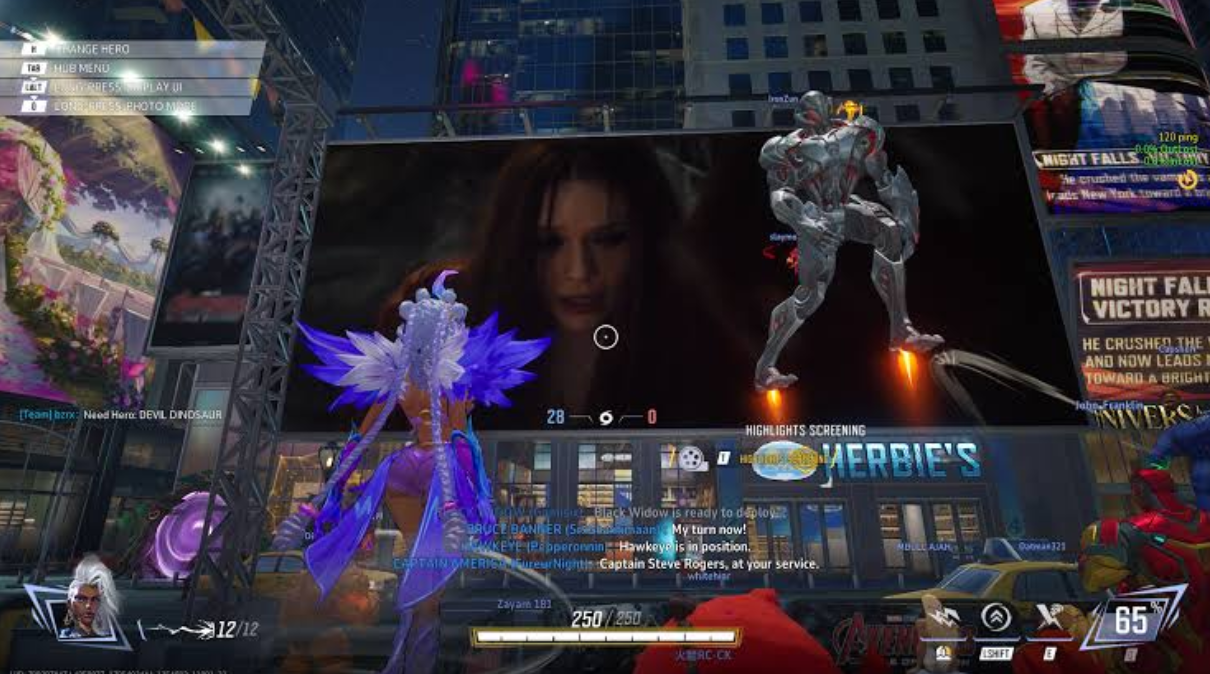
The July 31, 2026 Marvel Rivals update added two simple Age of Ultron activities in Times Square: remain in the social space for two minutes to earn an Ultron Spray, then create and share a qualifying group photo to receive 100 Units. This guide separates the two tasks, explains how to verify each completion state, and helps players avoid leaving before the server records the requirement.
The fastest rewards in a live-service game are often lost for the smallest reasons. A player enters the correct social area but leaves before the timer finishes. A photo looks perfect but is not created through the event's required interface. A sharing step opens, yet the player closes it before the game records completion. The Age of Ultron activities added to Marvel Rivals Times Square on July 31, 2026 are simple, but they still deserve a precise route.
There are two distinct objectives. Staying in Times Square for two minutes grants an exclusive Ultron Spray. Taking an Age of Ultron group photo and completing the required share action grants 100 Units. Do not treat them as one combined mission. Finish, verify, and claim each task separately so that a problem with the photo does not cast doubt on the two-minute reward.
The Reward Route in One Sentence
Enter the live Times Square instance, wait in the area for more than two uninterrupted minutes, claim and verify the Ultron Spray, then use the Age of Ultron photo feature with the required group composition, complete the share confirmation, and verify that the 100 Units reached the account.
That sentence is the whole route, but every verb matters. “Enter” means the event instance is fully loaded. “Wait” means remain connected and active long enough for the server to count the visit. “Claim” means open the relevant event or mission page instead of assuming automatic delivery. “Share” means satisfy the in-game completion condition, which may be different from merely taking a local screenshot. “Verify” means check the cosmetic inventory or currency total after the reward animation.
Before Entering Times Square
Update Marvel Rivals before beginning. The Age of Ultron activities arrived with the July 31 patch, so an outdated client can hide the relevant interface, prevent matchmaking with the correct version, or create an incomplete social-space experience. If the update has installed but the event is absent, restart the client once and confirm that the account is connected to its normal platform and region.
Open the event panel and read the displayed deadline, eligibility text, and claim method. Regional reset times can make “today” different across servers. The live page is more reliable than a reposted screenshot because it reflects the account currently being used.
Note the current Unit balance before doing the photo task. This creates a clean before-and-after check. Also inspect the Spray collection or customization page so the Ultron item can be found quickly after the timer completes. A reward is easier to verify when the player knows where it belongs.
If joining with friends, agree on a meeting instance and photo time before entering. Social hubs can separate players, and assembling a group after everyone has wandered away takes longer than the two-minute requirement itself.
How to Complete the Two-Minute Ultron Spray Task
Travel to Times Square through the method shown in the current client. Wait until the environment, nearby players, and social controls finish loading. Do not begin counting from the loading screen or from the instant the travel button is pressed. The safest starting point is the moment the character can move normally inside Times Square.
Remain in the area for slightly longer than two minutes. A short safety margin protects against loading delay, temporary connection loss, or a timer that starts after the social instance finishes synchronizing. There is no advantage in leaving at exactly 120 seconds.
Avoid switching instances, entering another mode, disconnecting, or returning to the main menu during the wait. Moving around Times Square should be fine, but remaining in the same loaded social space creates the clearest completion record. Use the time to locate the Age of Ultron photo feature and identify where friends can gather.
After the wait, open the event mission page. If the objective has a claim button, use it. If the interface says the reward was delivered automatically, open the Spray collection and look for the new Ultron item. When the mission still appears incomplete, stay in the instance for another minute before restarting. Re-entering too quickly can reset whatever visit state the server was tracking.
How to Complete the Group-Photo Task
The photo objective is more specific because it combines scene setup with an in-game sharing action. Begin from the Age of Ultron event page or the designated photo interaction in Times Square. A normal platform screenshot may preserve the image, but it may not trigger the event condition.
Gather the required participants or use the event's available group-photo setup exactly as shown by the live prompt. Do not assume that every nearby player is automatically included. Check whether the interface identifies group members, selected characters, poses, or an event frame before pressing the shutter.
Compose the image only after the eligibility indicators are satisfied. Centering the group and choosing a clean background are optional aesthetic choices; meeting the displayed conditions is mandatory. If the game provides an Age of Ultron frame, marker, or pose, keep it active until the photo is recorded.
After taking the picture, continue through the share flow. Some games award event progress when the share interface opens; others require a final confirmation. Follow the Marvel Rivals prompt until it reports completion. If the platform offers several destinations, choose one available to the account. Do not publish personal information or expose account details in the image.
Return to the event page and claim the 100 Units if a manual claim is required. Compare the currency balance with the number recorded before the task. A completed mission icon and a changed balance together provide stronger confirmation than a disappearing pop-up.
A Five-Minute Solo Route
A player without a prearranged party can still make the visit efficient. Enter Times Square and immediately start the two-minute stay. During that time, open the event panel without leaving the instance, read the group-photo requirement, and locate the designated camera interaction.
Use local social tools to join an available photo group if the event permits it. Stand near the activity point rather than repeatedly requesting help across the entire hub. Other players arriving on July 31 are likely attempting the same objective, so a visible gathering place naturally creates opportunities.
Once the two-minute mission becomes claimable, secure the Spray first. Then complete the photo and share action. If the photo requirement cannot be met immediately, the Spray remains finished and the player can return later with friends. Keeping the objectives separate prevents an incomplete group task from wasting the guaranteed visit reward.
A Faster Route for a Premade Group
Invite the group before traveling and choose one member to coordinate the image. Everyone enters the same Times Square instance, waits together for the two-minute objective, and moves to the event photo location while the timer runs.
The coordinator confirms that all required characters or players are visible and that the correct event interface is active. Take more than one photo if the tool allows it, but complete the official share flow with the strongest qualifying image. Each participant should then check their own mission page. One player's confirmation does not prove that every account received credit.
If one member is missing progress, keep the group assembled and repeat only the photo step for that player. Do not disband, queue for a match, or leave Times Square until every participant has checked the Spray and Unit balance.
Why the 100 Units Matter
Units are a premium-facing Marvel Rivals currency used for selected store purchases. A free 100-Unit reward is not enough to justify buying an item on its own, but it can reduce the amount needed for a planned cosmetic or remain in the account for a later release.
The sensible approach is to treat the reward as added balance, not as a command to spend immediately. Open the store only after the Units are verified, inspect the full price of the desired item, and decide whether the remaining balance is worth paying. A free reward loses its value when it triggers an unplanned purchase much larger than the reward itself.
Event Units should also be distinguished from temporary tokens, mission points, or mode-specific progression. Verify that the account's normal Unit total changed. If the reward is represented by a claim item first, redeem that item through the specified inventory page before concluding that the currency is missing.
Common Completion Problems
If the two-minute mission does not complete, the most likely causes are counting from the loading screen, leaving the instance too early, a short disconnect, or failing to claim through the event page. Remain in Times Square for an additional uninterrupted minute and reopen the panel.
If the photo mission does not complete, verify that the Age of Ultron photo tool was used, every required participant or condition was recognized, and the share flow reached its final confirmation. Retaking a normal screenshot will not fix an event-interface requirement.
If the mission shows complete but the reward is absent, check the Spray collection, event inbox, regular mailbox, and Unit balance after returning to the main menu. Allow the server a short synchronization period. Record the completed mission page before restarting so there is evidence if support is needed.
If friends cannot find one another, confirm region, platform restrictions, party status, and social instance. Re-forming the party before entering Times Square is usually cleaner than trying to synchronize after separate instances have loaded.
If the event page is completely missing on July 31, verify the client version and the regional release time. Do not reinstall immediately; a restart and update check are less disruptive first steps.
Spending After the Reward
The event itself does not require a purchase. Complete both free tasks first, verify the 100 Units, and only then evaluate any cosmetic that interests you. Compare the current price with the balance already owned and set a maximum total before opening any randomized offer.
Players who have already made a purchase decision can review supported services through Topuplist and the dedicated Marvel Rivals top-up page. Check the receiving account, platform, region, currency quantity, and final charge before payment. The free 100 Units should be included in the budget calculation rather than ignored.
Privacy-Safe Photo Sharing
A share objective does not require a player to expose personal information. Before confirming the image, inspect the frame for account identifiers, private chat, voice overlays, platform notifications, or names that friends did not agree to publish. Crop through the official tool when possible and use the most limited sharing destination that still satisfies the event prompt.
If the game awards progress after opening a platform share sheet, follow the displayed requirement but do not assume a public post is mandatory unless the wording says so. Some systems register the action before publication; others require completion. The live prompt must decide. Never grant a third-party application account access merely to obtain 100 Units.
For group photos, tell every participant where the image will appear. A social hub is public, but reposting a recognizable player name outside the game is a separate action. When someone prefers privacy, reposition the camera, hide optional labels, or create another group.
Keep one private screenshot of the completed mission and the updated Unit balance. It is useful evidence if the reward later disappears after synchronization, and it allows the public image to remain clean and free of account details.
Frequently Asked Questions
What are the two Times Square Age of Ultron rewards?
The July 31 event activities advertise an exclusive Ultron Spray for remaining in Times Square for two minutes and 100 Units for completing the Age of Ultron group-photo and share task.
Does the loading screen count toward the two minutes?
Do not rely on it. Begin counting after the Times Square instance has fully loaded and the character can move. Staying a little longer than two minutes provides a useful safety margin.
Can I use a normal screenshot for the photo reward?
Use the designated event photo interface and follow its share prompt. A normal screenshot may not communicate completion to the event system.
Does one group member's completion give everyone credit?
Each player should check their own event page and currency balance. Shared participation does not remove the need for account-level verification.
Should I spend the 100 Units immediately?
No. Treat them as account balance. Compare the full cost of a desired cosmetic and spend only if the remaining price fits a plan you already intended to follow.
Where can I add Marvel Rivals currency after claiming the free Units?
Players with a confirmed plan can compare supported options on Topuplist and use the Marvel Rivals recharge page. Verify every order field before completing payment.
