


Douyin Login Verification Problem: Phone Number, SMS Code and Account Security Fixes
Quick Diagnosis: Which Login Problem Do You Have?
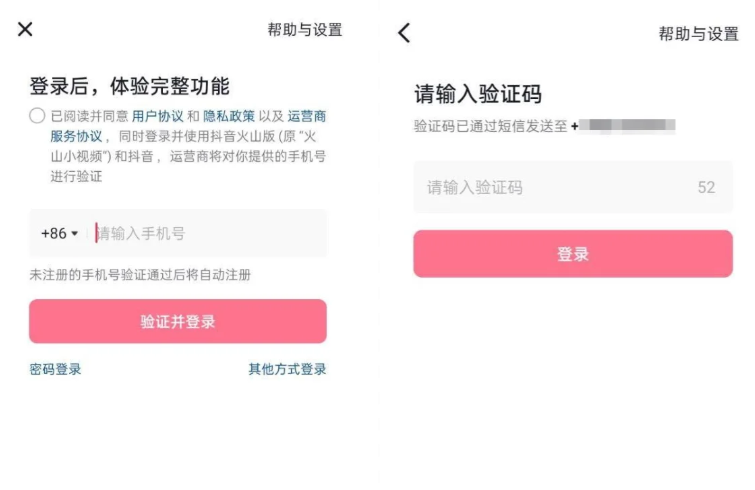
Section 1: Can't Receive SMS Verification Code
Check your network first
Weak signal or network instability can block SMS delivery.
Confirm your phone is NOT in airplane mode
Switch between Wi-Fi and mobile data — try both
Move to an area with stronger signal (away from basements, elevators, remote locations)
Restart your phone — this refreshes network registration
Check SMS interception settings
Many Android phones and third-party security apps automatically classify Douyin verification codes as spam or promotional messages.
Android:
Open your SMS app → look for "垃圾短信" (Spam), "拦截记录" (Blocked), or "短信分类" (Sorted) tabs
Check if Douyin codes are stuck there
Go to Settings → Security → SMS interception → add "douyin", "抖音", and "106" prefix numbers to the whitelist
iOS:
Check the "Unknown & Junk" filter in Messages
Settings → Messages → toggle "Filter Unknown Senders" OFF temporarily
Request a new verification code after removing the filter
Try voice verification
When SMS consistently fails, Douyin offers a voice call alternative:
On the verification screen, tap Can't get the code? Try voice verification
Confirm the displayed phone number is correct
Tap the voice call button → answer the incoming call
Listen to the 6-digit code and enter it manually
Voice verification bypasses the SMS gateway entirely, making it effective when carrier SMS channels are disrupted.
Check carrier SMS center number
If neither SMS nor voice works, your carrier's SMS center number might be misconfigured:
Open SMS app → Settings → More Settings → SMS Center Number
Confirm the number format matches your carrier's standard (e.g., China Mobile: +8613800100500)
If it looks wrong, contact your carrier to correct it
Section 2: Phone Number Changed — Old Number Lost
This is a common problem for users who changed their phone number but didn't update their Douyin binding before the old number was deactivated.
If you can still log in
Douyin → Me → Settings → Account & Security → Phone Number
Tap Change phone number
Enter your new phone number
The system may ask for the old number's verification code — if you can't receive it, tap (Old number can't receive code)
Follow the account recovery flow — you'll need to verify via other linked accounts or ID verification
If you can't log in at all
Use Douyin's account recovery system:
On the login screen, tap (Find my account)
Enter your old Douyin ID or any info you remember (nickname, old phone number)
Choose verification method:
WeChat/QQ login — if you previously linked these accounts, log in through them
Face verification — if your account had real-name verification with face data
Account verification — verify through your linked accounts or real-name information
After recovery, immediately update your phone number in Account & Security
Preventive tip
Before changing your phone number: log into Douyin and update the bound phone number first. Don't wait until the old number is deactivated — once it's gone, recovery becomes much harder.
Section 3: Verification Code Incorrect
Common causes and fixes
Edge case: receiving codes from a different request
If you requested codes multiple times, only the last one sent is valid. Earlier codes won't work even if they arrive later. Wait for the newest code, discard any earlier ones.
Section 4: Account Locked After Multiple Failed Attempts
Douyin's security system temporarily locks accounts after repeated failed login attempts or verification errors.
What happens
You see (Account abnormal) or (Login restricted)
All verification attempts are blocked for a cooldown period
How to unlock
Do NOT keep trying — repeated failed attempts extend the cooldown period.
Section 5: International Phone Number Rejected
Douyin's phone number dropdown includes some international country codes, but not all. If your country code is missing:
Option 1: Use a supported country code
Check if a nearby country's code is available. For example, some Southeast Asian country codes (+65 Singapore, +60 Malaysia, +62 Indonesia) are often listed.
Option 2: Third-party login
Use WeChat, QQ, Apple ID, or Weibo to log in instead of a phone number. After logging in, you can optionally add a phone number later in Account & Security.
Option 3: Get help from a contact in China
If you have a friend or family member in China:
Ask them to receive the SMS code on their Chinese phone number (+86)
Enter their number on the Douyin login screen
They forward the code to you
After login, go to Account & Security and update the phone number to yours (if supported)
Option 4: Use a Chinese virtual number service
Some services provide temporary Chinese phone numbers for verification. These are third-party tools not affiliated with Douyin — use them at your own discretion and only from reputable providers.
Section 6: Can't Log In on a New Device
Douyin requires device verification when you log in from a phone or browser you haven't used before.
What to expect
A confirmation prompt appears on your previously logged-in device
If you don't have the old device, you must verify via SMS or account recovery
How to fix
If you still have the old device: open Douyin on it → tap (Confirm login) when the prompt appears
If you don't have the old device: go through SMS verification on the new device
If SMS fails (e.g., phone number changed): use the account recovery flow described in Section 2
Adding trusted devices
After successful login on a new device, Douyin may add it to your trusted device list. You can review and manage this in Account & Security → Trusted Devices.
Account Security Best Practices
FAQ
Why does Douyin keep asking for verification every time I log in?
Douyin's security system checks device identity, IP location, and login patterns. If any of these change (new phone, different network, new location), it triggers additional verification. This is standard for Chinese apps.
Can I log in without a phone number?
Yes, via WeChat, QQ, Apple ID, or Weibo — as long as you previously linked one of these accounts. However, a phone number is required for full account security features (password reset, account recovery).
How long is the SMS verification code valid?
Approximately 5 minutes. Request a new one if it expires.
What if I don't have any linked accounts and can't receive SMS?
Use the account recovery flow: tap "找回账号" → verify through account information. This takes 1–7 business days.
Will Douyin lock my account if I try too many times?
Yes. After multiple failed attempts, the account enters a cooldown period. Stop trying and wait 24 hours, or use account recovery to unlock it faster.
Can I use the same Douyin account on multiple devices?
Yes, but each new device requires verification. You can manage trusted devices in Account & Security settings.
