


Blood Strike BR-TPS Vanguard Season Starts August 14
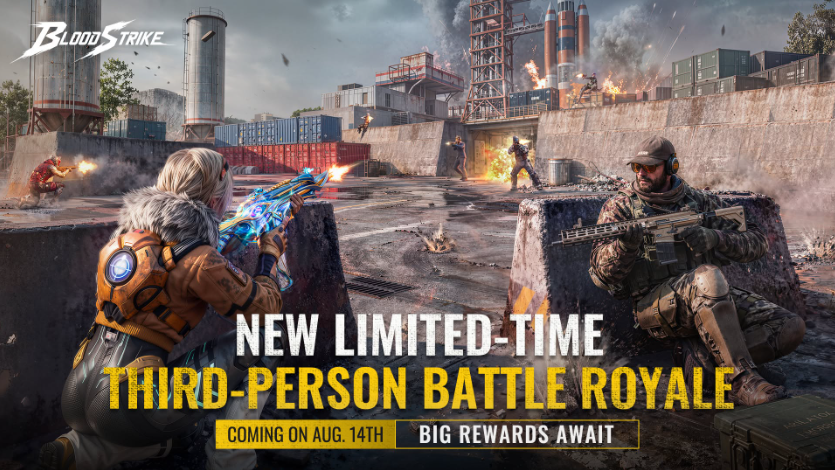
Blood Strike added limited-time third-person Battle Royale gameplay in its August 11 update. This guide covers confirmed access, the August 14 Vanguard Season, official rewards, and practical preparation.
Blood Strike's August 11 update added the limited-time BR-TPS format, giving players an official third-person option in Battle Royale Ranked and Custom Rooms before the Vanguard Season begins on August 14. Players preparing resources can use Topuplist and the dedicated Blood Strike top-up page for game recharge services, while the first priority should be understanding exactly what the announcement confirms and what must still be checked inside the live client.
What Changed in the August 11 Update
The main addition is a limited-time gameplay option called BR-TPS. TPS means third-person shooter, so the camera sits behind the controlled Striker instead of presenting the world through the character's eyes. The official update confirms that this format is available in Battle Royale Ranked and Custom Rooms. It also identifies a separate BR-TPS Vanguard Season beginning on August 14.
These details establish three useful facts. BR-TPS is not only a private-room experiment because Ranked access is included. Custom Rooms give organized squads a place to learn the viewpoint and rehearse team procedures. The Vanguard Season also has its own opening date, meaning that trying the mode after the update and competing in its seasonal progression are not necessarily the same activity.
The announcement calls BR-TPS limited-time. Players should therefore treat the event screen and its live timer as the authority for availability. Do not assume the mode will remain permanently, and do not postpone participation based on an unofficial schedule.
Confirmed Vanguard Season Rewards
The August 11 announcement names several ranked rewards. The headline item is the Legendary weapon skin QBZ95 - Glory. It also lists Rank Coins, an avatar, and a sticker. Those are the reward categories that can be discussed with confidence before the season opens.
Confirmed Reward | What to Verify In Game |
|---|---|
QBZ95 - Glory | Required rank, claim condition, and delivery method |
Rank Coins | Amount at each milestone and claim timing |
Avatar | Exact tier or objective connected to it |
Sticker | Relevant milestone and claim deadline |
The announcement does not provide a basis for inventing exact thresholds or quantities. Open the Vanguard Season interface after August 14, inspect every milestone, and record the conditions relevant to your account. If the ladder distinguishes highest rank from current rank, read the wording before changing your schedule.
Take screenshots of the season end time, reward page, and any scoring explanation. This simple record helps if a menu rotates or teammates remember a requirement differently.
How Third-Person View Changes Information
BR-TPS changes how players receive visual information even if the objective remains survival and victory. A third-person camera can display the controlled character, nearby cover, and more of the immediate scene. The practical task is to learn what Blood Strike's camera actually shows instead of importing assumptions from another shooter.
Start around doors, windows, rocks, slopes, rooftops, and narrow corridors. Observe how close the character can stand to cover before the camera becomes obstructed. Test whether fast direction changes reduce visual clarity. These are direct observations, not claims about hidden mechanics.
Third-person visibility makes disciplined movement important. A player may inspect an angle while the character remains behind cover, yet still need to expose the body before firing. Use Custom Rooms to compare camera information with the actual line of fire. Have one player hold a position while another watches from different elevations and distances, then swap roles.
Communication should distinguish direct sight, camera sight, sound, and a marked location. A call such as “behind the wall” becomes much more useful when the speaker explains how the information was obtained. That prevents a squad from pushing on an incomplete report.
Use Custom Rooms Before Ranked
Custom Rooms are the cleanest place to establish a BR-TPS routine because the update explicitly includes them. A short controlled session can answer practical questions more efficiently than several chaotic Ranked matches.
Begin with movement and camera checks. Walk, sprint, slide, climb, enter buildings, and change elevation. Confirm that your current sensitivity remains comfortable when tracking a target from the new perspective. There is no universal setting that must be copied; the goal is predictable control.
Next, test common cover. Place one player behind an object while another observes from multiple positions. Note when the camera reveals information but the weapon cannot fire cleanly. Repeat the test at doors and stairs, where the character model and environment may fill more of the screen.
Then rehearse team entries and revives. Decide who checks the closest angle, who watches the route behind the squad, and who reports enemy movement. A shared procedure is valuable before rank points are involved.
Finish with a short mock match. Use the same callouts, formation, and revive priorities planned for Ranked. The purpose is not to declare a perfect strategy; it is to expose communication gaps while the cost is low.
Preparation for August 14
Before the Vanguard Season starts, update Blood Strike through its official store or launcher and let all required resources finish downloading. Restart the client and verify that BR-TPS appears in the locations identified by the update.
Open the live mode description. Check whether matchmaking eligibility, squad options, map selection, scoring, and season timing are displayed. Live-service details can change through official adjustments, so the client on August 14 is more reliable than an older screenshot.
Review aim, fire, camera, crouch, jump, slide, interaction, healing, and item shortcuts. Avoid changing everything at once. Test one adjustment at a time so any improvement or problem can be linked to a specific setting.
For squad play, agree on a session goal. One session can focus on camera familiarity and consistent survival; another can focus on reaching a visible reward milestone. Combining practice, experiments, and rank climbing in every match makes progress difficult to evaluate.
Check the network and device before entering Ranked, but do not turn ordinary preparation into an unsupported technical diagnosis. Close unnecessary downloads, confirm the game is fully updated, and use settings already proven stable on your device.
Match Habits That Remain Reliable
Several fundamentals remain useful without guessing at unannounced balance. Carry equipment suited to the engagement ranges your squad expects. Share healing and ammunition when a teammate is short. Rotate before the playable area traps the team. Avoid separating so far that a downed teammate cannot be supported.
Treat cover as a sequence rather than one destination. Before leaving a position, identify the next protected location and the route between them. Third-person observation does not remove the danger of crossing open ground.
Manage noise and timing. When the game supplies footsteps, gunfire, pings, or other indicators, separate confirmed information from interpretation. A precise report states what was heard or seen, where it occurred, and how recent it was.
Do not remain fixed on one angle simply because the camera can inspect it. Opponents can rotate, use another elevation, or attack the squad from elsewhere. Assign responsibility for different approaches and update those responsibilities as the team moves.
After each match, review one decision: a rotation, building entry, revive, or final-zone position. Focused review produces actionable changes. Trying to debate every mistake usually obscures the most important lesson.
Tracking Vanguard Season Progress
Once the season opens, use the in-game Vanguard interface as the primary record. Check starting rank, current points, next milestone, reward state, and the visible end time. If match history is available, compare the displayed result with the rank change after each match.
Claim completed rewards when the interface allows it unless the game explicitly states that delivery is automatic. Confirm that cosmetics appear in the proper inventory and Rank Coins enter the correct balance. For QBZ95 - Glory, check the weapon customization screen rather than assuming it will be equipped automatically.
If progress appears delayed, return to the lobby, reopen the event page, and restart the client. If the discrepancy remains, use official support. Include the identifier support requests, match time, displayed result, and screenshots. Never send a password or verification code.
Keep seasonal objectives separate from general account objectives. A player may want the Legendary skin while another only wants to experience BR-TPS. Read the actual ladder and decide how much play is necessary for the desired reward instead of treating every visible item as mandatory.
Mistakes to Avoid
Do not treat camera sight as a guaranteed firing lane. Seeing an opponent around an object does not prove the barrel has an unobstructed path.
Do not enter Ranked before checking controls. A viewpoint change can make familiar sensitivity feel different, and Custom Rooms provide an official place to test it.
Do not rely on reward claims absent from the official announcement or live event page. The confirmed list is QBZ95 - Glory, Rank Coins, an avatar, and a sticker. Exact requirements belong to the client.
Do not delay without checking the timer. BR-TPS is explicitly limited-time, so assuming permanent availability could cost participation.
Topuplist provides game recharge services. Players should retain control of their accounts, protect login credentials, and submit only the information required by the selected recharge method.
Final Checklist
Before August 14, confirm that the August 11 update is installed, BR-TPS is selectable, and all resources are downloaded. Test camera movement and cover behavior in a Custom Room. Check controls and establish precise squad callouts.
When the Vanguard Season opens, read its live rules before the first Ranked session. Verify the exact conditions for QBZ95 - Glory, Rank Coins, the avatar, and the sticker. Record the season timer and claim rewards through the official interface.
Build strategy from what the game shows. The new viewpoint deserves practice, but it does not justify invented mechanics or guaranteed tactics. Players who separate confirmed rules from assumptions can adapt more efficiently and protect their ranked progress.
FAQ
When does the Blood Strike BR-TPS Vanguard Season begin?
The official August 11 update announcement says the BR-TPS Vanguard Season begins on August 14. Check the live event page for the precise opening time in your region and any official schedule changes.
Where can I play BR-TPS?
The announcement confirms BR-TPS in Battle Royale Ranked and Custom Rooms. It is limited-time, so verify availability in the client.
Which rewards are officially confirmed?
The confirmed rewards are the Legendary QBZ95 - Glory weapon skin, Rank Coins, an avatar, and a sticker. Check the season interface for exact milestones and quantities.
Should I practice in Custom Rooms first?
Yes. Custom Rooms let squads test the camera, cover, controls, entries, and communication before rank progress is involved.
Where can I recharge Blood Strike?
Players who need recharge services can visit Topuplist and its dedicated Blood Strike top-up page. Confirm the product and account information before payment, and never provide a password or verification code.
