
MICO Coins Not Showing Up After Recharge? Here's How to Fix It Fast
Few things are more frustrating than completing a MICO recharge, seeing the payment go through, and then discovering that your coins haven't appeared in your account.
Whether you're trying to send gifts during a live stream, unlock premium features, or simply top up your balance, delayed or missing MICO Coins can quickly become stressful.
Fortunately, most recharge issues can be resolved quickly once you identify the root cause.
This guide explains why MICO Coin recharges sometimes fail, how to troubleshoot common issues, what to do if you entered the wrong UID, and how to contact support efficiently.
If you're new to MICO top-ups, we also recommend reading our guide:
How to Buy MICO Coins Safely and Cheaper in 2026
This companion article explains how UID recharge works, how to avoid scams, and how to choose a trusted recharge platform.
Why MICO Coin Recharge Problems Happen
In most cases, missing MICO Coins are caused by temporary processing delays rather than permanent delivery failures.
Several factors can affect delivery speed.
Payment Verification Delays
Many payment providers perform additional verification checks before approving digital transactions.
According to the payment security guidelines published by the PCI Security Standards Council, payment verification procedures help reduce fraud but may occasionally delay order processing.
These delays are usually temporary and often resolve within minutes.
Server Synchronization Issues
Digital currency deliveries sometimes require synchronization between recharge providers and platform servers.
High-traffic periods, promotional events, or maintenance windows can occasionally create temporary delays.
Incorrect UID Submission
One incorrect digit is enough to cause delivery problems.
Because most recharge providers use UID-based delivery, coins are sent directly to the account associated with the submitted UID.
A typo can result in:
Delivery failure
Delivery to another account
Manual review requirements
Regional Restrictions
Some accounts may face recharge limitations due to:
Payment method restrictions
Regional regulations
Temporary account verification requirements
For example, digital payment regulations and regional restrictions can affect transaction processing in certain markets. Information from the Google Play Help Center and Apple Support provides additional details about payment verification and regional availability.
Check These Things Before Contacting Support
Before opening a support ticket, perform the following checks.
In many cases, the issue can be resolved without contacting customer service.
Quick Troubleshooting Checklist
Verify Your Payment Status
Check your:
Credit card statement
PayPal transaction history
E-wallet payment confirmation
Recharge order page
A pending payment generally means the recharge process has not yet started.
Refresh Your MICO Account
Sometimes coins are delivered successfully, but the balance does not immediately update.
Try:
Closing MICO completely
Logging out and back in
Refreshing your wallet page
Restarting your device
Review Order Confirmation Emails
A valid recharge order should usually include:
Order number
Transaction ID
Recharge amount
UID information
These details will be important if support assistance becomes necessary.
Topuplist MICO Recharge: Fast Delivery & Reliable Support
Looking for a reliable recharge experience with professional customer support?
Why Users Choose Topuplist
Instant UID-based delivery
No password required
Multiple global payment methods
Competitive pricing
Dedicated support team
Secure checkout process
Recharge your MICO Coins here:
Many delivery issues can be resolved quickly when using a platform that provides transparent order tracking and responsive customer service.
What Happens If You Enter the Wrong MICO UID?
Submitting an incorrect UID is one of the most common recharge mistakes.
Scenario 1: UID Does Not Exist
In some cases, the recharge system cannot locate the account.
The order may:
Remain pending
Require manual review
Fail automatically
Scenario 2: UID Belongs to Another User
This situation is more complicated.
If coins have already been delivered to another account, recovery may depend on:
Provider policies
Delivery status
Verification evidence
This is why double-checking your UID before payment is essential.
Information Support Teams Usually Need
Having these details prepared can significantly speed up the support process.
Why Some MICO Accounts Cannot Be Recharged
Occasionally, users encounter messages indicating that recharge is unavailable.
This does not always mean there is a problem with the account itself.
Region Mismatch
Certain recharge products may only support specific regions.
Always verify:
Account region
Recharge product region
Currency compatibility
Payment Method Restrictions
Some banks and payment providers may temporarily block digital purchases for security reasons.
The PayPal Security Center explains how payment verification and fraud-prevention systems may affect transaction approvals.
Temporary Maintenance
Like most online platforms, MICO occasionally performs maintenance or backend upgrades.
During maintenance periods:
Recharges may be delayed
Coin balances may update slowly
Certain payment methods may be unavailable
How Long Should a MICO Recharge Take?
Most successful top-ups are completed quickly.
However, actual processing times can vary depending on payment methods and platform workload.
Typical Recharge Processing Times
If your order exceeds the expected delivery window, contacting support is recommended.
How to Contact Recharge Support Effectively
Many users delay resolution simply because they don't provide enough information.
A well-prepared support request often receives faster assistance.
Include the Following Information
Order Number
The most important reference for locating your transaction.
UID
Provide the exact UID used during recharge.
Payment Proof
Examples include:
Payment receipt
Transaction confirmation email
Screenshot of completed payment
Delivery Issue Description
Explain:
When the recharge occurred
Whether payment succeeded
Whether coins partially arrived
The more complete the information, the faster the investigation process.
How Topuplist Handles Recharge Issues
One of the advantages of using a dedicated recharge platform is access to specialized support.
Topuplist provides:
Order tracking
UID verification assistance
Payment confirmation review
Recharge investigation support
Customer service for delivery issues
Recharge safely here:
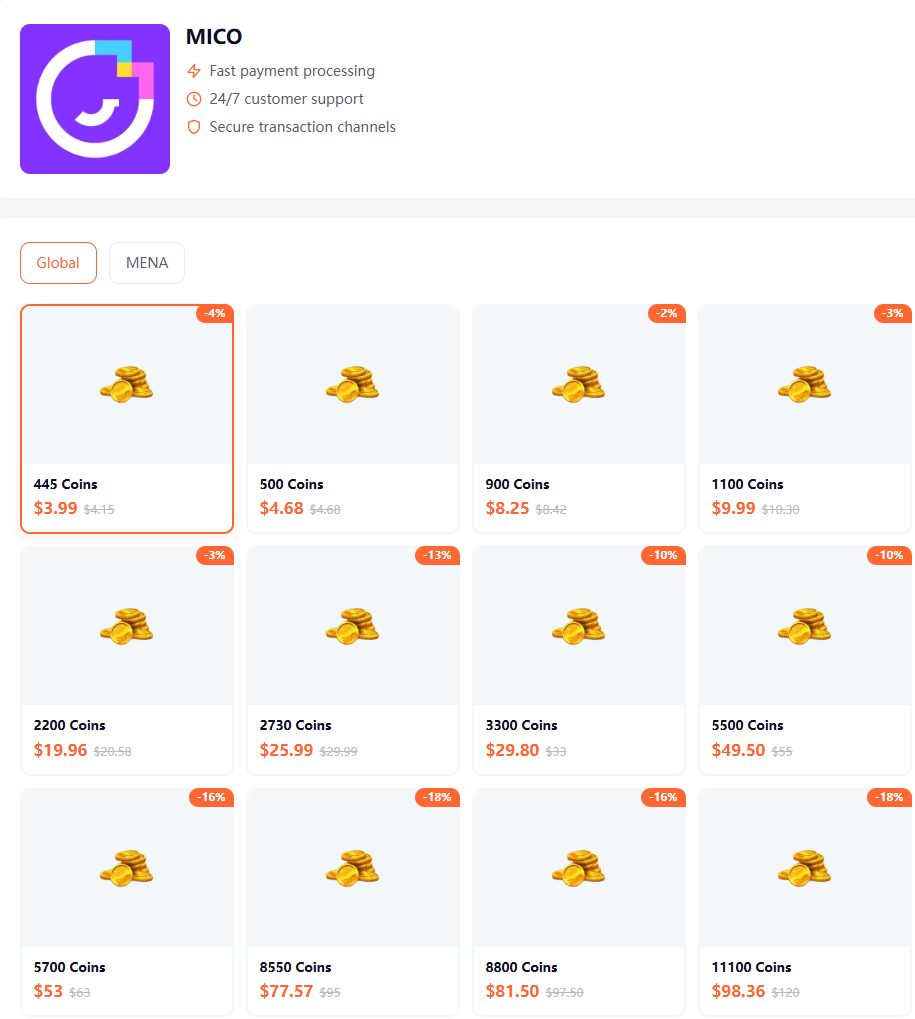
If you're still researching the safest and most affordable recharge options, don't miss our related guide:
How to Buy MICO Coins Safely and Cheaper in 2026
That article covers:
UID recharge security
Price comparisons
Scam prevention
Choosing reliable recharge platforms
Saving money on MICO Coin purchases
Frequently Asked Questions
Why haven't my MICO Coins arrived yet?
The most common reasons are payment verification delays, server synchronization issues, or incorrect UID submission.
How long should I wait before contacting support?
Most recharges are completed within minutes. If your order remains unresolved after the expected delivery window, contact support.
Can I recover coins sent to the wrong UID?
Recovery depends on the recharge provider's policies and whether delivery has already been completed.
Will refreshing the app help?
Yes. In some cases, coins are delivered successfully but the wallet balance has not refreshed.
What information should I prepare for support?
Prepare:
Order number
UID
Payment receipt
Screenshot of your MICO profile
How can I avoid recharge problems in the future?
Double-check your UID
Use trusted recharge providers
Keep payment receipts
Verify account information before payment
Final Thoughts
Most MICO recharge issues can be resolved quickly once you identify the underlying cause.
Whether the problem is a payment delay, incorrect UID, or temporary synchronization issue, having the correct information ready will help support teams resolve your case faster.
For a smoother recharge experience, many users prefer platforms that offer transparent tracking, secure payments, and dedicated customer support.
Recharge safely and quickly at:
