
Blood Strike Top Up Guide 2026: Buy Gold Safely with UID, Fast Delivery and Secure Payments
Learn how to top up Blood Strike Gold safely in 2026. Find your UID, choose the correct server, avoid common recharge mistakes, and enjoy fast Gold delivery with secure payment options.
Blood Strike has quickly become one of the most popular battle royale shooters, thanks to its fast-paced gameplay, unique Striker abilities, and regular seasonal updates. Whether you're unlocking premium skins, upgrading your Battle Pass, or preparing for limited-time events, Gold is the key currency that helps you get more from the game.
Before making a purchase, many players ask the same questions:
How do I top up Blood Strike Gold?
Where can I find my UID?
Is UID top up safe?
How long does Gold delivery take?
What happens if I choose the wrong server?
In this guide, we'll walk you through everything you need to know about topping up Blood Strike Gold safely and efficiently in 2026.
Top Up Blood Strike Gold Instantly
Looking for a fast and secure recharge platform?
Topuplist Blood Strike Top Up
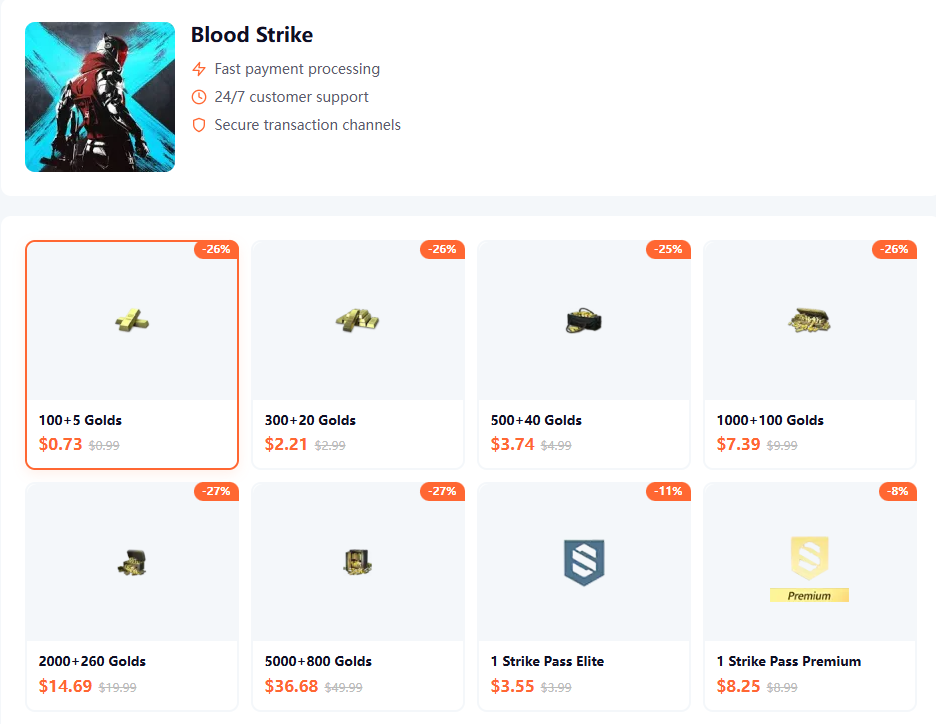
Why players choose Topuplist:
Secure UID-based top up
Fast order processing
Multiple payment methods
Safe and encrypted transactions
Global player support
No password is required. Simply enter your UID, choose a Gold package, and complete your payment.
Before You Top Up: Check Your UID, Server, and Purchase Plan
Many top-up issues can be avoided before you even reach the payment page.
Taking a few minutes to verify your account information can save you time and prevent delivery delays later.
Mistake #1: Entering the Wrong UID
Your UID is the unique account identifier used to deliver Gold to your Blood Strike account.
How to Find Your Blood Strike UID
Launch Blood Strike.
Tap your profile avatar.
Open your player profile.
Locate your UID on the profile screen.
Copy the number exactly as displayed.
UID vs. Nickname: What's the Difference?
Many new players accidentally enter their in-game nickname instead of their UID.
Keep in mind:
Nicknames can be changed at any time.
Your UID is permanently linked to your account.
When topping up, always use your UID rather than your nickname.
Mistake #2: Choosing the Wrong Server
Your server selection is just as important as your UID.
Selecting the wrong server may result in delayed delivery or failed orders.
Before making a purchase, double-check which server your account is currently using.
Top-Up Checklist Before Payment
Mistake #3: Buying Gold Without a Plan
It's easy to buy more Gold than you actually need.
Before topping up, consider what you're saving for:
A Battle Pass upgrade
A specific skin or cosmetic bundle
Upcoming seasonal events
Future content releases
Having a plan helps you get the best value from your purchase.
What Should You Spend Gold On?
Every player uses Gold differently.
Choosing the right package depends on your playstyle and goals.
For New Players
If this is your first top up, consider starting with a smaller package.
Benefits include:
Lower spending risk
Easy account verification
A chance to test delivery speed
For Battle Pass Players
Many players use Gold to unlock premium Battle Pass rewards.
Battle Passes often offer:
Exclusive skins
Additional progression rewards
Seasonal content and bonuses
For active players, this is often one of the best-value purchases available.
For Cosmetic Collectors
Gold can be used to unlock:
Character skins
Weapon skins
Limited-time cosmetic bundles
Special visual effects
Collectors often save Gold for exclusive releases rather than spending it immediately.
For Event-Focused Players
Seasonal and limited-time events frequently feature exclusive rewards.
Keeping some Gold available allows you to participate without making last-minute purchases.
Recommended Spending Strategy
How to Top Up Blood Strike Gold on Topuplist
Ready to recharge?
Top Up Blood Strike Gold Now
Follow these simple steps:
Step 1: Open the Official Blood Strike Top-Up Page
Visit the Topuplist Blood Strike recharge page.
Step 2: Choose Your Gold Package
Select the package that matches your budget and in-game goals.
Step 3: Enter Your UID
For accuracy, it's recommended to copy and paste your UID instead of typing it manually.
Step 4: Select Your Server
Make sure the selected server matches your Blood Strike account.
Step 5: Complete Payment
Choose your preferred payment method.
Common options include:
Visa
Mastercard
PayPal
Apple Pay
Google Pay
Local payment channels
Step 6: Receive Your Gold
Once payment is confirmed, your order will enter processing.
Most orders are delivered quickly after payment verification.
If this is your first purchase, consider starting with a smaller package to confirm that your UID and server information are correct.
Blood Strike Top Up Safety Checklist
Not every recharge offer online is trustworthy.
Before making a payment, take a moment to verify the platform.
Safe vs. Risky Top-Up Practices
Information You Should Never Share
A legitimate recharge service should never ask for:
Your game password
Verification codes
Email login credentials
Two-factor authentication codes
If anyone requests this information, stop immediately.
Watch Out for Common Scams
Be cautious if you see:
Unrealistically cheap Gold offers
Fake customer support accounts
Pressure to make immediate payments
Unsecured payment pages
Always verify that the website uses HTTPS encryption before entering any payment details.
Gold Not Received? Check These Before Buying Again
In most cases, delayed delivery is caused by account information errors rather than failed transactions.
Before placing another order, go through these checks.
Verify Your Payment Status
Make sure your payment has been completed successfully.
Orders under payment review may require additional processing time.
Review Your Order Details
Double-check:
UID
Server
Selected Gold package
Even one incorrect digit can prevent successful delivery.
Restart the Game
Sometimes Gold has already been delivered, but the game client hasn't refreshed yet.
Logging out and back in may solve the issue.
Contact Customer Support
If everything appears correct and your Gold still hasn't arrived, contact support and provide:
Order number
UID
Server information
Payment confirmation
Common Problems and Solutions
Frequently Asked Questions
Is Blood Strike Top Up Safe?
Yes. UID-based top up is generally considered safe because it only requires your UID and server information, not your account password.
What Information Is Required for Blood Strike Top Up?
Most top-up services only require:
UID
Server
Can I Top Up Blood Strike for a Friend?
Yes. As long as you have the correct UID and server information, you can recharge Gold for another player.
Why Has My Gold Not Arrived Yet?
Common reasons include:
Incorrect UID
Wrong server selection
Payment verification delays
Temporary game maintenance
How Long Does Gold Delivery Take?
Most orders are processed shortly after payment confirmation, although delivery times may vary depending on payment verification and server conditions.
Do I Need to Provide My Password?
No. Legitimate UID top-up services never require your account password.
Should I Buy the Largest Gold Package?
Not necessarily. The best package depends on your budget, playstyle, and future in-game plans.
Choosing a package based on your actual needs usually provides better value than simply purchasing the largest option available.