



Usually, it will be credited within 2–10 minutes after successful payment.

Pixel Gun 3D
รวดเร็ว
24/7
ปลอดภัย
-10%

175 Gem
$4.61$5.11
-44%

375 Gem
$5.45$9.70
-28%

800 Gem
$13.98$19.41
-23%

2200 Gem
$37.51$48.55
-24%

3500 Gem
$55.70$72.83
-25%
5000 Gem
$73.48$97.11
คำอธิบาย
Pixel Gun 3D Top-Up Guide
Top up Pixel Gun 3D at Topuplist now! Get Coins, Gems, and Keys at more favorable prices. Unlock powerful weapons, cool skins, and rare items in this creative pixel-style shooter. With our lightning-fast top-up service, we help you stand out in the intense blocky battlefield and dominate every match.
We are committed to providing every player with the highest quality top-up experience—ultra-fast delivery, secure transactions, and a variety of denominations to choose from. Simply provide your Player ID to easily begin your pixel battle journey.
About Pixel Gun 3D
Pixel Gun 3D is a world-renowned pixel-style multiplayer first-person shooter. The game features over 1,000 unique weapons, dozens of beautiful maps, and various exciting game modes (such as Battle Royale, Team Fight, and Zombie Survival). Players can customize skins, increase combat power by upgrading equipment, and compete in real-time with players from all over the world.
About Core Resources: Coins, Gems, Keys, and Pass
- Gems: The rare currency in the game, used to purchase top-tier weapons, upgrade accessories, and unlock special items.
- Coins: The basic currency, used for purchasing and strengthening basic weapons.
- Keys: Used to open various chests in the event Lottery (such as Big Chests and Super Chests). This is the fastest way to obtain rare weapon parts, skins, and massive resources.
Basic Top-Up Information
⚠️ Important Note:
Information Verification: Please ensure you fill in your Player ID accurately to guarantee that your Gems, Keys, or packages are delivered promptly.
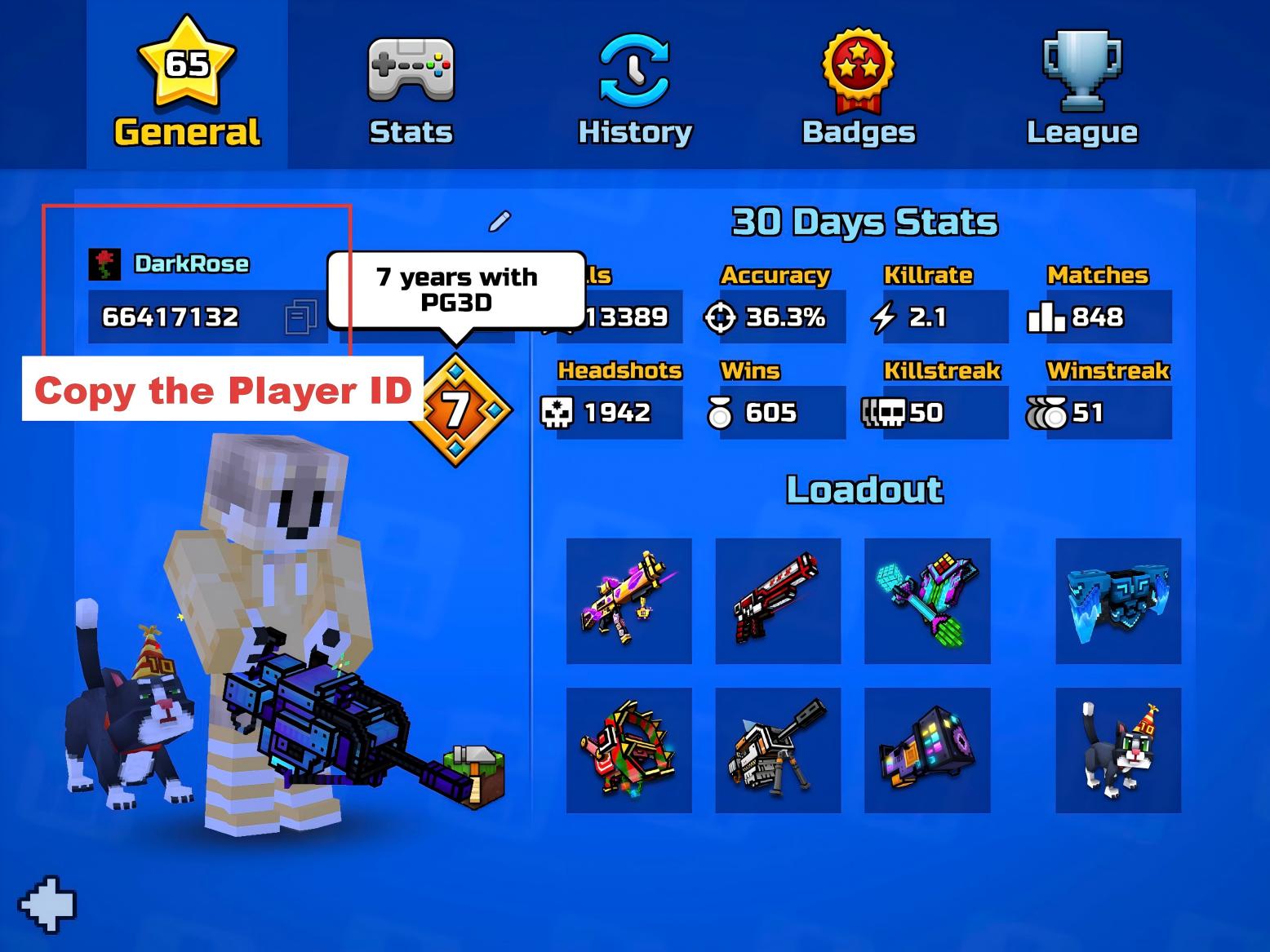
How to Find Your Pixel Gun 3D Player ID?
- Launch the game and enter the main lobby.
- Tap the Profile icon located in the upper left corner of the screen.
- Enter the personal details interface; your Player ID is displayed below your avatar.
- You can click the "Copy" button next to it to obtain the accurate ID.
How to Top Up Gems, Keys, or Packages?
The top-up process is simple and secure, requiring only a few steps:
- Select Product: Choose the amount of Gems, Key packs, or Pixel Pass you wish to purchase.
- Enter ID: Please enter your Player ID correctly.
- Complete Payment: Select your preferred payment method and check out.
- Instant Delivery: Once the payment is successful, the items will be automatically delivered to your game account shortly.
Why Choose Topuplist for Top-Up?
- 🏷️ Value Discounts: We provide more competitive prices than the official app stores, making every penny worth it.
- 🔒 Security Guarantee: 100% legitimate channels; top up with just your Player ID—no account password required.
- 💳 Convenient Payment: Supports Visa, PayPal, Google Pay, Apple Pay, and a variety of local payment methods.
- ⚡ Fully Automated Delivery: Our 24-hour automated processing system ensures your order arrives within minutes.
- 📞 Professional Support: Our customer service team is online in real-time to resolve any questions during the top-up process.
คำถามที่พบบ่อย
Pixel Gun 3D
รีวิว
4.8
อ้างอิงจาก 27 รีวิว
K
k***@gmail.com en
en
en11 ส.ค. 2569
ซื้อแล้ว375 Gem
Comparing prices, Topuplist has the best deal for Pixel Gun 3D.
H
h***@gmail.comen
en8 ส.ค. 2569
ซื้อแล้ว375 Gem
Had a smooth experience buying Pixel Gun 3D credits here.
G
g***@gmail.com pt-BR
pt-BR
pt-BR5 ส.ค. 2569
ซื้อแล้ว375 Gem
Satisfeito com Pixel Gun 3D, preço e velocidade!

Pixel Gun 3D 175 Gem
การชาร์จโดยตรง ยอดรวม$4.61







ทำไมต้องเลือก Topuplist?

เติมเงินรวดเร็ว
เพลิดเพลินกับการเติมเงินที่รวดเร็วและง่ายดาย พร้อมขั้นตอนที่ราบรื่นและเวลารอที่น้อยลง

ชำระเงินปลอดภัย
ข้อมูลการชำระเงินและบัญชีของคุณได้รับการปกป้องด้วยมาตรการที่ปลอดภัยและเชื่อถือได้

บริการช่วยเหลือ 24/7
ทีมช่วยเหลือของเราพร้อมให้บริการตลอด 24 ชั่วโมง เพื่อช่วยคุณทุกเมื่อที่ต้องการ