



If you mainly edit on mobile and only need basic premium features, CapCut Standard may be enough. If you create content frequently and want more advanced AI tools, premium assets, cloud features, and a more complete editing workflow, CapCut Pro is the better choice.

CapCut
Быстро
24/7
Безопасно
-13%

1 Month Standard
$8.77$9.99
Описание
Инструкции по пополнению
Подпишитесь на CapCut на Topuplist прямо сейчас! Получите доступ к подпискам CapCut Standard или CapCut Pro и откройте для себя более мощные функции редактирования, премиальные креативные ресурсы, продвинутые AI-инструменты, поддержку облачного рабочего процесса и более удобный процесс создания видео.
Topuplist стремится предоставлять каждому создателю CapCut быстрый, безопасный и удобный сервис подписки. Просто укажите ваш CapCut ID, выберите правильный регион и тарифный план подписки, завершите оплату и наслаждайтесь улучшенным опытом редактирования в CapCut.
Основная информация о пополнении
Пункт | Подробности |
|---|---|
Продукт | Подписка CapCut |
Тип приложения | Приложение для видеомонтажа и создания контента |
Разработчик / Издатель | Bytedance / CapCut |
Тип подписки | CapCut Standard / CapCut Pro |
Способ пополнения | Активация подписки |
Применимый регион | US / EU / UK, в зависимости от выбранного продукта |
Поддерживаемая платформа | CapCut Mobile / PC; CapCut Standard может быть ограничен мобильными устройствами |
Требуемая информация | CapCut ID |
Время доставки | Обычно обрабатывается вскоре после успешной оплаты; фактическое время доставки может варьироваться в зависимости от статуса заказа и системной обработки |
⚠️ Примечание: Пожалуйста, выберите продукт подписки, соответствующий региону, в котором зарегистрирован ваш аккаунт CapCut. Введите ваш CapCut ID точно, чтобы избежать задержек или неудачной активации.
Как найти ваш CapCut ID?
Откройте CapCut и войдите в свой аккаунт.
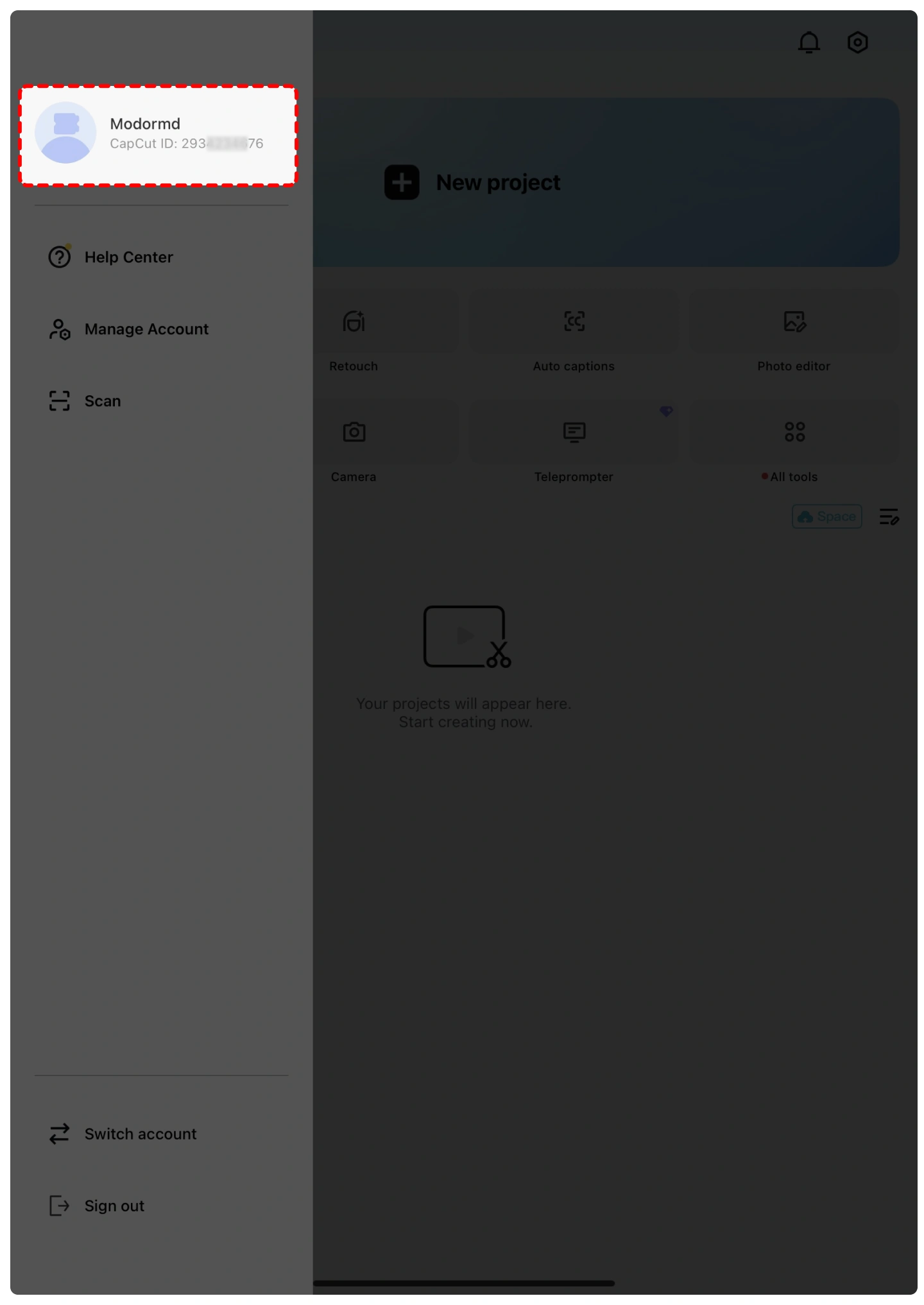
Нажмите на аватар профиля или откройте страницу профиля.
Ваш CapCut ID обычно отображается рядом с вашим аватаром или на странице информации профиля.
Скопируйте ваш CapCut ID и правильно введите его на Topuplist.
⚠️ Примечание: Пожалуйста, дважды проверьте ваш CapCut ID перед отправкой заказа. Неверная информация об аккаунте может привести к задержкам доставки.
Как подписаться на CapCut на Topuplist?
Пожалуйста, выполните эти простые шаги, чтобы быстро и безопасно приобрести подписку CapCut:
Выберите язык и валюту — Выберите предпочитаемый язык и местную валюту на Topuplist.
Войдите или создайте аккаунт — Войдите в свой аккаунт Topuplist или создайте новый, если у вас его еще нет.
Выберите продукт — Перейдите на страницу подписки CapCut на Topuplist.
Выберите тарифный план подписки — Выберите подходящий пакет CapCut Standard или CapCut Pro в зависимости от региона вашего аккаунта.
Введите ваш CapCut ID — Точно заполните ваш CapCut ID.
Подтвердите и оплатите — Нажмите «Top-up Now», выберите предпочтительный способ оплаты и завершите оплату.
Получите вашу подписку — Ваша подписка CapCut будет обработана после успешной оплаты.
Что такое CapCut?
CapCut — это популярное универсальное приложение для видеомонтажа и создания контента, разработанное Bytedance. Оно широко используется создателями для редактирования коротких видео, контента для социальных сетей, влогов, обучающих материалов, рекламы и креативных роликов для таких платформ, как TikTok, YouTube, Instagram, Facebook и других.
CapCut предлагает простые в использовании инструменты редактирования, такие как обрезка, разделение, регулировка скорости, переходы, фильтры, стикеры, текст, музыка, звуковые эффекты, автоматические субтитры, удаление фона, шаблоны и AI-функции редактирования. Он поддерживает редактирование на мобильных устройствах, настольных компьютерах и онлайн, что делает его подходящим как для начинающих, так и для опытных создателей.
Для пользователей, которые часто создают контент, подписки CapCut Standard и CapCut Pro предоставляют доступ к большему количеству премиальных ресурсов и продвинутых инструментов, помогая создателям быстрее и эффективнее выпускать видео более высокого качества.
Что такое CapCut Standard и CapCut Pro?
CapCut Standard — это базовый вариант подписки, разработанный для пользователей, которым нужны дополнительные креативные ресурсы и более удобный мобильный опыт редактирования. Он может включать доступ к выбранным премиальным шаблонам, фильтрам, эффектам, стикерам, шрифтам, экспорту без водяных знаков и другим расширенным функциям в зависимости от региона и доступности платформы.
CapCut Pro — это премиальный уровень подписки для создателей, которым нужен более полный набор инструментов для редактирования. Он открывает более широкий доступ к премиальным ресурсам, продвинутым AI-инструментам, функциям облачного хранилища, премиальным шаблонам, профессиональным эффектам, шрифтам, музыкальным ресурсам и другим функциям редактирования, ориентированным на продуктивность.
CapCut Standard подходит для обычных создателей и пользователей, ориентированных в первую очередь на мобильные устройства, тогда как CapCut Pro лучше подходит для активных создателей контента, редакторов социальных сетей, пользователей в сфере маркетинга и всех, кому нужны более продвинутые возможности редактирования.
Зачем покупать подписку CapCut?
Бесплатная версия CapCut уже полезна для базового видеомонтажа, но платная подписка может улучшить ваш рабочий процесс, если вам нужны премиальные ресурсы, продвинутые функции или более высокая эффективность.
С CapCut Standard или CapCut Pro вы сможете создавать более качественные видео с помощью премиальных шаблонов, эффектов, переходов, шрифтов, музыки, фильтров, стикеров и инструментов с поддержкой AI. Эти функции особенно полезны для создателей, которые регулярно делают контент для TikTok, YouTube Shorts, Instagram Reels, рекламы, брендовых видео, обучающих материалов или личных проектов.
Если вы часто тратите дополнительное время на поиск эффектов, ручное редактирование субтитров, удаление фона или улучшение качества видео, переход на подписку CapCut поможет сэкономить время и сделать ваш контент более профессиональным.
Варианты подписки CapCut
Доступность подписки CapCut и ее преимущества могут различаться в зависимости от региона, платформы, статуса аккаунта и официальных обновлений CapCut.
Распространенные варианты подписки могут включать:
CapCut Standard — более доступное обновление для пользователей, которым нужны отдельные премиальные функции и ресурсы, особенно для мобильного редактирования.
CapCut Pro — более полный премиальный план, открывающий более широкий набор продвинутых инструментов, AI-функций, премиальных ресурсов, поддержку облачного рабочего процесса и профессиональные преимущества редактирования.
⚠️ Примечание: Пожалуйста, всегда выбирайте тарифный план подписки, соответствующий региону вашего аккаунта CapCut и требованиям платформы.
Как скачать CapCut?
Вы можете установить CapCut через официальные каналы:
iOS / iPadOS — Откройте App Store, найдите «CapCut» и установите приложение.
Android — Откройте Google Play, найдите «CapCut» и установите приложение.
Windows — Скачайте CapCut с официального сайта CapCut или из Microsoft Store.
Mac — Скачайте CapCut с официального сайта CapCut или из Mac App Store, если доступно.
Для безопасности аккаунта избегайте загрузки неофициальных APK-файлов или модифицированных версий CapCut с неизвестных сторонних сайтов.
Почему стоит выбрать Topuplist для подписки CapCut?
Лучшие цены
Topuplist предлагает конкурентоспособные цены на подписку CapCut, а также специальные акции, промокоды и пакетные предложения, чтобы вы получали больше выгоды от каждой покупки.
Безопасные транзакции
Безопасность ваших платежей важна. Topuplist поддерживает безопасную обработку платежей, чтобы защитить информацию о ваших транзакциях.
Несколько способов оплаты
Выбирайте из различных вариантов оплаты, включая кредитные карты, цифровые кошельки и местные способы оплаты, в зависимости от вашего региона.
Быстрая обработка
После оплаты ваш заказ на подписку CapCut будет обработан как можно быстрее, чтобы вы могли быстрее вернуться к созданию и редактированию контента.
Полезная служба поддержки
Если у вас есть вопросы по заказу, служба поддержки Topuplist может помочь с вопросами по оплате, проверкой информации аккаунта и проблемами с доставкой подписки.
Глобальный сервис цифрового пополнения
Topuplist поддерживает пользователей в разных регионах и предоставляет услуги цифрового пополнения для популярных игр, приложений, подарочных карт и продуктов подписки.
Часто задаваемые вопросы
CapCut
Пока нет отзывов
Отзывы об этом товаре появятся здесь, как только клиенты поделятся своим опытом.

CapCut 1 Month Standard
Прямая зарядка Итого$8.77








Почему стоит выбрать Topuplist?

Быстрое пополнение
Пополняйте быстро и удобно благодаря простому процессу и минимальному времени ожидания.

Безопасная оплата
Ваши платежные данные и данные аккаунта защищены надежными мерами безопасности.

Поддержка 24/7
Наша служба поддержки работает круглосуточно и готова помочь вам в любое время.