



Yes. LivU offers free features, but certain video calls, virtual gifts, and other in-app interactions require Coins.

LivU
Fast
24/7
Secure
-43%

650 Coins
$3.99$6.99
-37%

1250 Coins
$8.20$12.99
-42%

1800 Coins
$10.45$17.99
-41%

3500 Coins
$20.39$33.99
-41%

7000 Coins
$39.99$66.99
-40%

15000 Coins
$86.23$142.99
-40%

35000 Coins
$203.61$333.99
Description
LivU Coins Top Up
Recharge LivU Coins on Topuplist at competitive prices. Simply enter your LivU User ID (UID), choose your preferred Coins package, and complete your payment. No LivU account password is required.
About LivU
LivU is a social video chat app that connects people from around the world through real-time video calls and messaging. With LivU, you can meet new people, discover different cultures, and enjoy interactive conversations.
LivU Coins are the in-app currency used for virtual gifts and certain paid interactions, allowing you to enjoy more of what LivU has to offer.
What Are LivU Coins Used For?
LivU Coins can be used for several in-app activities:
Video Calls: Pay for eligible video calls and enjoy conversations with other users.
Virtual Gifts: Send gifts to friends or chat partners to show your appreciation.
Paid Interactions: Use Coins for certain messaging and other paid features available within LivU.
Coin charges may vary depending on the feature or interaction. Check the displayed price in the LivU app before using your Coins.
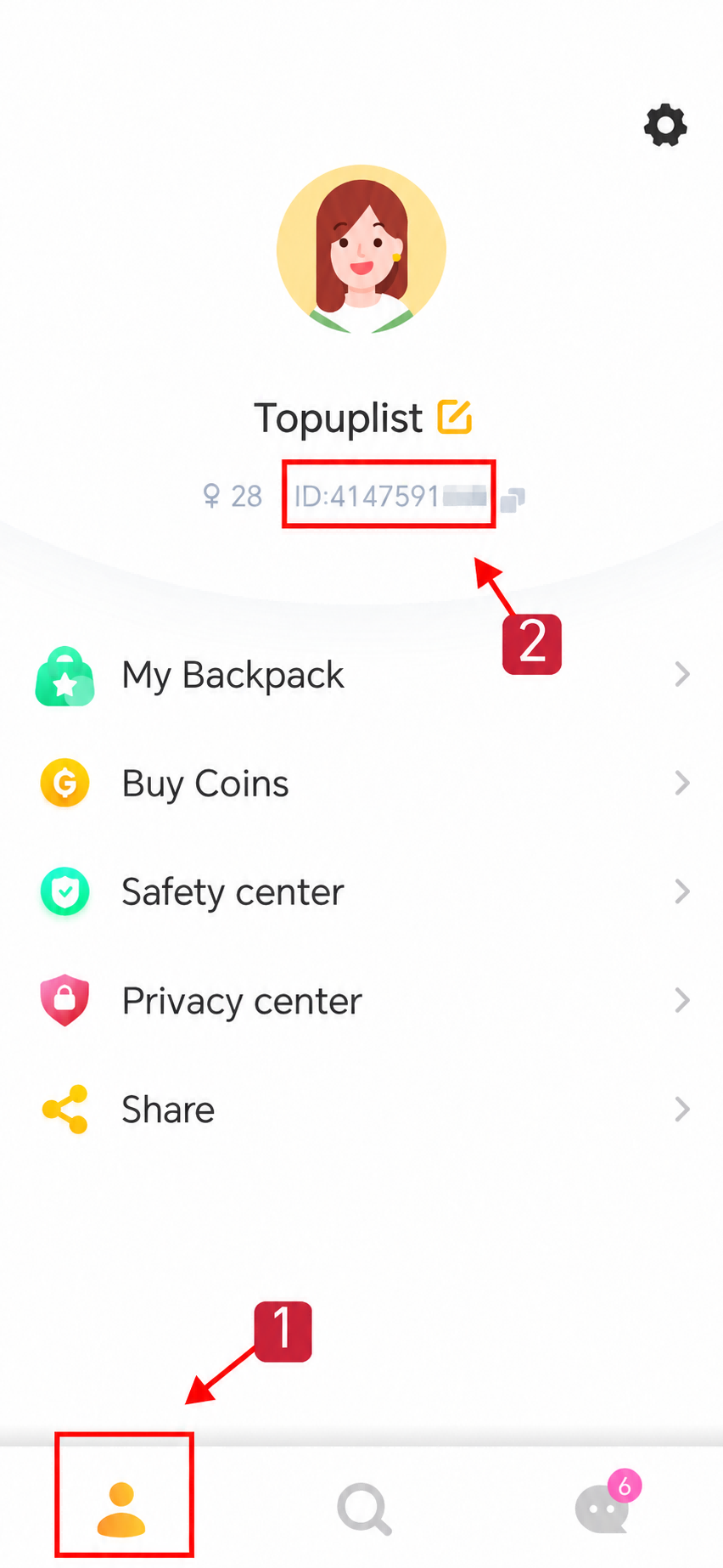
How to Find Your LivU UID?
Open the LivU app and log in to your account.
Tap your Profile icon to open your account page.
Find your User ID (UID) displayed in your profile information.
Copy your UID and enter it on Topuplist when placing your order.
Important: Make sure you enter the correct UID to avoid delivery issues.
How to Top Up LivU Coins on Topuplist?
Visit Topuplist and find the LivU Coins top-up page.
Select your preferred LivU Coins package.
Enter your LivU UID correctly.
Click Buy Now and choose your preferred payment method.
Complete your payment and check your LivU account once the order has been processed.
Why Choose Topuplist for LivU Recharge?
Convenient UID Top-Up: Recharge without sharing your LivU account password.
Secure Payment: Complete your purchase through secure payment channels.
Multiple Coin Packages: Choose a package that suits your needs and budget.
24/7 Customer Support: Get assistance if you have questions about your order.
Important Notes
Double-check your LivU UID before completing payment.
Ensure your account is eligible for the selected package and supported region.
Coins will be credited to the LivU account associated with the UID provided.
Delivery times may vary depending on order processing and system conditions.
Successfully completed digital top-ups generally cannot be reversed or refunded due to an incorrect UID.
FAQ
LivU
No reviews yet
Reviews for this product will appear here once customers share their experience.

LivU 650 Coins
Direct top-up Total$3.99
Related products










Why Choose Topuplist?

Fast Delivery
Enjoy quick and efficient top-ups with a smooth process and minimal waiting for your purchase.

Secure Payment
Your payment and account information are protected with secure and trusted payment measures.

24/7 Support
Our support team is available 24/7 to assist you with questions whenever you need help.