


How to Download Douyin App on iPhone and Android: Complete Installation Guide
Why Douyin Isn't on Your App Store
Douyin (抖音) is only listed on the China mainland App Store and Chinese Android markets. It has never been published on international App Stores or Google Play. This is a deliberate choice by ByteDance — Douyin and TikTok are separate products for separate markets.
If you search "抖音" on a non-China App Store, you won't find it. Here's how to get it.
Method 1: iPhone — Create a China Apple ID (Recommended)
This is the safest method. Your regular Apple ID stays untouched, and Douyin works normally after installation.
Step-by-step
Create a new Apple ID at appleid.apple.com
Use a new email address (different from your current Apple ID email)
Set Country/Region to China Mainland
For payment method, select None
Fill in a Chinese address (any valid format — street, district, city, postal code)
Sign into the China Apple ID on your iPhone
Open App Store → tap your profile icon → Sign Out
Sign In with the new China Apple ID
Agree to any terms that appear
Download Douyin
Search "抖音" in the App Store
Tap Get → the app downloads to your phone
Switch back to your regular Apple ID
App Store → Sign Out of the China Apple ID
Sign In with your regular Apple ID
Douyin stays installed and works normally
Updating Douyin
When Douyin needs an update:
Sign into the China Apple ID in the App Store
Find Douyin → tap Update
Switch back to your regular Apple ID
Tip: Don't delete Douyin — updates keep it current without needing to re-download.
Method 2: iPhone — Switch Your Existing Apple ID Region
⚠️ Warning: This method changes your Apple ID region permanently until you switch back. It affects all subscriptions, payment methods, and purchase history. Only use this if you don't have active Apple subscriptions.
Step-by-step
iPhone Settings → tap your name → Media & Purchases → View Account
Tap Country/Region → Change Country or Region
Select China Mainland
Agree to terms and conditions
Payment method → select None (if available) or add a Chinese-compatible payment method
Fill in billing address with a Chinese format
App Store → search "抖音" → download
After downloading: Switch your Apple ID back to your original region if needed. Douyin remains installed.
Method 3: Android — Official APK from Douyin Website
Android is straightforward — no account changes needed. You install the APK directly.
Step-by-step
Enable APK installation
Settings → Security → Enable "Install from unknown sources"
Only enable this for your browser app (not globally)
Download from Douyin's official site
Open Chrome → visit douyin.com/download
The page auto-detects your Android device
Tap the download button → APK file saves to your Downloads folder
Install the APK
Open your file manager → Downloads → find
douyin_*.apkTap to install → confirm permissions
Open Douyin and start browsing
Important: Only download APK from the official Douyin website. Third-party sites may distribute modified versions with security risks. If you must use an alternative source, Uptodown is a reputable option.
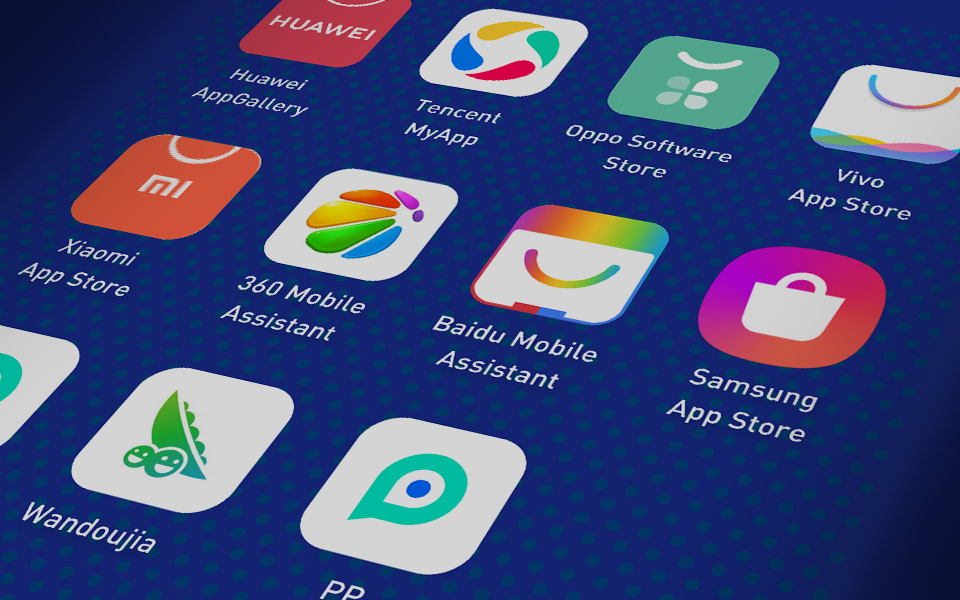
Method 4: Android — Chinese App Stores
If you prefer using an app store interface:
After installing any of these stores, search "抖音" and install.
After Installation: First-Time Setup
Allow necessary permissions
When you first open Douyin, the app requests:
Phone number — for registration and verification
Storage — for saving videos and caching content
Camera — for recording videos (optional)
Location — for content recommendations (optional)
Grant at least phone and storage permissions for the app to function properly.
Language note
Douyin's interface is entirely in Chinese. There is no official English mode or language toggle. Key navigation terms:
Registering Your Account
You can browse Douyin without an account, but registration is required for following creators, commenting, and recharging Diamonds.
With an international phone number
Open Douyin → tap Login
Tap the country code dropdown (default: +86)
Scroll to find your country code (e.g., +1 US, +44 UK, +65 Singapore)
Enter your phone number → request SMS code
Enter the code → account created
Note: Not all country codes are available. If yours isn't listed, use a third-party login method.
With third-party accounts
Douyin supports login via WeChat, QQ, Apple ID, and Weibo. Tap "其他方式登录" (Other login methods) on the login screen.
Douyin vs TikTok: Don't Confuse Them
If you already have TikTok: That's the international version. Douyin is a different app with different content, different currency, and a different user base. You need to install Douyin separately.
FAQ
Is it safe to download Douyin APK on Android?
Yes, when downloaded from the official Douyin website. Avoid random third-party APK sites — they may distribute modified or malicious versions.
Will creating a China Apple ID affect my regular account?
No. The China Apple ID is completely separate. After downloading Douyin, sign back into your regular Apple ID — Douyin stays installed.
Can I use Douyin without a Chinese phone number?
Yes, for browsing content. For full features (recharging Diamonds, commenting), you need an account — which can be created with some international phone numbers or third-party logins.
Does Douyin work on all iPhones?
Yes, as long as the iPhone runs iOS 13 or later (Douyin's minimum requirement). The current version supports iOS 15+.
Can I have both Douyin and TikTok on the same phone?
Yes. They are separate apps with no conflict. Just don't confuse their currencies — Douyin Diamonds and TikTok Coins are not interchangeable.
