



If you mainly edit on mobile and only need basic premium features, CapCut Standard may be enough. If you create content frequently and want more advanced AI tools, premium assets, cloud features, and a more complete editing workflow, CapCut Pro is the better choice.

CapCut
Rápido
24/7
Seguro
-13%

1 Month Standard
$8.77$9.99
Descripción
Instrucciones de recarga
Suscríbete a CapCut en Topuplist ahora. Obtén acceso a los servicios de suscripción CapCut Standard o CapCut Pro y desbloquea funciones de edición más potentes, recursos creativos premium, herramientas avanzadas de IA, compatibilidad con flujo de trabajo en la nube y una experiencia de creación de video más fluida.
Topuplist se compromete a proporcionar a cada creador de CapCut un servicio de suscripción rápido, seguro y práctico. Solo tienes que proporcionar tu ID de CapCut, elegir la región y el plan de suscripción correctos, completar el pago y disfrutar de una experiencia de edición de CapCut mejorada.
Información básica de la recarga
Artículo | Detalles |
|---|---|
Producto | Suscripción de CapCut |
Tipo de aplicación | Aplicación de edición de video y creación de contenido |
Desarrollador / Editor | Bytedance / CapCut |
Tipo de suscripción | CapCut Standard / CapCut Pro |
Método de recarga | Activación de suscripción |
Región aplicable | US / EU / UK, según el producto seleccionado |
Plataforma aplicable | CapCut Mobile / PC; CapCut Standard puede estar limitado a dispositivos móviles |
Información requerida | ID de CapCut |
Tiempo de entrega | Normalmente se procesa poco después de que el pago se haya realizado correctamente; el tiempo de entrega real puede variar según el estado del pedido y el procesamiento del sistema |
⚠️ Nota: Selecciona el producto de suscripción que coincida con la región en la que está registrada tu cuenta de CapCut. Introduce tu ID de CapCut con precisión para evitar retrasos o fallos de activación.
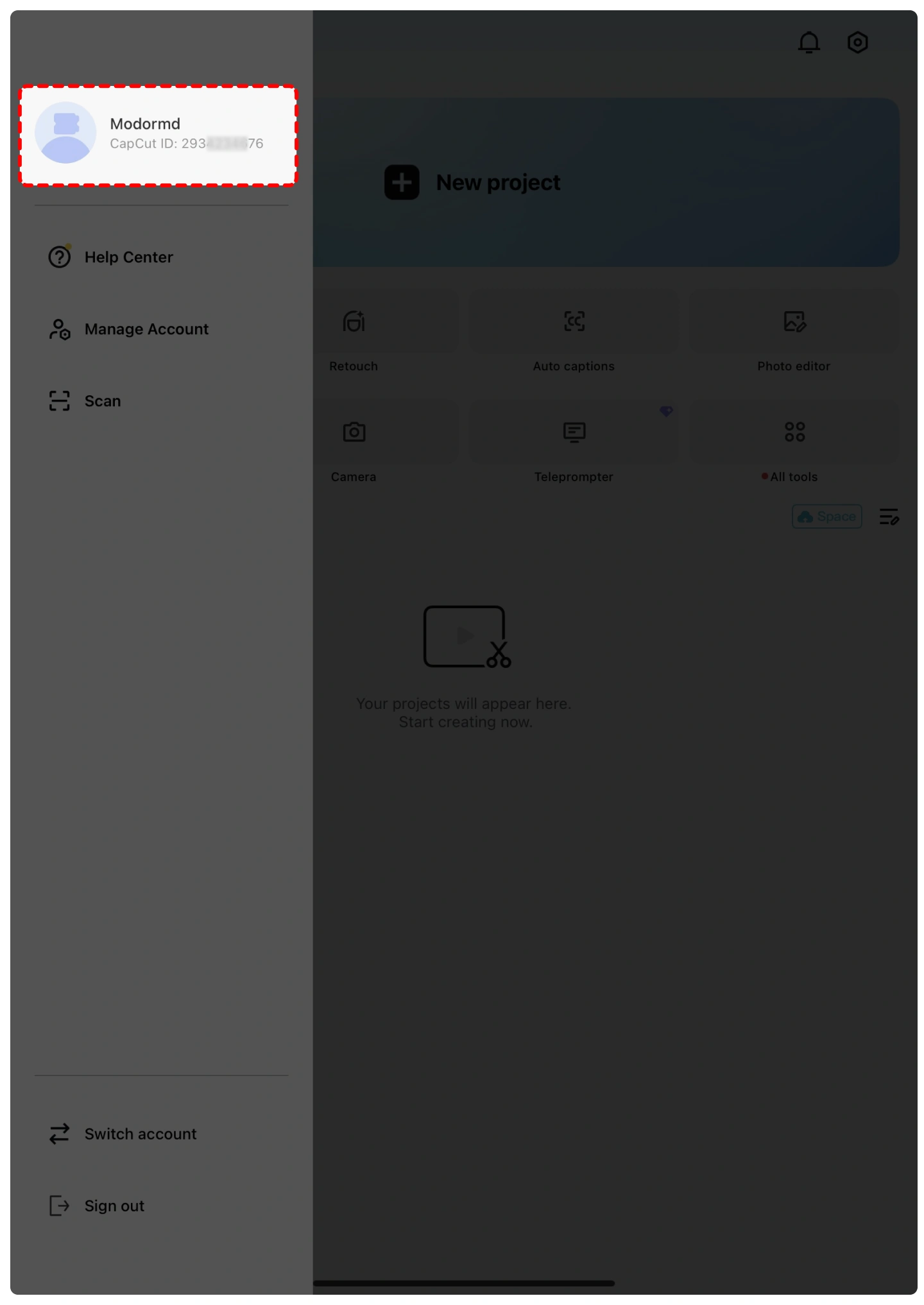
¿Cómo encontrar tu ID de CapCut?
Abre CapCut e inicia sesión en tu cuenta.
Toca tu avatar de perfil o la página de perfil.
Tu ID de CapCut suele mostrarse junto a tu avatar o en la página de información de tu perfil.
Copia tu ID de CapCut e introdúcelo correctamente en Topuplist.
⚠️ Nota: Verifica cuidadosamente tu ID de CapCut antes de enviar tu pedido. La información incorrecta de la cuenta puede causar retrasos en la entrega.
¿Cómo suscribirse a CapCut en Topuplist?
Sigue estos sencillos pasos para iniciar tu compra de suscripción a CapCut de forma rápida y segura:
Elige tu idioma y moneda — Selecciona tu idioma preferido y tu moneda local en Topuplist.
Inicia sesión o crea una cuenta — Inicia sesión en tu cuenta de Topuplist, o crea una nueva si aún no tienes una.
Selecciona el producto — Ve a la página de suscripción de CapCut en Topuplist.
Elige tu plan de suscripción — Selecciona el paquete correcto de CapCut Standard o CapCut Pro según la región de tu cuenta.
Introduce tu ID de CapCut — Rellena tu ID de CapCut con precisión.
Confirma y paga — Haz clic en “Top-up Now”, elige tu método de pago preferido y completa el pago.
Recibe tu suscripción — Tu suscripción de CapCut se procesará después de que el pago se haya realizado correctamente.
¿Qué es CapCut?
CapCut es una popular aplicación todo en uno de edición de video y creación de contenido desarrollada por Bytedance. Es ampliamente utilizada por creadores para editar videos cortos, contenido para redes sociales, vlogs, tutoriales, anuncios y clips creativos para plataformas como TikTok, YouTube, Instagram, Facebook y más.
CapCut ofrece herramientas de edición fáciles de usar, como recorte, división, ajuste de velocidad, transiciones, filtros, stickers, texto, música, efectos de sonido, subtítulos automáticos, eliminación de fondo, plantillas y funciones de edición impulsadas por IA. Es compatible con la edición en móvil, escritorio y en línea, lo que la hace adecuada tanto para principiantes como para creadores con experiencia.
Para los usuarios que crean contenido con frecuencia, las suscripciones CapCut Standard y CapCut Pro proporcionan acceso a más recursos premium y herramientas avanzadas, ayudando a los creadores a producir videos de mayor calidad de forma más rápida y eficiente.
¿Qué son CapCut Standard y CapCut Pro?
CapCut Standard es una opción de suscripción de nivel inicial diseñada para usuarios que quieren más recursos creativos y una experiencia de edición móvil más fluida. Puede incluir acceso a plantillas premium seleccionadas, filtros, efectos, stickers, fuentes, exportaciones sin marca de agua y otras funciones mejoradas según la región y la disponibilidad de la plataforma.
CapCut Pro es el nivel de suscripción premium para creadores que necesitan un conjunto de herramientas de edición más completo. Desbloquea un acceso más amplio a recursos premium, herramientas avanzadas de IA, funciones de almacenamiento en la nube, plantillas premium, efectos profesionales, fuentes, recursos musicales y otras funciones de edición centradas en la productividad.
CapCut Standard es adecuado para creadores ocasionales y usuarios que priorizan el móvil, mientras que CapCut Pro es mejor para creadores de contenido frecuentes, editores de redes sociales, usuarios de marketing y cualquiera que necesite una capacidad de edición más avanzada.
¿Por qué comprar una suscripción de CapCut?
La versión gratuita de CapCut ya es útil para la edición básica de video, pero una suscripción de pago puede mejorar tu flujo de trabajo cuando necesitas recursos premium, funciones avanzadas o mayor eficiencia.
Con CapCut Standard o CapCut Pro, puedes crear videos más pulidos usando plantillas premium, efectos, transiciones, fuentes, música, filtros, stickers y herramientas asistidas por IA. Estas funciones son especialmente útiles para creadores que hacen contenido con regularidad para TikTok, YouTube Shorts, Instagram Reels, anuncios, videos de marca, tutoriales o proyectos personales.
Si a menudo dedicas tiempo extra a buscar efectos, editar subtítulos manualmente, eliminar fondos o mejorar la calidad del video, actualizar a una suscripción de CapCut puede ayudarte a ahorrar tiempo y hacer que tu contenido tenga un aspecto más profesional.
Opciones de suscripción de CapCut
La disponibilidad y los beneficios de la suscripción de CapCut pueden variar según la región, la plataforma, el estado de la cuenta y las actualizaciones oficiales de CapCut.
Las opciones de suscripción comunes pueden incluir:
CapCut Standard — Una mejora más asequible para usuarios que quieren funciones y recursos premium seleccionados, especialmente para la edición móvil.
CapCut Pro — Un plan premium más completo que desbloquea una gama más amplia de herramientas avanzadas, funciones de IA, recursos premium, compatibilidad con flujo de trabajo en la nube y ventajas de edición profesional.
⚠️ Nota: Elige siempre el plan de suscripción que coincida con la región de tu cuenta de CapCut y los requisitos de la plataforma.
¿Cómo descargar CapCut?
Puedes instalar CapCut a través de canales oficiales:
iOS / iPadOS — Abre la App Store, busca “CapCut” e instala la aplicación.
Android — Abre Google Play, busca “CapCut” e instala la aplicación.
Windows — Descarga CapCut desde el sitio web oficial de CapCut o Microsoft Store.
Mac — Descarga CapCut desde el sitio web oficial de CapCut o Mac App Store donde esté disponible.
Por la seguridad de la cuenta, evita descargar archivos APK no oficiales o versiones modificadas de CapCut desde sitios web desconocidos de terceros.
¿Por qué elegir Topuplist para la suscripción de CapCut?
Precios con la mejor relación calidad-precio
Topuplist ofrece precios competitivos para suscripciones de CapCut, junto con promociones seleccionadas, códigos de cupón y ofertas de paquetes para ayudarte a obtener más valor en cada compra.
Transacciones seguras
La seguridad de tu pago importa. Topuplist admite procesamiento de pagos seguro para ayudar a mantener protegida la información de tu transacción.
Múltiples métodos de pago
Elige entre una variedad de opciones de pago, incluidas tarjetas de crédito, monederos digitales y métodos de pago locales, según tu región.
Procesamiento rápido
Después del pago, tu pedido de suscripción de CapCut se procesará lo más rápido posible para que puedas volver a crear y editar con menos espera.
Atención al cliente útil
Si tienes preguntas sobre tu pedido, el servicio de atención al cliente de Topuplist puede ayudarte con preguntas sobre pagos, comprobaciones de información de la cuenta y problemas de entrega de la suscripción.
Servicio global de recarga digital
Topuplist da soporte a usuarios de diferentes regiones y ofrece servicios de recarga digital para juegos, aplicaciones, tarjetas regalo y productos de suscripción populares.
Preguntas frecuentes
CapCut
Aún no hay reseñas
Las reseñas de este producto aparecerán aquí una vez que los clientes compartan su experiencia.

CapCut 1 Month Standard
Cargo directo Total$8.77






¿Por qué elegir Topuplist?

Entrega rápida
Disfruta de recargas rápidas y sencillas, con un proceso fluido y tiempos de espera mínimos.

Pago seguro
Tu información de pago y de cuenta está protegida con medidas seguras y confiables.

Soporte 24/7
Nuestro equipo de soporte está disponible las 24 horas para ayudarte cuando lo necesites.