

Telegram Stars Top Up: Buying Methods and Better-Value Choices
Telegram Stars let you pay for digital content, use services inside bots and mini apps, send gifts, and support creators without leaving Telegram. If a photo, subscription, or digital item you want has a Stars price, buying Stars adds the balance needed to complete that purchase.
There is more than one way to buy them, and the amount charged can differ between payment routes. The useful comparison is the final cost for the same quantity of Stars delivered to the correct account. This article explains the available routes, what changes the price, and how to choose between Stars and Premium before paying.
What Are Telegram Stars, and What Can You Buy?
Telegram is a messaging service with private chats, groups, public channels, bots, and mini apps. Stars are its virtual items for supported digital purchases. You do not need to buy Stars to use ordinary messaging; a Stars balance becomes relevant when you choose a paid feature or product that accepts it.
The Telegram Stars terms describe several uses: digital goods and services from bots and mini apps, paid media, creator support, Telegram gifts, and other supported features. A bot might sell access to a digital service, while a channel might offer paid photos or videos. The item or service decides the amount required.
Gifts provide another reason to keep a small balance. Instead of paying for access to a post, you choose a gift for another user and pay the amount shown. That action is different from sending your existing wallet balance as a transferable cash payment. Purchase the gift you actually want rather than assuming every gift has identical conversion or resale rules.
Telegram Stars vs Premium: Which One Do You Need?
Stars are a spendable balance. Telegram Premium is a subscription that unlocks account features. Buying one does not automatically give you the other. The easiest way to choose is to look at the thing you are trying to unlock: a Stars price calls for Stars, while a subscription offer calls for the relevant Premium product.
Your goal | Product to look for | What to verify |
|---|---|---|
Pay a bot or unlock paid media | Telegram Stars | The Stars amount on the purchase screen |
Send an eligible Telegram gift | Telegram Stars | The gift price and recipient |
Use Premium account features | Telegram Premium | Subscription duration and recipient account |
Some Telegram purchase flows also allow Stars to be spent on Premium gift subscriptions. That is a separate transaction using Stars, not a rule that every Stars top-up activates Premium. If you only want a subscription, compare the displayed subscription purchase options directly rather than buying an arbitrary Stars balance first.
This distinction matters on a product page that offers both. On Topuplist’s Telegram page, check the selected product name before entering the recipient username. A longer Premium duration is not a larger Stars balance, and a Stars purchase does not extend an existing subscription simply because both appear under Telegram.
 Telegram




Where Can You Buy Telegram Stars?
Inside Telegram on iPhone or Android
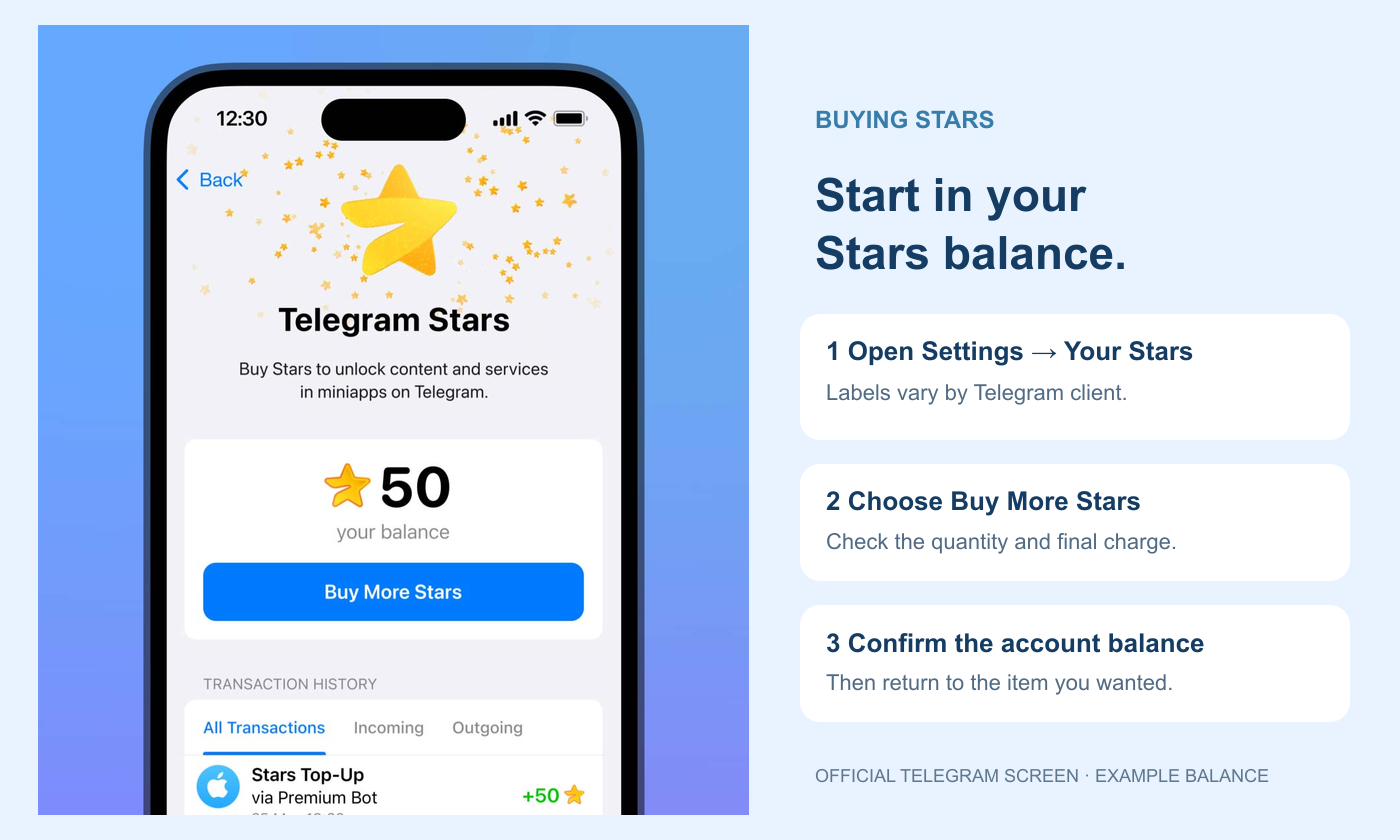
Telegram supports Stars purchases through Apple and Google in-app payments. Open the official app, find your Stars balance in Settings, and use the option to buy more. The store payment sheet shows the offer available to that account and region. Check the quantity and the amount to be charged before confirming with your usual store payment method.
This route keeps the purchase close to the content you want to unlock. It is useful when you already have a supported store payment method and prefer the purchase record to remain with that store. The price you see is still a local checkout quote, rather than a universal Stars exchange rate.
Through the official PremiumBot on supported clients
Telegram also lists @PremiumBot as a purchase route on its direct Android version and on its Web and Desktop apps. Use the exact official bot rather than a similarly named account. Availability is client-dependent, so an option visible on Desktop may not appear in the same place in an app-store version.
For a buyer, the advantage is having another quote to compare. It does not mean every bot purchase is always cheaper in every country. Open the offer that actually applies to your account, check the payment currency, and compare it with the in-app total for an equivalent amount.
A username-based top-up listing
A top-up platform may sell Stars for delivery to a Telegram username. This is a different ordering process from adding Stars inside your own app: the account identifier becomes part of the order. Check the product, recipient requirements, payment total, and order terms. A seller listing is not, by itself, proof of Telegram endorsement.
Why Do Telegram Stars Prices Differ?
Telegram’s terms identify local taxes, payment-provider commissions, and currency conversion as factors that can affect a purchase. Different payment routes can therefore show different totals. A cheaper-looking foreign-currency price can also become less attractive once your card provider converts it into your billing currency.
Compare like with like. Match the Stars quantity first, then use the final payable total in one currency. If two offers contain different quantities, divide each total by the Stars delivered to find the cost per Star. Use only benefits actually included in that order; an advertised coupon or reward with conditions you do not meet should not reduce your comparison price.
Do not assume a fixed platform-fee percentage explains every price difference. Tax treatment, the payment method, seller pricing, and exchange rates can all matter. The checkout total tells you what you would pay now; a general claim about app-store fees cannot replace that quote.
A lower cost per Star is useful only when you will use the balance. Someone unlocking one piece of content has a different need from someone regularly buying gifts or supporting a channel. Choose around your intended purchases, since an unused balance is still money already spent.
How to Buy Stars for the Correct Telegram Account
Allow for how the feature charges you. A gift has its displayed purchase price, while a chat with paid messaging can charge Stars for each message you send. If you intend to have a conversation, the cost of the first message is not the cost of the whole exchange. Telegram’s terms describe exceptions for contacts and other eligible users, but the price shown for your own account is what matters before sending.
For paid content from a bot or creator, read the description before topping up. Check what access the payment provides, whether the offer describes a one-time purchase or continuing service, and who provides support. Stars are the payment unit, not a guarantee that every seller offers the same service. Saving the purchase description and transaction record makes a delivery dispute easier to explain without confusing the content payment with the earlier purchase of Stars.
Start with the account where you intend to spend the Stars. Telegram lets people use multiple accounts, so a purchase made while one account is active should not be confused with a purchase for another. Look at the profile first, then check that account’s existing Stars balance and the amount needed for your intended purchase.
Buying inside your own Telegram account
Open Settings and find Your Stars or the corresponding Stars balance page in your client.
Select Buy More Stars, choose an offer, and read the final payment screen.
Approve the payment through the displayed official payment flow.
Return to the Stars balance and transaction history before making the intended digital purchase.
Ordering through a username-based product page
For Topuplist’s Telegram product, the recipient field uses a Telegram username starting with @. Find it in Telegram Settings or your profile, and copy it rather than typing a display name. The display name shown above your messages can change independently and is not a substitute for the username requested by the order.
Select Stars rather than Premium, enter the full username, and review the recipient information and final charge. This direct top-up product does not require your Telegram password or login verification code. After the order is processed, check the intended account’s Stars history. If buying for someone else, ask them to confirm their current username before payment and their balance afterward.
Can You Refund or Cash Out Purchased Stars?
Keep the payment receipt and the Stars transaction record separately. One identifies how you funded the balance; the other identifies where that balance was spent and which purchase needs attention.
Purchased Stars sit in a personal balance and are not an ordinary cash wallet. Telegram’s terms do not allow users to sell, withdraw, or transfer that personal balance outside the uses the terms permit. Creator and developer revenue follows separate rules, so an article about creator withdrawals should not be treated as a cash-out method for a buyer’s unused Stars.
Buying Stars and paying a bot are also separate transactions. Telegram says unwanted or accidental Stars purchases are final. If a bot or mini app does not deliver what you purchased, the developer can refund the Stars for that digital purchase; the terms point users to /paysupport. A problem with the original Stars payment should instead be raised with the payment processor handling that purchase.
Telegram Stars FAQ
Do I need Telegram Premium to use Stars?
No. Stars and Premium are separate products. You can use supported Stars purchases without first subscribing to Premium.
Can I buy Stars for a friend?
A purchase flow that supports a recipient account can do this. For a username-based top-up, use your friend’s exact current username, not their display name or your own account details.
Is the cheapest advertised price always the best choice?
No. Compare the final payment, Stars delivered, account eligibility, and purchase terms. An offer that does not apply to your recipient or payment region is not an equivalent option.
Will a Stars top-up renew Premium automatically?
No. Adding Stars changes the Stars balance. A Premium subscription or supported Premium gift purchase is a separate choice.
Choose the Purchase for What You Want to Do
For paid posts, bots, and gifts, start with the Stars cost of your intended purchase. For Premium features, compare the subscription itself. Then choose a supported buying route, compare its final charge, and verify the receiving account. That gives you a useful balance without paying for a different Telegram product or more Stars than you plan to spend.