

Poppo Live Coins Top Up Guide: Buying Coins for Gifts
A virtual gift is one of the simplest ways to join the conversation on Poppo Live. You choose an item in a live room, pay its displayed Coin cost and send it to the host. Recharging gives you the balance to do that, but choosing a large pack before looking at the gifts can leave you spending more than you intended.
This guide explains what you are buying, how the main recharge routes differ and how to send Coins to the right account. Start with the gift or occasion you have in mind; the pack size can come afterward.
What Are Poppo Live Coins Used For?
Poppo Live is a social livestreaming platform where viewers can watch hosts, join conversations and interact through virtual gifts. Coins are the viewer-side spending balance used for paid items such as gifts. The price on the individual item tells you how many Coins that particular action requires.
Buying Coins does not send a gift automatically. The recharge increases the recipient account’s balance; the user still chooses what to send inside Poppo. Keep the recharge amount separate from any creator-side rewards or earnings shown elsewhere in the app. A viewer’s Coin purchase is not a promise of cash income.
Where Can You Recharge Poppo Live?
You can inspect the recharge options available to your account in the app and compare them with the Poppo official recharge website. Available amounts and payment choices can differ by route or location. Compare the actual order for your account instead of assuming that every channel offers the same packages.
 Poppo Live




A separate option is a User ID recharge through Topuplist’s Poppo Live Coins page. This product uses the recipient’s User ID to identify the account. That makes it important to copy the numeric identifier from the intended profile rather than entering a nickname or the number of a live room.
How to Find Your Poppo Live User ID
Open Poppo Live and enter your personal profile. Locate the account’s User ID in the profile information and copy the number. If you switch between accounts, check the avatar and profile name before copying. The identity you use to sign in and the public User ID used for a recharge are different pieces of information.
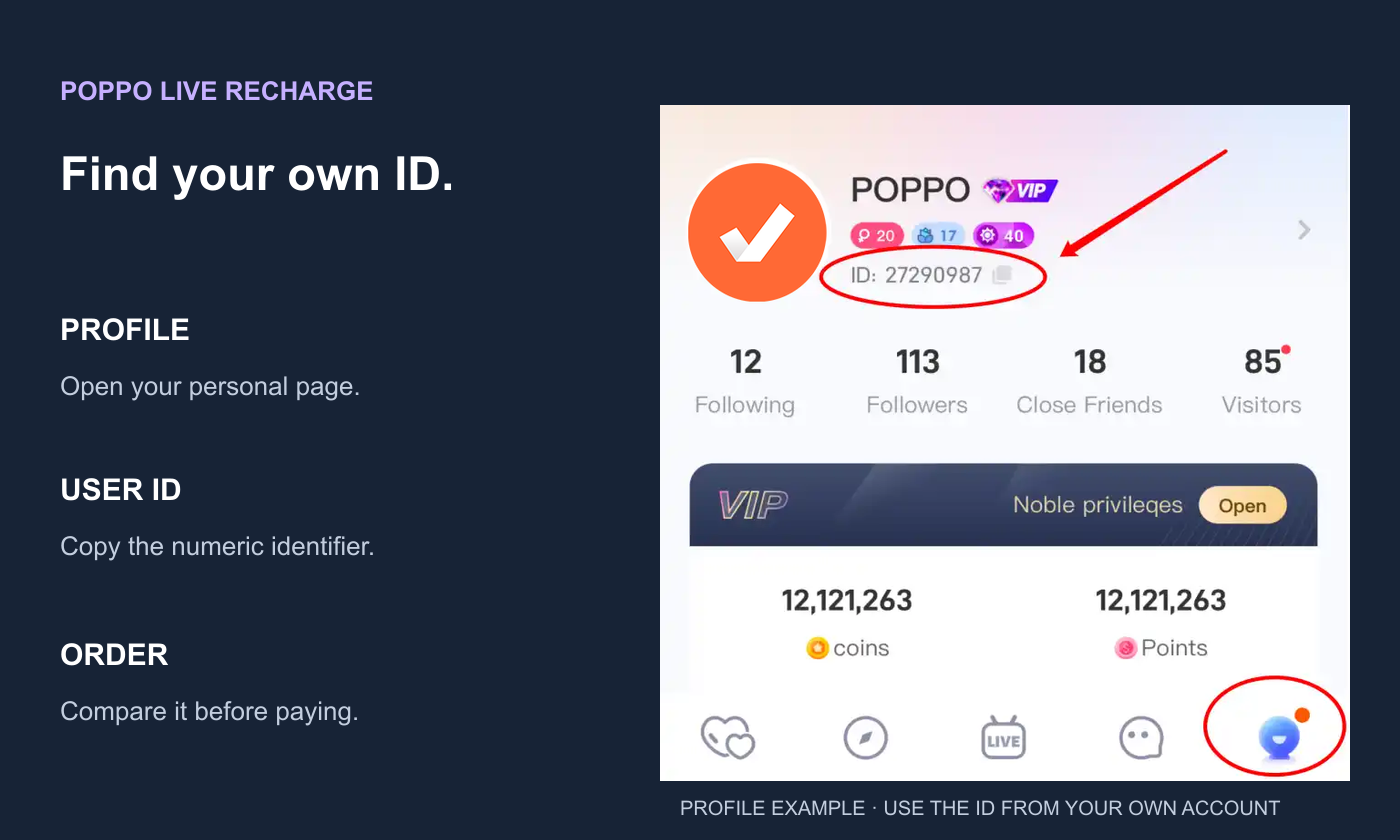
For a gift to a friend, ask them to copy the User ID from their own profile. Sending Coins to their account lets them choose how to spend the balance. Sending a virtual gift to them inside the app is a different action, with its own recipient and item price. Decide which of those two things you mean before placing the order.
How to Buy Coins Through a User ID Top Up
Open the Poppo Live product page and read the supported account or server information.
Select a Coin amount that fits the gifts you intend to send.
Enter the intended recipient’s User ID and compare it with the profile again.
Review the product, credited amount and final payment total before completing checkout.
Keep the order number, then open the recipient account and check its Coin balance.
A User ID top-up does not require the recipient to give you their Poppo password. Keep login credentials and verification codes out of the order notes. If an order does not appear in the balance, first compare the submitted ID and payment status with your receipt, then contact the original seller with the order number.
How Much Should You Recharge for Gifts?
Use the price of the gift as your starting point. For a single item, subtract the Coins you already have from its displayed cost. For several gifts, add the intended quantities first. This produces a useful target balance without assuming that you need the biggest available pack.
When comparing offers, divide the final amount you will pay by the Coins that the order will actually credit. Include any fees shown at checkout, and check whether a bonus belongs to your specific purchase. A large headline bonus is less useful if it requires buying far more Coins than you will use.
There is no universal Coin price for a Poppo gift: different items can have different costs, and the selection can change. Read the live gift panel before you recharge for a particular item. You can also set a personal spending limit for a session and stop once you reach it, even if some balance remains.
Questions Before Your First Recharge
Is buying Coins the same as sending a gift?
No. A recharge funds an account. Sending a gift spends that balance on a chosen item and recipient inside Poppo. Confirm the target profile for each action.
Should I use the cheapest advertised offer?
Compare a compatible product’s final charge and actual credited Coins. Also check the order’s account requirements and the seller’s support process. An incompatible product does not become useful because its headline price is lower.
Can I use a nickname instead of the User ID?
Use the identifier requested by the checkout form. For a Poppo User ID recharge, copy the numeric User ID from the intended profile. Keep the order receipt until you have confirmed the balance.