Mobile Legends Diamonds Top Up: User ID, Zone ID, and Delivery Checks
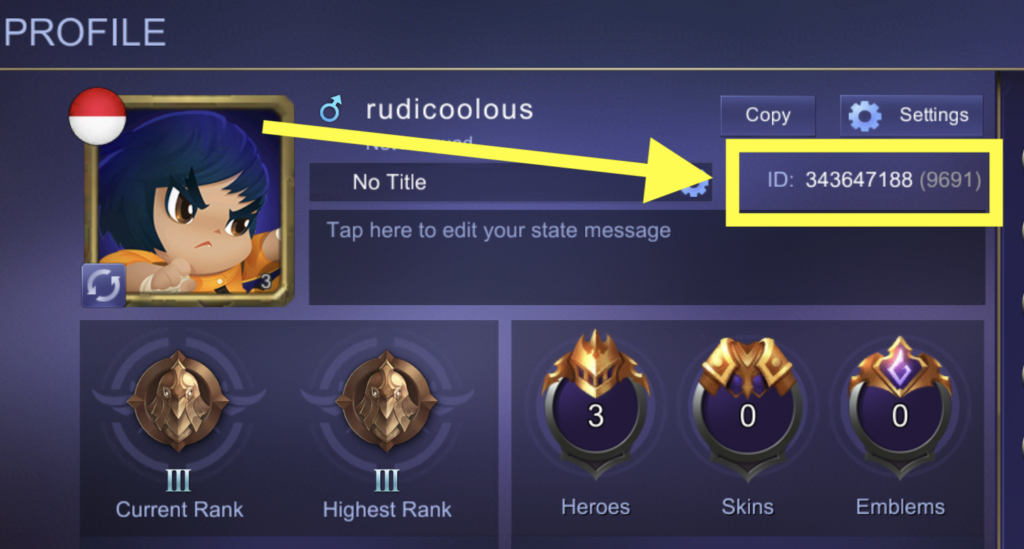
A Mobile Legends: Bang Bang Diamond top-up is tied to two account values, not one: the numeric User ID and the Zone ID shown beside it on the player profile. Entering a correct User ID with the wrong Zone ID can identify the wrong destination or cause validation to fail. The account pair should be copied from the game immediately before checkout, before any package is selected.
Why Mobile Legends Uses Two ID Numbers
The public nickname is not the recharge identifier. Names can be changed, decorated with symbols or shared by different players. The User ID identifies the account, while the Zone ID separates the server location attached to that account. In the profile, the usual presentation places the Zone ID in parentheses after the longer User ID.
Copy both numbers from the account that will receive the Diamonds. Do not copy them from a chat message unless the owner has just reconfirmed them in game. A cropped profile screenshot can help compare the public nickname, avatar and number pair, but no password, social-login credential, verification code or QR login is needed for an ID-based top-up.
The official Google Play listing identifies the current Android game published by MOONTON. This matters because similarly named apps, regional store listings and old screenshots should not be treated as proof that an account belongs to the same client or payment route.
Where to Find User ID and Zone ID
Launch Mobile Legends: Bang Bang and tap the profile portrait from the main lobby. The account number line appears on the profile page. The longer number before the parentheses is the User ID; the shorter number inside the parentheses is the Zone ID. Preserve leading digits and do not include spaces, brackets or the nickname unless the checkout form specifically requests them.
Open the intended account rather than a secondary profile saved on the device.
Enter the profile and use the copy control if one is available.
Separate the two values into the matching checkout fields.
Compare the displayed nickname, if the seller returns one, with the live profile.
If a checkout combines both values into one field, follow the exact format shown on that page. If it supplies two boxes, never paste the complete parenthesized string into the User ID box. The labels on the live form take priority over an old tutorial because merchant interfaces can change.
The Safest Checkout Sequence
Start by confirming the account in game, then choose only a package currently displayed on the checkout page. Paste the User ID first, then the Zone ID. Before payment, compare the last several digits of each value with the open profile; this is faster and more reliable than trusting browser autofill.
Autofill is especially risky for households that recharge several accounts. A browser can remember the previous player's details even after the package changes. Open a fresh product page, clear any prefilled identifier and confirm the recipient again. If an account lookup returns a nickname, treat a mismatch as a stop signal, not a minor spelling issue.
 Mobile Legends: Bang Bang


Package Value, Bonuses, and Account Fit
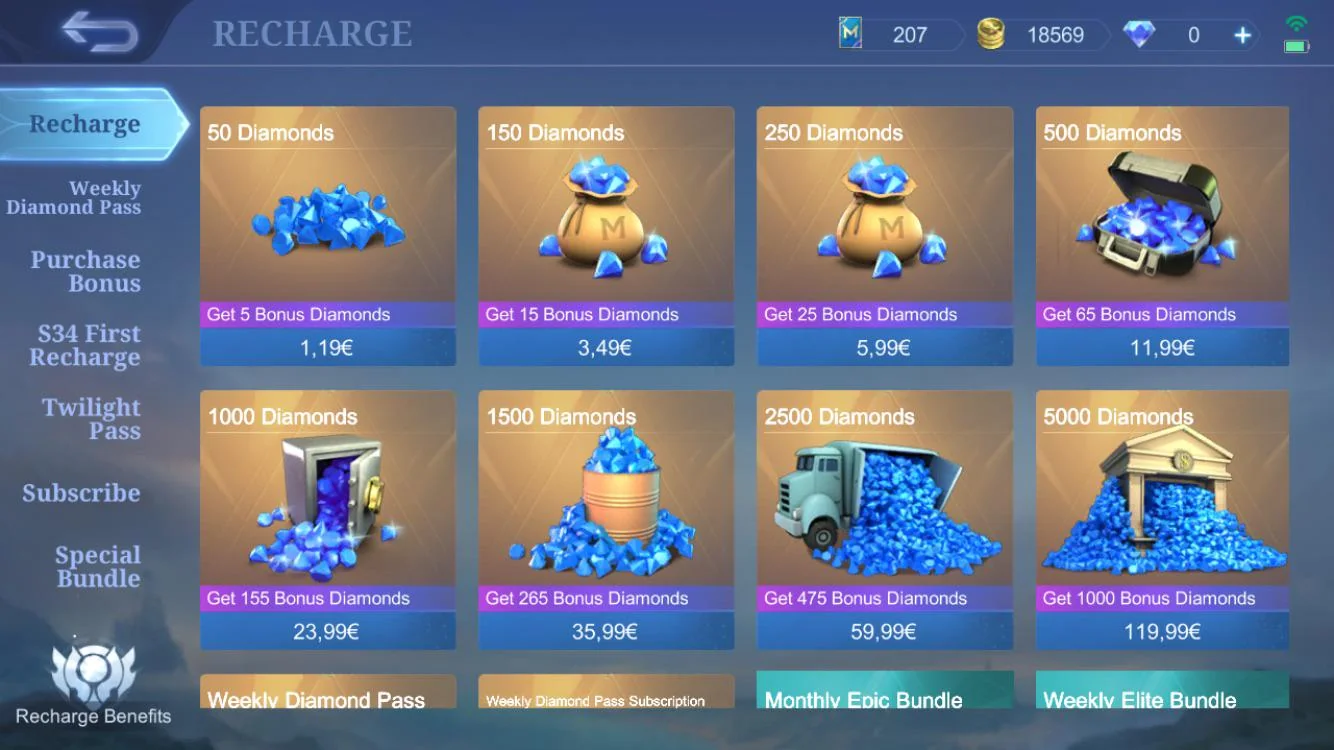
Diamond quantities and promotional extras are live commercial information. A social post, cached search result or old receipt may describe a package that no longer exists. Count only the base amount and bonus visibly attached to the package at checkout. Do not assume a first-purchase bonus, subscription reward or in-game event benefit applies unless the current page and account confirm it.
Check | Correct evidence | What it prevents |
|---|---|---|
User ID | Long number copied from the live profile | Sending value to another account |
Zone ID | Short number shown in parentheses | Server mismatch or failed validation |
Package | Current checkout quantity | Expecting an expired offer |
Recipient | Returned nickname matches the player | Paying despite an account mismatch |
Receipt | Order number and payment record | Missing support evidence |
Choose the package according to the intended in-game purchase, then leave a small buffer only when the exact store price is already visible in the account. Diamonds can be used across multiple store systems, but a recharge does not guarantee a random draw result, event reward or limited skin. Keep the value of the currency separate from the probability attached to any gacha-style feature.
If the Diamonds Do Not Appear
First return to the lobby and refresh the balance, or restart the game. Next, inspect the order status: pending, failed and completed describe different problems. Compare the submitted User ID and Zone ID with the current profile before placing another order. A duplicate purchase can create a second successful charge while the first one is still processing.
Prepare the order number, payment receipt, selected package, both submitted IDs and a current balance screenshot. Contact the seller through the support route shown in the order record. For account-level issues, use the in-game Customer Service entry or MOONTON's official channels. Never send a password or one-time verification code to prove ownership of an ID-based delivery order.
If either number was entered incorrectly, report it immediately. However, currency already delivered to another valid account may not be reversible. This is why the nickname response, when available, and the final confirmation screen are the most important checks in the entire process.
Frequently Asked Questions
Is the Zone ID the number in parentheses?
Yes. On the normal profile display, the shorter number in parentheses after the User ID is the Zone ID. Copy it into the separate Zone ID field when checkout requests both values.
Can I recharge with only a Mobile Legends nickname?
No. A nickname is not a reliable unique payment identifier. Use the numeric User ID and Zone ID from the live profile.
Does a Diamond top-up require my account password?
An ordinary ID-based delivery should not require the game password, linked social-login password or one-time code.
Where can I compare current Mobile Legends Diamond packages?
After verifying the account pair, use the recharge product module above to open the current package list. Use only the quantity and any bonus shown at checkout.