Marvel Rivals Summer Festival Vol. 2 Skins Arrive August 13
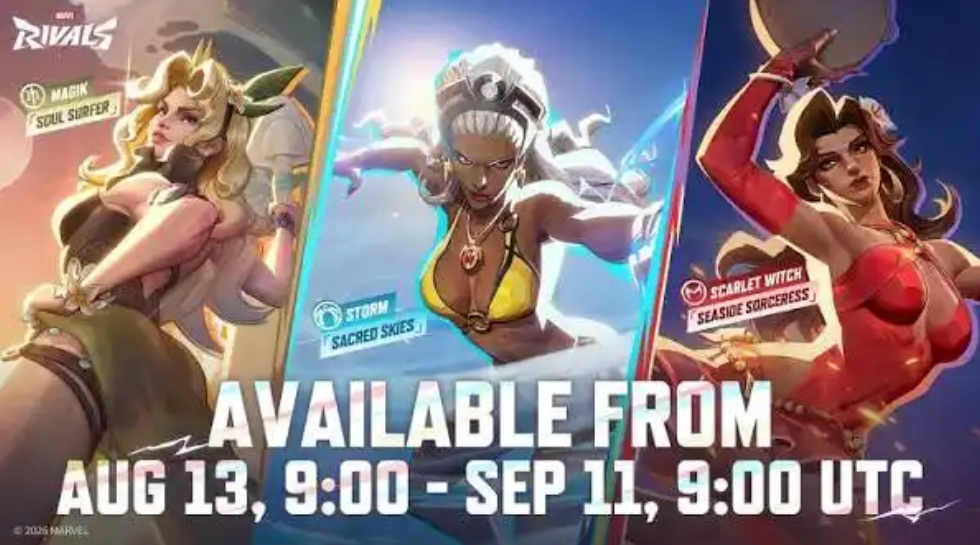
Marvel Rivals has confirmed that Summer Festival Vol. 2 begins August 13, 2026, with six new summer costumes for Star-Lord, Winter Soldier, Scarlet Witch, Black Cat, Storm, and Magik. This guide organizes the confirmed roster, explains how to compare the live costume pages, and provides a disciplined way to review pricing, bundles, previews, and purchase priorities without inventing costs or sale rules before the store refresh.
Marvel Rivals is opening Summer Festival Vol. 2 on August 13, 2026, with six summer costumes announced for Star-Lord, Winter Soldier, Scarlet Witch, Black Cat, Storm, and Magik. Players who decide to recharge Lattice for an eligible costume after checking the live store can use Topuplist and the dedicated Marvel Rivals top-up page, while the smart first move is to compare each complete bundle rather than judging only the reveal artwork.
The event date and six-character lineup are confirmed. Exact regional prices, bundle contents, individual release timing, discount rules, and availability periods should be read from the refreshed store and official notices. This article does not fill those missing fields with older summer-event data.
The Six Confirmed Summer Costumes
Summer Festival Vol. 2 covers heroes from multiple roles and play styles. The announced lineup is Star-Lord, Winter Soldier, Scarlet Witch, Black Cat, Storm, and Magik.
Hero | Practical buying question |
|---|---|
Star-Lord | Do you regularly use him enough to value a full cosmetic presentation? |
Winter Soldier | Does the costume's model and effect package suit your preferred loadout? |
Scarlet Witch | Are the live spell effects distinct enough from cosmetics you already own? |
Black Cat | Do the model, animations, and profile extras justify the bundle? |
Storm | Can the effects remain clear during busy aerial team fights? |
Magik | Do sword, portal, and transformation visuals match the preview quality? |
These questions are intentionally practical. A costume's value depends on how often the hero is played and what the live bundle contains, not merely on popularity in promotional material.
Confirm the Store Refresh Time
The event begins August 13, but the visible store time can depend on the game's update schedule and regional platform refresh. Install the required update, restart the client, and check the official event notice before assuming a missing costume is delayed.
Some live-service stores rotate products in waves. Do not assume that all six costumes must become purchasable at the same minute unless the official store page says so. The confirmed lineup tells players what belongs to the event; the live listings determine when and how each item can be bought.
Use the countdown on each listing as the final availability reference. A general event date is not a substitute for an individual product timer.
Compare the Complete Cosmetic Package
Marvel Rivals costume bundles can be more than a character model. The live store may show related MVP animations, emotes, nameplates, sprays, or other cosmetic components. Inspect the actual listing and do not infer included items from a trailer scene.
Preview every available angle. A close-up promotional shot may hide the back of a costume, weapon design, cape behavior, or visual effects that dominate normal gameplay. For heroes with movement or transformation states, watch the full preview rather than only the standing model.
Also compare the bundle with any individual purchase option shown in the store. The correct choice depends on which components the player wants. A bundle is not automatically better value if most of its extras will never be equipped.
Role-Based Preview Tests
Each hero presents a different cosmetic viewing problem. Testing by role helps players notice details that a static gallery misses.
Star-Lord
Star-Lord moves quickly and spends much of a fight tracking targets while firing. Review weapon effects, reload presentation, movement readability, and the costume silhouette at normal camera distance. A detailed model can look excellent in the hero screen but become less visible during actual play.
Winter Soldier
Winter Soldier's presentation centers on weapon use and his mechanical arm. Check whether the cosmetic changes the parts that remain visible during regular combat. Preview the MVP animation separately from the playable model so the cinematic presentation does not determine the entire purchase decision.
Scarlet Witch
Scarlet Witch generates prominent magical effects. Compare color, clarity, and sound with any costume already owned. Effects should feel distinctive without making it harder for the player to read combat.
Black Cat
Black Cat's costume can be judged through character model, motion, and any unique cosmetic animation listed in the bundle. Confirm the exact live contents rather than assuming every scene in an event video is included with the costume.
Storm
Storm often operates above or behind the main fight. View the costume at gameplay distance and inspect ability effects during a busy scene. Strong close-up art is only one part of a costume that will usually be seen from farther away.
Magik
Magik's sword, portals, and alternate visual states make complete previewing important. Check all states provided by the official preview tool. Do not assume a transformation has a new model unless the live preview displays it.
Use a Three-Level Priority System
Instead of trying to rank all six costumes universally, place each one into a personal priority level.
The first level is “main hero.” These are heroes used regularly in competitive or casual play. A cosmetic for a main receives the most screen time and is easier to justify.
The second level is “frequent alternative.” These heroes appear when the team composition, map, or matchup requires them. Their costumes can be worthwhile, but they should be compared against upcoming content for the main hero.
The third level is “collection only.” These are heroes rarely played. A purchase here depends almost entirely on art and collection interest. It should not displace a higher-priority item unless the player deliberately collects that character.
This system prevents a reveal trailer from turning six separate choices into one oversized purchase plan.
Check Existing Ownership Before Recharging
Open each hero's cosmetic collection and note which costumes, MVP animations, emotes, and nameplates are already owned. A new summer costume may overlap strongly with an existing bright, casual, or seasonal design.
Compare actual usage. If an older costume has not been equipped for months, buying another for the same hero may not solve a real preference. Conversely, a frequently used hero with only a default appearance may provide better long-term value.
Also check the current Lattice balance and any platform wallet balance. The useful amount to recharge is the difference between the confirmed live price and currency already available, not a guessed total from an unofficial price post.
Avoid Price Assumptions Before Launch
The public reveal confirms costumes and timing, not every commercial detail. Do not publish or rely on a price until it appears in an official store or notice for the relevant region.
Regional taxes, platform rules, currency packages, and bundle structures can affect the final cost. A price from another country may not match the amount shown on the player's platform.
If the store offers a discount, read whether it is automatic, time-limited, bundle-only, or conditional on ownership. Do not describe a crossed-out number as a universal discount without checking the accompanying text.
Players who decide to purchase an eligible costume can verify the account platform and required currency before using Topuplist and the Marvel Rivals top-up page. Confirm the player information and order amount before completing the recharge.
Cosmetic Clarity and Competitive Play
Costumes do not alter a hero's official combat statistics, but visual and audio preferences can still affect comfort. Test a new costume in the practice range or a low-pressure mode before an important ranked session if the game permits it.
Pay attention to personal readability. A more elaborate effect may be attractive but unfamiliar. The player should still recognize attack timing, movement states, and ability feedback.
Do not claim that a costume provides a competitive advantage unless an official statement explicitly establishes one. If the community reports a visual issue, wait for documented evidence and an official response rather than presenting the report as a confirmed property.
A Clean Purchase Order
A disciplined order for Summer Festival Vol. 2 is:
Confirm which of the six heroes you actually play.
Preview the complete costume and every included component.
Read the live price, availability timer, and bundle conditions.
Compare current Lattice with the required amount.
Buy only the highest-priority item first.
Use the costume in play before considering another purchase.
This is not a thirty-item checklist designed to prolong the article. It is the shortest sequence that prevents the most common mistakes: buying for an unused hero, misunderstanding a bundle, or recharging the wrong amount.
Review the Costumes in Real Matches
After buying one costume, use it in the Practice Range and at least one ordinary match before considering another. Check whether the weapon model blocks information, whether ability colors remain comfortable, and whether the MVP presentation is something you will actually equip.
This short pause also tests purchase satisfaction. Reveal-day excitement can make every item feel urgent, but the event timer usually provides enough time to evaluate the first choice. Use the live countdown rather than assuming that all six products disappear immediately.
If a listed component is not visible after purchase, check the hero's customization categories and the bundle receipt. Some extras require manual equipping. Follow the official support process if the store confirms ownership but the item remains unavailable.
Final Recommendation
Summer Festival Vol. 2 has a clear confirmed attraction: six newly announced summer costumes arrive for Star-Lord, Winter Soldier, Scarlet Witch, Black Cat, Storm, and Magik beginning August 13. The choice among them should remain personal and evidence-based.
Wait for the live store, inspect complete previews, and prioritize heroes you actually use. Do not borrow prices from an older event or assume every trailer element belongs to a bundle. One carefully chosen costume will usually deliver more value than several purchases made before reviewing the store details.
FAQ
When does Marvel Rivals Summer Festival Vol. 2 begin?
The event is scheduled to begin August 13, 2026. Check the client update and regional store refresh for the exact local availability time.
Which heroes receive the confirmed summer costumes?
The announced lineup is Star-Lord, Winter Soldier, Scarlet Witch, Black Cat, Storm, and Magik.
Are the costume prices confirmed in the announcement?
The event reveal does not provide every regional store price and bundle condition. Use the live store for the relevant platform and region.
Do the costumes improve hero statistics?
Cosmetics do not change official hero statistics. Evaluate them through model, effects, animation, sound, and personal use.
Where can I recharge Lattice for Marvel Rivals?
After checking the live store and required amount, players can use Topuplist and the dedicated Marvel Rivals top-up page. Verify platform and account information first.