


Magic Chess: Go Go User ID & Zone ID Guide for Safe Top Up
Your Magic Chess: Go Go Diamonds are delivered to a User ID + Zone ID pair. Here is how to find, read, and verify that pair before every top-up.
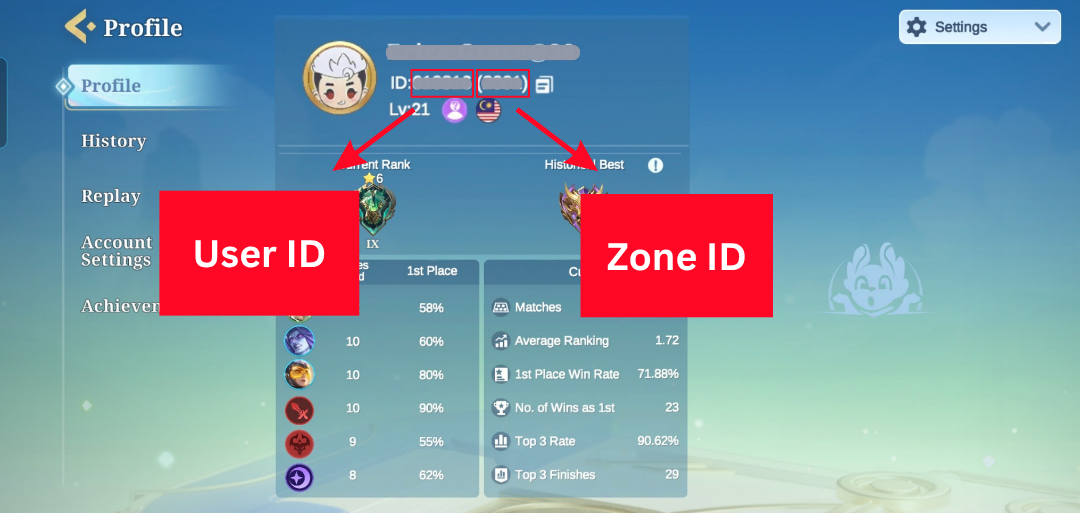
If you have ever stared at a top-up form wondering which numbers to type, you are not alone. In Magic Chess: Go Go (MCGG), every Diamond purchase is delivered to a specific User ID and Zone ID pair, not to your email or your login name. Get that pair right and the Diamonds land in your wallet. Get one digit wrong and the money is spent while the Diamonds are sent somewhere you cannot reach. This guide shows you exactly what the two numbers are, where to read them inside the game, and the routine that keeps every top-up safe.
Before you top up anywhere, a verified channel that asks for your ID pair and shows the matched account first removes most of this risk. A Magic Chess: Go Go top-up at Topuplist through the official Topuplist storefront is built around pasting your User ID and Zone ID and confirming the account before payment.
Before we go further, one habit beats every other tip on this page: always copy your ID pair from inside the game right before you pay, and paste it instead of typing it. The rest of this guide explains why that single habit matters and how to do it correctly.
What Are User ID and Zone ID in Magic Chess: Go Go
Magic Chess: Go Go identifies each player account with two numbers that work as a team.
User ID is the unique number for your account. Think of it as your permanent account number.
Zone ID is the number for the server or region your account lives on. The same User ID can exist on different Zones, which is why both are required.
Because Magic Chess: Go Go runs on a Moonton/MLBB-style account framework, the Zone is not cosmetic — it tells the delivery system which server cluster holds your data. Two players in different regions can share the same User ID digits on different Zones, so the Zone is what makes the pair unique. That is also why a top-up form will not accept "just the User ID": without the Zone, the system cannot tell which of several identical accounts should receive the Diamonds.
Together they are written in the format User ID(Zone ID) — for example, 12345678(1234). When you buy Diamonds, the top-up system reads that pair and credits the matching account. The official Magic Chess: Go Go website points players to the in-game Basic Info screen as the place to read these numbers, which is the same place every top-up form expects you to copy from.
A common point of confusion: your Diamonds are bound to your account and work across devices, but they are delivered by ID pair. Logging in as "you" does not automatically prove the top-up went to "your" ID if the numbers on the form were typed wrong. The delivery is decided by the pair you submit, not by who is holding the phone.
How to Find Your User ID and Zone ID
The pair is shown inside the game, and that is the only source you should trust.
Open Magic Chess: Go Go on your device.
Tap your avatar (profile picture) in the top corner.
Open Basic Info (sometimes labeled Account or Profile details).
Your User ID and Zone ID appear together, usually as 12345678(1234).
That screen is your source of truth. When you are about to top up, open it, copy the full pair, and move to the top-up form. Do not rely on a screenshot from last month or a number you memorized — Zone details and account pairings are easy to misremember, especially if you own more than one account.
If you play multiple characters or multiple Zones, pause and confirm you are reading the pair for the character you actually want the Diamonds on right now. Players who switch between accounts are the ones most likely to copy the wrong pair and wonder why the Diamonds "never arrived." The fix is trivial: read the pair from the active account before each purchase.
Why trust the in-game screen over anything else? Because it is the same source the top-up system reconciles against. A note you typed in a notes app, a cropped screenshot from months ago, or a number a friend read to you can all drift by a single digit. The Basic Info screen is live and authoritative, which is exactly why every safe top-up starts there.
Most top-up forms also show a preview of the detected account name after you paste the ID pair. Use that preview as a second check — if the name shown is not your commander, stop and re-copy.
Why the ID Pair Is the Whole Point of a Safe Top Up
Here is the part that surprises players: a wrong ID pair is not a delay, it is a mis-delivery.
When the numbers are correct, Diamonds are credited almost instantly. When one digit is off, the purchase still succeeds — the system happily sends the Diamonds to the account that owns that (wrong) pair. From your side it looks like the money vanished. From the system's side, it did exactly what you asked. That is why "I paid but got nothing" is so often an ID problem rather than a missing-delivery problem.
This is different from a temporary delay. A delayed delivery usually resolves on its own within minutes and the Diamonds show up in your own wallet. A wrong-ID delivery does not roll back by itself, because the Diamonds are now sitting in a valid, different account. The practical takeaway is simple: the few seconds you spend verifying the pair before paying is the cheapest insurance you can buy.
Players sometimes assume support can simply "move" the Diamonds to the right account after a mistake. In practice, once Diamonds are credited to a valid pair, the system treats the delivery as complete, and shifting them means involving the receiving account or a manual investigation that is not guaranteed to succeed. The moment to prevent the loss is the ten seconds before you pay — not the support ticket afterward.
If you already suspect a mis-delivery, our separate guide on missing Diamonds after payment in Magic Chess: Go Go walks through what to check next. The prevention, however, starts here — with the pair.
Whenever you are ready to buy, prefer a channel that surfaces the detected account name from your ID pair before you commit. A Magic Chess: Go Go top-up at Topuplist via the official Topuplist storefront does exactly that, so a typo shows up as a name mismatch instead of a lost purchase.
Common User ID / Zone ID Mistakes That Cause Lost Diamonds
Most "lost Diamond" cases trace back to one of a handful of ID errors. Knowing them helps you spot your own mistake fast. Notice that almost all of them come from handling the numbers manually instead of copying them — which is the thread this whole guide pulls on.
Mistake | What goes wrong | Result |
Typing the pair by hand | A missed, extra, or transposed digit, or a broken bracket format | Diamonds sent to a different account |
Mixed accounts | Logged in as account A but pasted account B's ID | Delivery goes to B, not you |
Stale Zone ID | Zone changed after a merge or region move; old number used | Diamonds land on the old Zone |
Copy-paste noise | Extra spaces, line breaks, or surrounding text included | Form reads a malformed ID |
Using a name instead of the number | Commander name or nickname typed in the ID field | No valid match; purchase fails or misroutes |
Trusting memory | Recalled the wrong pair from another account | Delivery to the remembered (wrong) account |
None of these are mysterious, and all of them are avoidable by copying from Basic Info and pasting into the form. The single highest-risk habit is typing the numbers from memory on a second account you rarely use — that is exactly when a digit drifts.
How to Verify Your ID Before Every Top Up
Turn the habit into a four-step routine you run every time, even if you have done it a hundred times. It feels slow the first time and takes under thirty seconds by the tenth. The cost of skipping it, by contrast, is a purchase you cannot undo — so the routine pays for itself on the very first save.
Step 1 — Open Basic Info and copy the current pair. Go to avatar → Basic Info and copy the full User ID(Zone ID) for the account you are playing right now.
Step 2 — Paste and compare digit by digit. Paste the pair into the top-up form, then read it back against the game screen. Confirm every digit of the User ID and every digit of the Zone ID match. Do not glance — read it.
Step 3 — Confirm the Zone matches the character you play. If you switched accounts or Zones recently, this is the step that catches the error. The name preview on the form should match your commander.
Step 4 — Glance at the order preview before tapping Buy. Most forms show the detected account name and the package. One last look costs two seconds and prevents a wasted purchase.
The rule to live by: paste, do not type; check live, do not trust memory. A top-up is irreversible once delivered to the wrong pair, so the verification is not optional — it is the whole job.
Safe Top Up Checklist + Where to Top Up
Run this checklist before you pay, and you will almost never hit an ID problem:
Step | Action | Done? |
1 | Open Basic Info in-game and copy the pair | ☐ |
2 | Paste into the form; match every digit | ☐ |
3 | Confirm Zone matches the character you play | ☐ |
4 | Check the account-name preview on the form | ☐ |
5 | Keep the payment screenshot until Diamonds arrive | ☐ |
When you are ready to buy, use a channel that asks for your ID pair up front and shows the detected account before you confirm. A Magic Chess: Go Go top-up at Topuplist through the official Topuplist storefront lets you paste your User ID and Zone ID and see the matched account before payment, which removes the hand-typing risk that causes most lost-Diamond cases.
Stick to a verified, account-bound channel rather than unofficial resellers promising a discount. A too-cheap offer is a red flag, and with ID-based delivery there is no buyer protection if the Diamonds go to the wrong place. The official Magic Chess: Go Go site remains the reference for your account details, and any top-up you choose should map clearly to the same ID pair you see there.
FAQ
1. Is my User ID the same as my account ID or login email?
No. Your User ID is the numeric account number shown in Basic Info, formatted as User ID(Zone ID). Your login email, Moonton/MLBB account, or social login is how you sign in; the User ID is what a top-up system uses to deliver Diamonds. Always copy the numeric pair, not your email.
2. Can I change my Zone ID?
Your Zone is tied to the server your account was created on, and it is not something you normally edit on a top-up form. If you believe your Zone changed after a merge or region move, read the pair fresh from Basic Info before each purchase rather than reusing an old number.
3. What if I already sent Diamonds to the wrong ID — can I get them back?
Because delivery is addressed to the pair you submitted, a wrong-ID purchase is treated as delivered. Recoveries are not guaranteed and depend on the channel and support. Your fastest move is to gather the payment receipt and the correct ID pair and contact the channel you used; prevention via the verification routine above is far more reliable than recovery. Do not try to "fix" it by buying the package again on the correct ID and hoping the first one refunds — that usually creates a second charge while the first one stays delivered elsewhere.
4. Where exactly do I find my User ID and Zone ID in the game?
Tap your avatar, open Basic Info, and read the pair shown as User ID(Zone ID). That screen is the only source you should copy from when filling a top-up form.
5. Do I need the Zone ID if I only play on one server?
Yes. Top-up systems key on the full pair, and omitting or guessing the Zone is a common cause of mis-delivery even for single-server players. Always include both numbers exactly as shown in Basic Info.
6. Is it safe to share my User ID and Zone ID with a top-up site?
The ID pair is required for any legitimate Diamond delivery, so sharing it with a verified, account-bound top-up channel is normal and expected. What you should avoid is unofficial resellers with no clear delivery confirmation, since an ID-based purchase has no fallback if it goes to the wrong place. Use a channel that shows the matched account before you pay.
