


How to Unlock Cooking in Love and Deepspace Home
Love and Deepspace Version 6.0 expands Home with a kitchen, cooking, spice planting, handicrafts, weather settings, and photo features. Home becomes available after completing Main Story stage 03-08, while Cooking unlocks after Renovation Guide V. This guide explains the progression route, how to avoid wasting Home Vitality, what to do when a recipe remains locked, and how to use cooking as a relationship and collection feature rather than treating it as a combat requirement.
Cooking is one of the most visible additions to the expanded Home system in Love and Deepspace Version 6.0, but it does not unlock immediately when a new account enters the game. Players with separate Crystal purchase plans can review Topuplist and the dedicated Love and Deepspace top-up page, while the Home route itself is driven by story and renovation progress. Complete Main Story stage 03-08 to unlock Home, then advance the Home Renovation Guide through stage V to open Cooking.
The Version 6.0 Home update also adds ingredient collection, spice planting, handicrafts, room design, weather adjustment, outfit and hair customization, and expanded photo options. Cooking belongs to this wider daily relationship space; it is not a replacement for combat progression or Memory building.
The Direct Unlock Route
First, progress through the Main Story until stage 03-08 is completed. Return to the main menu and follow the Home introduction prompt.
Enter Home and complete each Renovation Guide objective in order. The guide teaches room interaction, furnishing, resource collection, and partner activities.
Finish Renovation Guide V. Cooking and the kitchen interaction should then become available, subject to the live Version 6.0 interface.
If the kitchen remains locked, claim the stage reward, leave and re-enter Home, and check for an unfinished tutorial prompt. Reaching the numerical stage without claiming its final task can leave the feature unavailable.
Why Main Story 03-08 Is Required
Home is connected to the player's relationship and story progression. The early Main Story requirement ensures that core characters, interfaces, and basic account systems have been introduced.
A player who has reached chapter 3 but not completed stage 03-08 has not met the exact requirement. Read the stage number on the story map rather than relying on chapter completion memory.
Side stories, event stories, and Memory dates do not replace the Main Story requirement. They may provide relationship content, but the Home unlock checks the specified main stage.
If the stage is cleared and Home does not appear, finish any result screen, claim story rewards, return to the main lobby, and restart once before contacting support.
Renovation Guide V Is a Progression Gate
The Renovation Guide is more than decoration advice. It acts as a structured tutorial that unlocks Home functions in a controlled order.
Each stage can contain several objectives. One incomplete furniture placement, interaction, claim, or resource task can prevent the next stage from opening.
Tap every task line and use its direct navigation when available. It will identify the correct room or interface. Do not buy random furniture hoping that it satisfies a specific requirement.
After completing all tasks in a stage, claim the stage reward. Some games display full progress but do not advance until the reward button is pressed.
What Cooking Adds
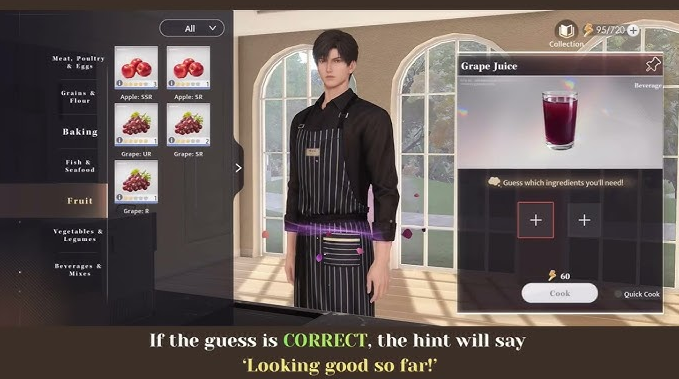
Cooking lets the player prepare dishes inside Home using ingredients and recipes. The feature supports partner interaction, collection, visual presentation, and daily routine.
Recipes can require base ingredients, planted spices, progress, or discovery. The live recipe book shows what is owned, missing, locked, or ready.
A completed dish may trigger dialogue, preference reactions, Home progress, collection records, or related rewards. Do not promise a specific affection gain for every dish without checking its description.
Cooking animations and partner behavior are part of the appeal. Players who care about character moments may value a recipe even when its material reward is small.
Ingredients and Spice Planting
Version 6.0 introduces ingredient-related Home activities, including growing spices. Planting has a time component, so choose crops based on recipes planned next rather than filling every plot randomly.
Read growth time and harvest quantity. A long crop can block a plot needed for a short tutorial recipe.
Keep a small reserve of common ingredients. Spending every item on one dish can delay Renovation Guide tasks that ask for a different recipe.
Harvest before the storage or event deadline when one exists. Normal Home crops may be permanent, while limited event ingredients can follow another schedule.
Home resource | Best early use | Common mistake |
|---|---|---|
Common ingredients | Required tutorial and guide recipes | Spending all on repeated favorite food |
Spice plots | Missing recipe components | Planting only long-duration crops |
Home Vitality | Progression tasks and meaningful interactions | Emptying it before checking the guide |
Furniture currency | Required room functions first | Buying decoration before unlock objectives |
Recipe rewards | Claim immediately after discovery | Leaving a completed recipe unregistered |
Home Vitality Management
If Cooking or other Home activities consume a daily or regenerating Home resource, check the exact cost before beginning. Use the resource first on tasks that unlock permanent features.
Do not spend the entire balance on repeated low-priority interactions when Renovation Guide tasks remain. A locked guide can delay cooking more than one missed casual interaction.
Regeneration should be read from the live interface. Do not assume it refills at daily reset; some systems recover over time or use a separate cap.
When the balance is low, wait for recovery unless a limited reward justifies an item. Home is designed as long-term content, not a one-day completion race.
How to Read the Recipe Book
Separate three states: undiscovered, discovered but locked, and ready to cook. An undiscovered recipe may require experimentation, a guide reward, a partner event, or a later update.
A locked recipe should display its condition. It can require Home level, Renovation Guide progress, ingredient discovery, or another activity.
A ready recipe has every required ingredient. Select it and confirm the quantity. Repeated cooking can consume more than expected when a batch option is active.
After the animation, claim or register the dish if the interface offers a separate button. Check the recipe collection to verify completion.
Partner Preferences
Different companions can react differently to dishes, flavors, and presentation. Preference dialogue is part of Home characterization.
Do not convert one reaction into a universal “best dish.” A favorite for one partner can be neutral for another, and Version 6.0 can add new dialogue later.
Record preference through the game's collection or notes when available. There is no need for a large external spreadsheet; keep only recipes relevant to the current companion.
If a dish triggers no special scene, it may still count for recipe completion or a Renovation Guide task. Dialogue value and progression value are separate.
Handicrafts and Cooking Compete for Time
Home includes handicraft activities alongside cooking. Both can use attention, energy, ingredients, or scheduled slots depending on the live rules.
Prioritize permanent unlocks. If one handicraft task opens another room function, complete it before repeatedly cooking collection dishes.
A player focused on photography and decoration may prefer handicrafts, while a player focused on companion interactions may prefer cooking. The system supports different goals.
Do not describe one Home activity as mandatory for every player unless it blocks a formal guide stage.
Weather, Outfits, and Photos
Version 6.0 adds more control over Home weather and visual scenes. These settings can improve cooking screenshots without changing the recipe result.
Choose lighting that keeps the dish and companion visible. Bright windows can overexpose food, while dark weather can hide small ingredients.
Outfit and hairstyle customization can support a themed meal or seasonal scene. The customization is visual and should not be confused with a recipe bonus.
Use the expanded camera functions after the cooking animation when the game allows. Save favorite images before leaving the scene if they are not automatically stored.
Efficient First-Day Home Route
Enter Home after Main Story 03-08 and follow only the Renovation Guide. Place required furniture, complete guided interactions, collect rewards, and avoid optional shopping until stage V is complete.
Once Cooking opens, prepare the required tutorial recipe first. This confirms the kitchen works and teaches ingredient selection.
Then plant the spice needed for the next known recipe. Use remaining Home resources on one partner interaction or permanent unlock.
Stop when the system becomes time-gated. Waiting for a crop or Vitality is normal and does not indicate failed progression.
New Player Priorities
New players should not rush Main Story only for Cooking while ignoring combat basics. Stage 03-08 requires enough account progress to clear normally.
Build one functional combat team, level Memories and equipment as needed, and read the story. Home will remain available after unlock.
Free Home content provides plenty to explore. Do not buy furniture or cosmetics before learning which resources are permanent, premium, or event-limited.
Cooking is a relationship and collection feature. Missing one daily interaction does not ruin the account.
Returning Player Priorities
Returning players who already cleared 03-08 should look for the Home introduction and Version 6.0 guide. Old accounts can still need to complete the new Renovation stages.
Claim update mail and inspect newly added currency before spending. The Home update can provide free materials or tutorial furniture.
Do not assume furniture owned before Version 6.0 automatically completes the guide. Place or interact with the exact required item when the task asks.
Review partner outfits and photo settings after Cooking unlocks. The expanded system may include options not present when the account was last active.
When Cooking Does Not Unlock
Confirm Main Story 03-08 is complete, Home introduction is finished, every Renovation Guide stage through V is complete, and all stage rewards are claimed.
Tap the locked kitchen and read its prompt. It may point to one remaining objective.
Leave Home, return to the lobby, and re-enter. Restart the game once if the interface has not refreshed.
If the lock remains, capture the player identifier, server, story completion, guide stage, claimed rewards, and kitchen prompt. Contact official support rather than spending premium currency.
When a Recipe Does Not Register
Check whether the cooking animation completed and whether a final confirm or claim button remained. Verify the recipe quantity and ingredient deduction.
Open the recipe book and look for a discovery marker. Some dishes register only after the result screen.
If the dish was cooked with a companion, confirm the correct companion and mode. A practice or preview interaction may not count as normal cooking.
Restart once and check the collection. Save screenshots before reporting the issue.
Common Home Mistakes
The first mistake is stopping at chapter 3 without clearing 03-08. The second is completing Renovation Guide V tasks but forgetting the stage claim.
The third is spending all ingredients before the tutorial recipe. The fourth is emptying Home Vitality on optional interactions. The fifth is assuming every partner has the same favorite dish.
Another mistake is treating Cooking as paid content. The core unlock comes from story and renovation progress, while optional cosmetics and currency are separate.
Final Recommendation
To unlock Cooking in Love and Deepspace Home, clear Main Story stage 03-08, enter Home, and complete every Renovation Guide objective through stage V. Claim each guide reward and re-enter Home if the kitchen does not refresh immediately.
Use early ingredients and Home Vitality on permanent unlocks and tutorial recipes, then explore partner preferences, spice planting, handicrafts, weather, and photos at a sustainable pace. Cooking is long-term relationship content, not a combat requirement or a one-day race.
FAQ
When does Home unlock in Love and Deepspace?
Home unlocks after completing Main Story stage 03-08 and following the introduction prompt.
When does Cooking unlock?
Cooking becomes available after completing and claiming Renovation Guide V.
Do I need to pay to unlock Cooking?
The core feature is unlocked through story and Home progression. Optional purchases are separate.
Why is the kitchen still locked after stage V?
Check every task, claim the stage reward, leave and re-enter Home, and read the kitchen prompt for an unfinished tutorial.
Where can I prepare Crystals for unrelated Love and Deepspace plans?
Players with a separate budget can review the Topuplist official site and the Love and Deepspace top-up page. Verify the player ID, server, product, and delivered currency first.
Do all companions like the same dishes?
No. Reactions and preferences can differ. Use the live dialogue and recipe records.
Should I spend all Home Vitality every day?
Use it efficiently, but permanent unlocks and current guide tasks matter more than forcing every optional interaction.
