


Free Fire Brazil Instinto do Goleador Login Guide: How to Get the Nagi Theme, Isagi Avatar, and Free Rewards
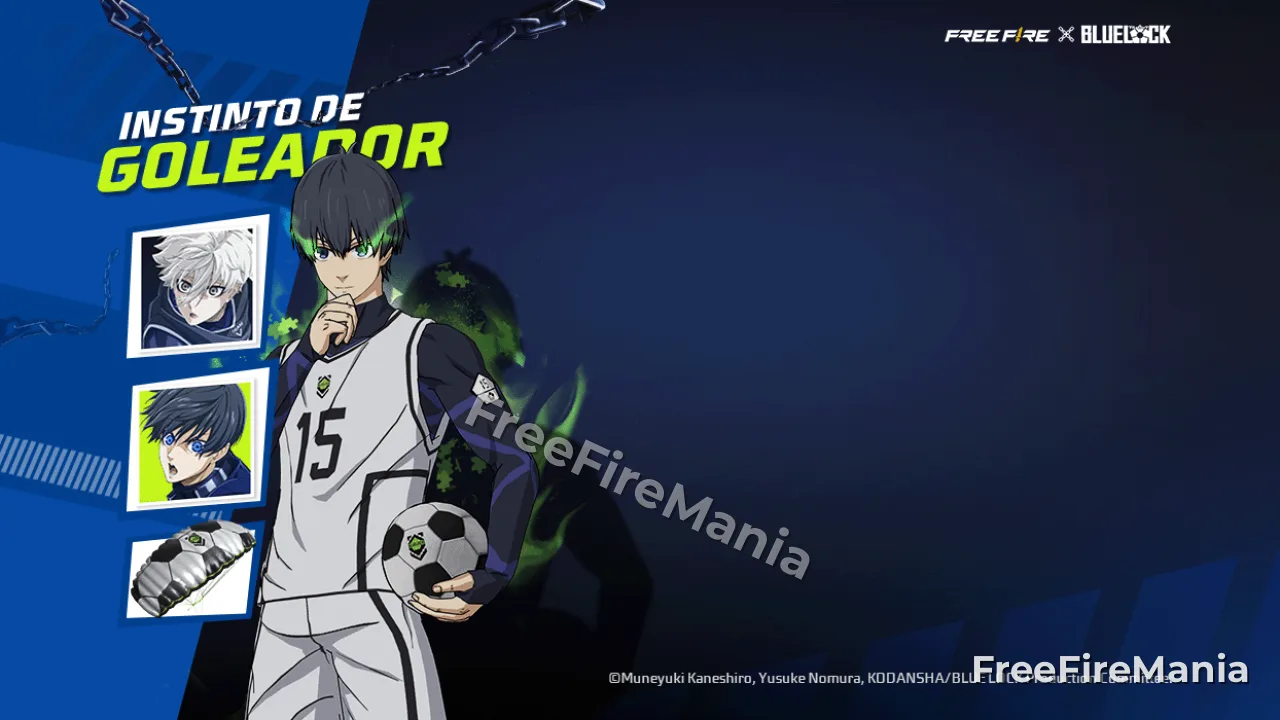
Instinto do Goleador is a BLUE LOCK login mission currently running on the Free Fire Brazil server. The reward track includes a Nagi-themed item, an Isagi avatar, and other free rewards, and players should complete the live requirements before August 3, 2026. This guide turns the event into a daily claim routine, explains how to verify the Brazil-only schedule and exact reward track, prevents missed-claim mistakes, distinguishes login from manual collection, and provides recovery steps for delayed or missing progress.
Instinto do Goleador brings a BLUE LOCK-themed login mission to the Free Fire Brazil server. The active reward track features a Nagi-themed item, an Isagi avatar, and additional free rewards. Players should complete the requirements before August 3, 2026, which is still a future deadline as of July 27.
This guide is limited to the Brazil server. A player in another region may see a different collaboration schedule, reward track, task name, or no equivalent mission. The exact number of required login days and the placement of each reward must be read from the current Brazil client.
Login events look effortless, but rewards are often missed because players open the game without entering the event page, assume progress and claiming are the same action, skip a daily reset, or wait until the final day without enough remaining opportunities. A one-minute routine prevents most of these problems.
Event Identity Card
Item | What to Verify |
|---|---|
Server | Free Fire Brazil |
Collaboration | BLUE LOCK |
Mission name | Instinto do Goleador |
Highlight reward | Nagi-themed item shown in the live track |
Character reward | Isagi avatar shown in the live track |
Other rewards | Exact current client list |
Completion deadline | Before August 3, 2026 |
Daily reset | Time displayed or used by the Brazil server |
Do not use a global event calendar to calculate remaining days. Open the Brazil client and use its countdown, progress bar, and reset behavior.
Locate Instinto do Goleador
Start Free Fire on the Brazil account after completing any required update. Open the event calendar and look for the BLUE LOCK branding and Portuguese mission name Instinto do Goleador. Several collaboration pages may be active simultaneously, so match the title and reward previews instead of tapping the first BLUE LOCK image.
Open the information panel and read the active period, login requirement, claim method, and reward sequence. If the mission is nested inside a larger collaboration hub, check whether it has its own daily tab or claim button.
Take a screenshot of the initial progress and full reward track. It will help distinguish a real progress problem from a mistaken memory later.
Confirm the Brazil Server
The account's server determines event eligibility. Language alone does not prove the account is on the Brazil server, and changing interface language does not move an account between regions.
Compare the event calendar, regional announcements, player profile, and available payment region. If Instinto do Goleador does not appear after an update and restart, first confirm server eligibility rather than reinstalling repeatedly.
Do not give an account to someone in Brazil to log in for you. Physical location does not safely override account region, and shared access creates security risk.
Read the Live Reward Track From Left to Right
Inspect every milestone in order. Record the required login count, reward icon, quantity, whether it is permanent or time-limited, and whether manual claiming is required. Zoom into item details where the interface allows it.
The Nagi-themed item and Isagi avatar are the headline rewards, but their exact milestone positions should come from the live track. Other rewards may include collaboration items or general account materials. Do not replace unclear icons with guesses from another server.
If a reward says “valid for” a limited period, distinguish ownership duration from event deadline. A temporary item can expire after being claimed even though the claim was successful.
Login Progress and Reward Claiming Are Different
A qualifying login usually advances progress after the account reaches the main lobby and synchronizes with the server. That does not always collect the unlocked reward. Many event pages require the player to tap a claim button separately.
After entering the lobby, open Instinto do Goleador, wait for the progress animation, and claim every available milestone. Read the confirmation and check the item destination. Leaving the game immediately after the login banner can result in unlocked but unclaimed rewards.
Treat the daily process as two actions: register the login, then collect the reward.
Use a One-Minute Daily Routine
Open Free Fire after the Brazil server's daily reset.
Wait until the main lobby and account data finish loading.
Open the BLUE LOCK event hub.
Enter Instinto do Goleador.
Confirm the login counter increased.
Tap every available claim button.
Open the mailbox or inventory destination.
Record the new progress and close the event only after confirmation.
Performing this routine at a consistent time reduces reset confusion. It also creates daily evidence if progress later appears incorrect.
Understand the Daily Reset
A calendar day on your phone may not match the Brazil server's event day. Logging in just before and just after local midnight might still count as one server day, while two sessions separated by fewer local hours can count as different event days when they cross the server reset.
Observe when daily missions change and use the same reset reference for Instinto do Goleador. The countdown in the event interface is more useful than assuming midnight in your physical location.
Avoid scheduling the only daily login within a few minutes of reset. Maintenance, connection failure, or slow loading can push the account into the wrong event day.
Build an August 3 Completion Plan
August 3 is in the future, but the safe plan is to finish before it. On July 27, compare the current login counter with the highest required milestone and the number of reset opportunities shown by the event.
Use three dates:
Target finish: complete all required logins by August 1.
Recovery day: use August 2 for a missed session or delayed progress.
Displayed deadline: treat the exact August 3 countdown as the final boundary.
This plan does not promise that a missed day can be recovered. It simply avoids depending on the final reset when the live schedule provides enough time.
Calculate Whether Completion Is Still Possible
Subtract current credited logins from the required milestone. Then count the remaining eligible server resets before the event closes. If the required number is less than or equal to the remaining opportunities, completion may still be possible.
Do not count the same reset twice. Do not assume the final partial day creates another login. Use the client countdown and progress behavior.
If completion no longer appears possible, check whether the event includes a legitimate make-up option. Do not assume one exists, and do not pay a third party to “restore” login days.
Claim the Nagi-Themed Reward
When the Nagi milestone becomes available, tap the claim button and read the item name and duration. Follow the indicated destination, such as the vault, profile customization area, collection, or mailbox.
Because “theme” can describe different interface or cosmetic categories, use the exact location shown by the client. Equip or preview it to confirm ownership. Capture the claimed milestone and owned item in separate screenshots.
If the track marks the reward as claimed but it is not visible, restart once, check filters and temporary-item tabs, then prepare a support report.
Claim the Isagi Avatar
The Isagi avatar should be treated as a profile cosmetic, not a gameplay bonus. After claiming it, open the profile or avatar customization area and look for the BLUE LOCK design associated with Isagi.
Filters, newest-item sorting, and collaboration categories can help locate it. If an unread indicator appears, clear it only after confirming the item is present.
Equipping the avatar is not normally required to keep it, but read the live description for duration and usage conditions. A permanent avatar and a time-limited avatar have different collection value.
Track the Other Free Rewards
Create a short checklist from the actual Brazil reward track. Include the milestone, exact item name, quantity, claim state, and destination. This is more reliable than remembering only the two headline items.
General resources can enter the account without a dramatic animation. Check currency, vouchers, crates, fragments, and mailbox attachments where relevant. Do not mistake an item sent to inventory for a missing reward merely because the mailbox is empty.
Claim expiring attachments first and use them only after reading their eligible event or shop scope.
What Counts as a Qualifying Login?
A brief appearance at the title screen may not be enough. The account should connect to the server, load the main lobby, and allow event data to synchronize. If maintenance interrupts the connection, verify the counter after service returns.
Keeping the application open across a daily reset may also fail to refresh progress immediately. Return to the lobby, reopen the event, or restart the client after the reset.
The counter on Instinto do Goleador is the final confirmation, not the device's application-usage history.
Missed a Day: What to Do
First, do not panic and do not manipulate the device clock. Open the event and compare credited days, remaining milestones, and the live countdown. The schedule may include more calendar days than required logins, leaving natural recovery room.
If the interface offers an official make-up action, read its cost and limit. If it does not, continue logging in every remaining reset. Community claims about automatic compensation should not be treated as a feature.
A missed day matters only in relation to the number of required milestones and remaining server resets.
Progress Did Not Increase
Use this repair sequence:
Confirm the server has passed its daily reset.
Return to the main lobby and wait for synchronization.
Reopen Instinto do Goleador.
Check whether the counter changed without an animation.
Restart the client once.
Confirm the account and server are correct.
Capture the event page, time, player ID, and daily mission reset state.
Contact official support if a qualifying login remains uncredited.
Do not reinstall before preserving evidence. Reinstallation usually does not change server-side login history.
Reward Unlocked but Cannot Be Claimed
Check the claim button state, inventory capacity if relevant, network stability, and whether a prerequisite milestone must be collected first. Tap once and wait; repeated tapping during lag can obscure the result.
If an error appears, record the exact text. Restart and inspect the normal delivery destination. If the reward is still absent, submit a support request with the milestone, screenshots, date, approximate time, and player ID.
Never provide a password, social-login code, or recovery token to someone claiming to fix the event.
Event Page Is Missing
Confirm the Brazil server, current client version, account login, and event period. Close and reopen the game, check for resource downloads, and inspect the full event calendar rather than only the home banner.
If the page disappeared before the displayed deadline, capture the calendar and countdown evidence and use official support. If the account belongs to another region, the absence may be expected.
Changing device language or using a virtual private network is not a safe solution to server eligibility.
Avoid Final-Day Failure
Do not leave the last required login or claim until August 3. The event may close at a server time that differs from local midnight. Maintenance, weak connection, an application update, or a forgotten manual claim can remove the final opportunity.
Finish early, then use the remaining days only to verify that every unlocked reward is marked claimed and appears in the correct inventory.
A screenshot of a complete track is more useful than relying on a notification that disappeared.
Free Rewards and Diamond Spending
Instinto do Goleador is a login mission built around free rewards. Do not assume Diamonds are required unless the live mission explicitly shows a separate paid action. Login rewards should be evaluated independently from nearby draw banners in the collaboration hub.
If you plan a separate BLUE LOCK purchase, first complete and inventory all free rewards to avoid buying something already supplied by the event. For a direct currency option, visit Topuplist and the Free Fire top-up page. Confirm the Brazil player ID, server, product, amount, and payment details before completing a transaction.
A top-up cannot replace missed logins unless the event itself provides an official paid make-up mechanism.
Account Security During the Collaboration
Use official client and community channels. Fake “Nagi reward claims” or “Isagi avatar unlocks” may ask players to sign in through copied pages. A legitimate login mission does not require remote access, a one-time code, or payment to a private account.
Protect the linked login provider with two-step verification, review active sessions, and never share the account for daily check-ins. The free reward is not worth losing control of the profile.
FAQ
Is Instinto do Goleador a global Free Fire event?
No assumption of global availability should be made. This guide covers the Brazil server. Other regions can have different schedules and rewards.
What are the highlighted rewards?
The current Brazil event track highlights a Nagi-themed item, an Isagi avatar, and other free rewards. Use the live client for exact item names, quantities, durations, and milestone positions.
When should I finish the event?
Complete the required logins and claims before August 3, 2026. Finishing by August 1 leaves practical recovery time.
Does opening the game automatically claim everything?
Not necessarily. Login progress and reward collection can be separate. Open Instinto do Goleador and tap all available claim buttons.
Can I recover a missed day?
Calculate remaining server resets first. There may be natural spare days. Use a make-up feature only if the live event explicitly provides one.
Why did my login counter not increase?
The server reset may not have occurred, the event data may need synchronization, the application may have remained open across reset, or the account may be on the wrong server. Follow the repair sequence and preserve evidence.
Where is the Isagi avatar stored?
After claiming, inspect the profile avatar customization area and BLUE LOCK or newest-item filters. Read the live description to confirm whether it is permanent.
Do I need Diamonds for the login rewards?
A normal login mission should not be confused with nearby paid banners. Follow the live requirements. Do not spend unless a separate action is clearly described and you choose it deliberately.
Final Daily Checklist
After each Brazil server reset, enter the lobby, open the BLUE LOCK hub, select Instinto do Goleador, confirm progress, claim every unlocked milestone, and verify the destination inventory. Keep a record until the Nagi-themed reward, Isagi avatar, and other desired items are safely owned.
Complete the track before August 3 rather than trusting the final hour. The mission is simple when login and claiming are treated as two deliberate actions.
