Eggy Party Top-Up Not Working? Fix Payment Issues, Missing Store Access & Safe Recharge Options
If you're trying to buy Egg Coins in Eggy Party but the payment keeps failing, you're not alone.
Some players experience failed transactions, missing purchase buttons, or incomplete store pages when trying to top up for limited-time events or seasonal content.
In most cases, these issues are related to account settings, store availability, payment methods, or temporary service conditions rather than the game itself.
This guide explains the most common causes and what you can do to complete your purchase successfully.
Why You Can’t Complete a Top-Up in Eggy Party
There are several reasons why purchases may not work properly depending on your account setup and region.
1. Store Availability Differences
Some players may find that the purchase section is missing or not loading properly.
This can happen when:
App store region does not match account region
Certain countries do not support in-app purchases for specific content
Store configuration varies by device or platform
If the purchase option does not appear, it usually indicates a store-side availability issue rather than a gameplay problem.
2. Payment Method Compatibility
Not all payment methods are supported in every region.
This may include:
Prepaid cards or gift cards
Some debit or credit cards
Local payment systems not recognized globally
If your payment fails repeatedly, your payment provider may not be fully supported by the store system.
3. Temporary Store or Network Issues
Some issues may occur due to temporary connectivity or service delays.
This can include:
Loading errors during checkout
Delayed response from the store page
Interrupted purchase flow
Trying again later or switching networks may help in some cases.
Why Purchase Options Sometimes Disappear
Some users report that they cannot see Egg Coin purchase options at all.
This is usually related to:
Store region configuration
Account login status
Device or platform-specific limitations
If the store does not display correctly, reinstalling or refreshing account login may help restore visibility.
Basic Troubleshooting Steps
Before trying again, you can perform the following checks:
Restart the Game
Restarting can refresh your session and fix temporary loading issues.
Re-login to Your Account
Logging out and back in may help refresh store authentication.
Check Internet Connection
Switch between Wi-Fi and mobile data if needed to ensure stable connectivity.
Update Game and Store Services
Make sure both the game and your device’s store services are up to date.
Clear Cache (Android Only)
Clearing app cache may resolve UI or store loading issues.
What If Payment Fails but No Error Appears?
In some cases, payments may simply fail without a clear error message.
This may be related to:
Bank or payment provider restrictions
Store verification delays
Regional billing limitations
If this happens repeatedly, trying another payment method or platform may help.
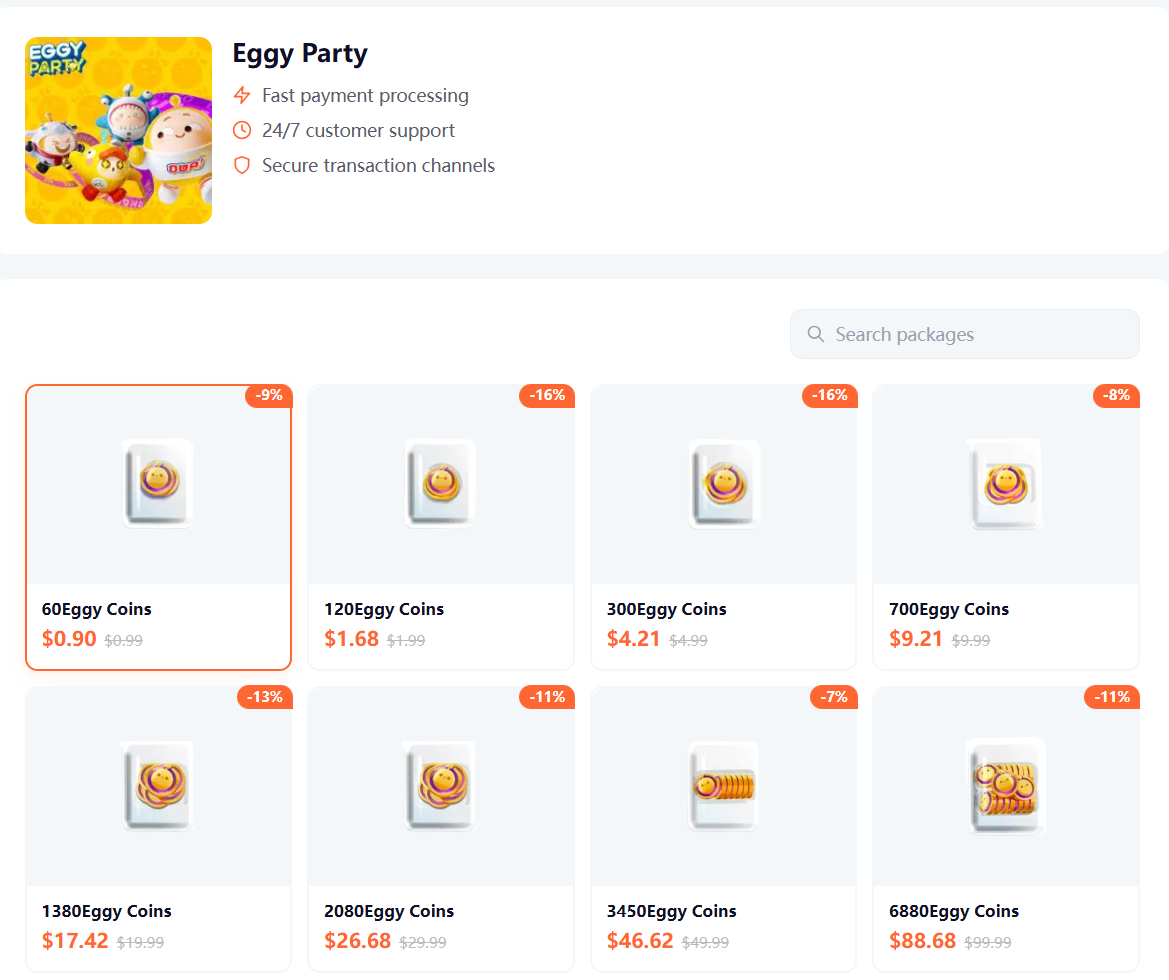
Safe and Convenient Alternative Top-Up Options
For players who frequently encounter store-related issues, some choose to use account-based recharge platforms that support direct delivery using a User ID.
These services do not require app store checkout and instead process purchases directly to your game account.
Popular platforms such as Topuplist provide:
Direct Eggy Party top-up via User ID
Multiple international payment options
Fast delivery to in-game account
Support for players across different regions
This can be especially useful for players who:
Cannot access in-game purchase options
Experience repeated payment failures
Are using accounts from different regions
If your in-game store is not working, platforms like Topuplist offer a simple alternative way to recharge Egg Coins using your User ID.
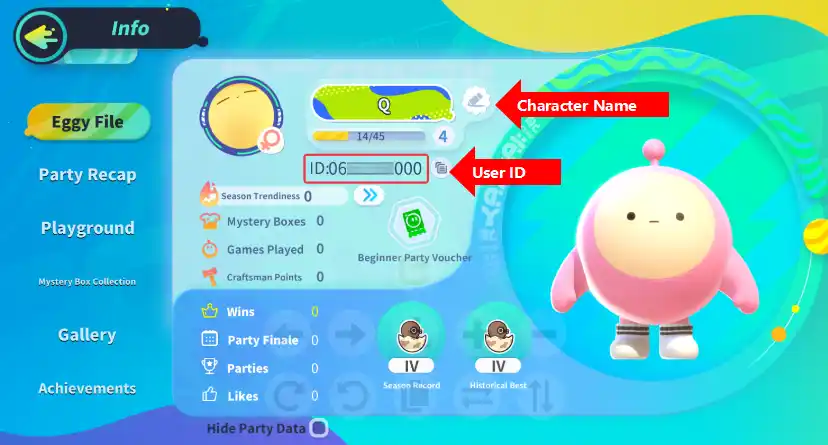
How to Find Your Eggy Party User ID
To complete any recharge process, you will need your User ID:
Open Eggy Party
Go to your profile page
Locate your User ID
Copy it carefully before making any purchase
Always double-check your ID to ensure correct delivery.
When You Should Contact Support
You may need to contact support if:
Payment was completed but not reflected in-game
Transaction is stuck in pending status
Repeated failures occur across different methods
Provide the following when contacting support:
User ID
Payment receipt or order ID
Device and platform information
Summary
Eggy Party top-up issues are usually related to:
Store region differences
Payment method limitations
Temporary store or network conditions
If basic troubleshooting does not resolve the issue, account-based recharge platforms like Topuplist can provide an alternative way to complete your purchase using your User ID.
Final Note
This guide is intended to help players understand common payment issues in Eggy Party and explore available solutions. Actual availability of purchase options may vary depending on region, platform, and store conditions.