Dragon Nest M: Classic User ID & Server ID Guide for Safe Top Up
A step-by-step guide to finding your Dragon Nest M: Classic Character ID and Server ID, plus a pre-pay checklist that prevents wrong-account top-ups.
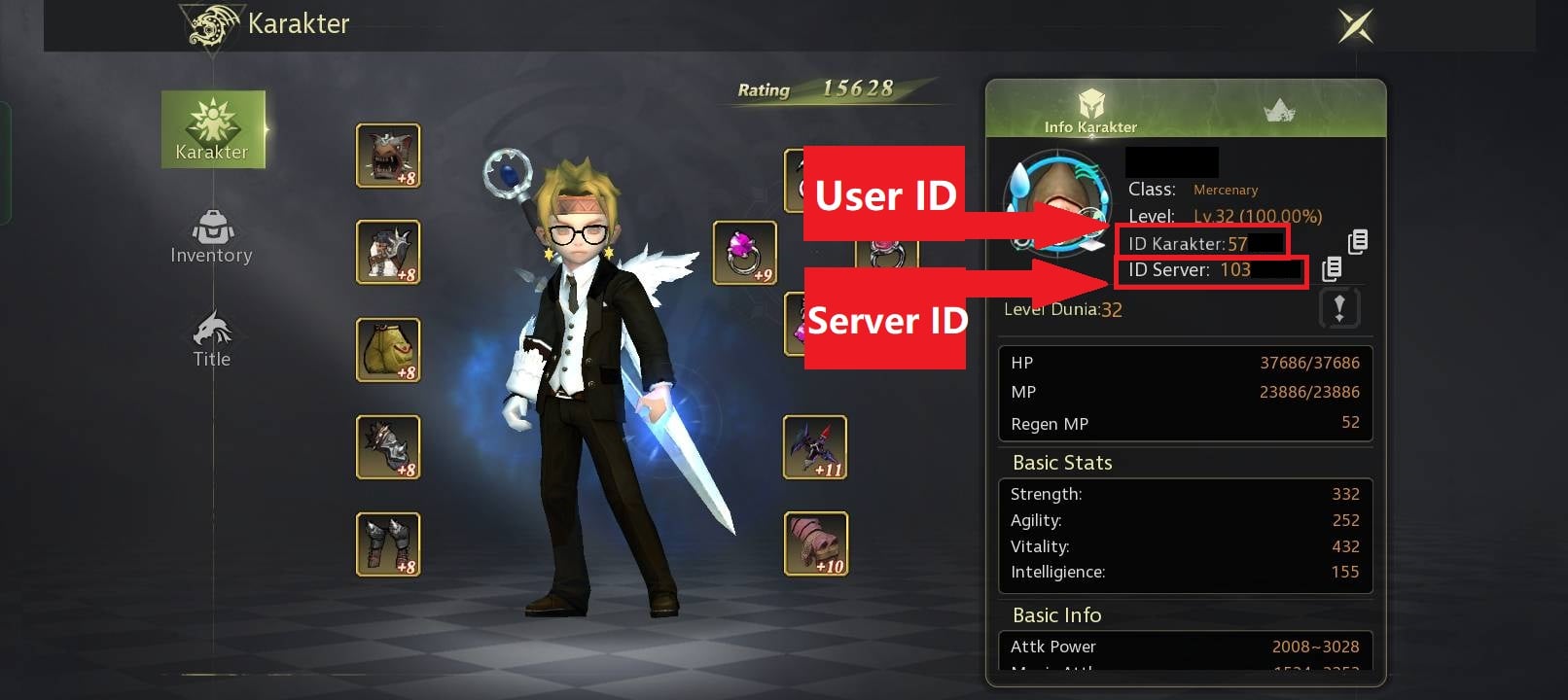
You are one typo away from sending your Dragon Nest M: Classic Cash to a stranger. The game, a manual-combat 3D action MMORPG built by Eyedentity Games, does not route top-ups to "your account" in the abstract — it routes them to one exact pairing: your Character ID on one specific Server. Type either value wrong and the Diamonds or Cash land somewhere you cannot reach. This guide shows you precisely where those two numbers live, the mistakes that misroute purchases, and a pre-pay checklist that makes a wrong-server top-up nearly impossible.
When you are ready to buy, a verified Dragon Nest M Classic top-up at Topuplist through the official Topuplist storefront keeps your ID and Server on the same screen so currency goes exactly where you intend.
What Are User ID and Server ID in Dragon Nest M: Classic (and Why They Matter)
Before you can protect a purchase, you have to know what you are protecting. Two identifiers control every top-up, and confusing them is the root of almost every lost-currency story.
Character ID (User ID) This is the unique numeric ID tied to your specific character. It is the wallet address for any Cash or Diamonds you buy. The checkout needs this number to know whose account to credit. Without a valid ID, the order cannot resolve to a destination at all.
Server ID / Zone ID Dragon Nest M: Classic splits its player base across regional worlds, and your character exists on exactly one of them — a server identified by a name and often a number. The Server ID tells the top-up system which world your Character ID lives on. Because the same numeric Character ID can exist on multiple servers (belonging to different players), the server is what makes the destination unique.
Why Both Are Required A top-up is delivered to the Character ID on the server you select at checkout. Pick the wrong server and the currency is credited to that ID on that world — which may be a different account entirely, or even an empty slot, depending on what exists there. The delivery is "successful" from the system's point of view; it is simply not your account. This is why support cannot just "move" the currency afterward.
Identifier | What It Is | Example Format |
Character ID (User ID) | Unique number for your specific character | 12345678 |
Server ID / Zone ID | The world your character belongs to | S1 Altera / Zone 1000031 |
Platform | iOS, Android, or PC client you play on | Bound account shows the same ID |
Why Servers Are Split in the First Place The regional server model exists so that latency, language, and community stay manageable across a global player base. A practical side effect is that the same numeric Character ID can be reused on a different world for a completely different player. That is why "I typed my ID correctly" is never enough on its own — without the matching server, the system has no way to know which of the several identical IDs is yours. The server is the disambiguator, and top-up systems trust the server you select at checkout over any assumption about who you are.
The Hard Rule Once Cash or Diamonds are delivered to an ID, they are bound to it. They cannot be moved to another account or another server, and a wrong-server delivery is almost never auto-refunded. This single fact is why getting both values right is the most important top-up habit you can build — more important than hunting for the cheapest price.
How to Find Your User ID and Server ID (Step-by-Step)
The values are always in the same place: your in-game Profile. The path does not change between updates, so learn it once and you are set for every future purchase.
Step 1 — Launch the Game Open Dragon Nest M: Classic on the device where you normally play. Make sure you are logged into the account you actually want to top up — not a secondary or guest profile.
Step 2 — Open Your Profile Tap your character avatar in the top-left corner of the main screen. This opens your Profile panel, the same place you go to change equipment or read your stats.
Step 3 — Go to Basic Info Switch to the Basic Info tab. Both identifiers are displayed here, usually near the top of the panel alongside your character name and level.
Step 4 — Read and Copy Note your Character ID (User ID) and your active Server / Zone name and number. Copy them rather than memorizing — a single transposed digit is enough to misroute a purchase, and muscle memory is exactly what gets players into trouble.
Step 5 — Screenshot Both Together Capture one screenshot showing your avatar, Character ID, and Server. Keep it until your next top-up is confirmed. It doubles as the fastest proof if anything ever goes wrong.
If your account is bound to an email, phone, or social login, the same Character ID appears across the iOS, Android, and PC clients — but the Server must still match the world you play on each time. Binding does not change your ID; it only makes it recoverable if you ever lose access. If you are unsure which server is current in your region, the official Facebook page for Dragon Nest M: Classic regularly posts server-status and region notices you can cross-check.
A direct Dragon Nest M Classic top-up at Topuplist on the official Topuplist site lets you paste your ID and confirm your Server on one verified screen, removing the manual-entry risk entirely.
Common Mistakes That Send Top-Ups to the Wrong Account
Support teams see the same handful of errors repeated daily. Recognize them before they cost you.
Mistake | What Happens | How to Avoid |
Copying only the ID, not the server | Currency sent to correct ID on wrong world | Always copy + confirm both values |
Picking a similar server from a list | S1 vs S11, or regional clones | Match the full server name + number |
Multiple characters on different servers | Paying against the wrong character | Open the exact character first, then copy |
VPN or region switch mid-checkout | Server list silently changes | Disable VPN; top up on your real region |
Guest account later bound | Paying to the old unbound ID | Bind first, then verify the live ID |
The "One Digit" Trap Hand-typing a long ID is the most common failure. Players swap two digits, the number resolves to a real but different account, and the purchase completes perfectly — to someone else. The system cannot know it was not you. Always paste from your screenshot or clipboard.
The Multi-Character Trap If you run several characters across servers, the ID you remember may belong to a different world than the one you are topping up for. Always re-open the specific character and re-copy its ID and server immediately before paying. Do not trust memory across a long session.
The VPN and Region Shift A VPN or an automatic region switch can silently change which server list the checkout shows you. You think you are on your home server; the checkout thinks otherwise. Disable location-spoofing tools before you pay and confirm the region label at checkout matches your account.
The Guest-to-Bound Switch Players who started on a guest account and later bound it sometimes keep paying against the old, unbound ID they memorized. After binding, re-open Profile and copy the current live ID — do not reuse an old number from a note.
How to Double-Check Before You Pay (Safe Top-Up Checklist)
Treat the thirty seconds before you confirm as the most valuable half-minute in the whole purchase. Run this list every time, no exceptions.
Copy-Paste, Never Type Paste your Character ID from the screenshot or clipboard. Do not key it in by hand — transposition errors are invisible until the currency vanishes.
Confirm Server Name + Number Re-open Profile and verify the Server shown there matches the Server selected at checkout — exactly, including the number. "Altera" is not enough if two Altera worlds exist.
Confirm the Region If the checkout shows a region different from your account's region, stop. A region mismatch usually means the server list is wrong too, and the delivery will go elsewhere.
Screenshot the Checkout Screen Capture the final screen that shows ID + Server + package before you hit pay. If something goes wrong, this is your evidence and it beats a fuzzy memory.
Use One Verified Path Stick to a single official, verified checkout tied to your regional publisher so any issue has one clear owner. Spreading purchases across many resellers makes tracing a bad order far harder.
Pre-Pay Check | Action | Why It Matters |
ID entry | Paste, don't type | Avoids transposition errors |
Server match | Compare name + number | Prevents wrong-world delivery |
Region match | Confirm at checkout | Catches VPN/region shifts |
Proof | Screenshot checkout | Speeds any future dispute |
Channel | One official path | Single point of accountability |
What to Do If You Entered the Wrong ID or Server
Even careful players slip. If you realize the values were wrong, move fast — but understand the limits, because this is where expectations and reality often diverge.
Currency Is Bound Cash and Diamonds are tied to the ID they were sent to and cannot be transferred between accounts or servers. There is no in-game "move" button and no support tool that relocates delivered currency. This is not a policy quirk; it is how the account system is built.
Act Immediately Open an official support ticket right away and include a complete evidence packet so the team can trace the order without round-trips:
Your transaction or order ID from the app store or payment gateway
The correct Character ID and Server you intended to fund
The package amount and currency type (Cash vs Diamonds)
The date, time, and timezone of the purchase
The mistaken destination, if the checkout confirmation showed one
Your screenshot of the checkout screen, if you took one
The fresher the order, the easier it is to trace before the currency is touched — and tracing cools quickly once a recipient account logs in and spends it.
Recovery Is Conditional A wrong-server delivery can only be corrected if the currency is unspent and the destination ID was a real account. If you typed a number that matches no account, the order may simply fail and reverse on its own — check your order status before assuming the worst. If the currency landed on a stranger's active account and they spent it, recovery is effectively impossible and a refund is unlikely.
Don't Double-Pay Resist the urge to "just buy again" to fix it. That creates a second transaction to trace and can trip bank risk controls that block both orders. Wait for the ticket outcome first.
For the full missing-top-up recovery and refund playbook, see our companion guide on what to do when a Dragon Nest M: Classic top-up doesn't arrive — but the best fix is the checklist above, applied every single time. The simplest protection is a Dragon Nest M Classic top-up at Topuplist via the official Topuplist platform, where your verified Character ID and Server travel with the order from the start.
FAQ
Is my User ID the same as my character name?
No. Your character name is a display label that can repeat across servers; your User ID (Character ID) is a unique number tied to that specific character on that specific server. Top-ups use the number, not the name, which is why copying the name will not work.
Can I transfer Diamonds or Cash between servers or accounts?
No. Both currencies are bound to the Character ID and Server they were delivered to. There is no transfer or merge function, which is exactly why entering the right ID and server matters so much in the first place.
What if I have more than one character on different servers?
Each character has its own Character ID and lives on its own server. Always open the exact character you want to fund, then copy its ID and server immediately before paying — do not rely on memory, especially after a long session switching characters.
Do I need the Server ID for an in-app purchase too, or only web top-ups?
You need the right server in every case. In-app purchases still resolve to your currently logged-in character and server, so confirming you are on the correct account and world applies to app-store buys just as much as web checkouts.
I topped up on the wrong server — can I get a refund?
Only in limited cases. If the currency went to a real but wrong account and is unspent, support may recover it; if it was spent, recovery is essentially impossible and refunds are typically denied. Prevention via the checklist above is far more reliable than hoping for a reversal.
Where is the safest place to top up Dragon Nest M: Classic?
A verified official checkout tied to your regional publisher, where your Character ID and Server are confirmed at purchase, is safest. A direct Dragon Nest M Classic top-up at Topuplist through the official Topuplist storefront is one such path that keeps delivery tied to your verified account from the start.