


4Fun Lite Top Up by Player ID: Find Your ID and Avoid Wrong Delivery
A 4Fun Lite top up uses the numerical Player ID shown on your profile to send Diamonds to a specific account. The important part is not memorizing a long checkout routine: it is copying the correct ID, selecting a package by its exact Diamond amount, and checking the recipient details one final time before payment. A legitimate Player-ID recharge does not need your password, SMS code, or social-login credentials.
That distinction matters because 4Fun Lite combines social rooms, virtual gifts, profiles, and casual games in one app. A display name may look like the obvious account identifier, but names can be changed and can be shared by similar-looking profiles. The numerical Player ID is the field that identifies the recipient. If it is wrong, a technically successful order can still reach the wrong account.
What is 4Fun Lite, and what do Diamonds pay for?
Google Play lists the app as 4Fun lite - Group Voice Chat, published by SpreadFun. Its official description centers on public voice chat rooms, clubs and hosts, one-to-one profiles and messages, Moments posts, virtual gifts, and local games including Ludo, dgash, and Uno. This is the correct product identity; it should not be confused with similarly named board games or unrelated apps.
Diamonds are the paid in-app currency associated with 4Fun recharge listings. The app's official store images and description show the clearest supported uses: sending virtual gifts in rooms and accessing visible customization or status items such as vehicles, badges, and backgrounds. Exact catalog items and Diamond prices are controlled inside the app, so check the live room or store screen before deciding how much currency you actually need.
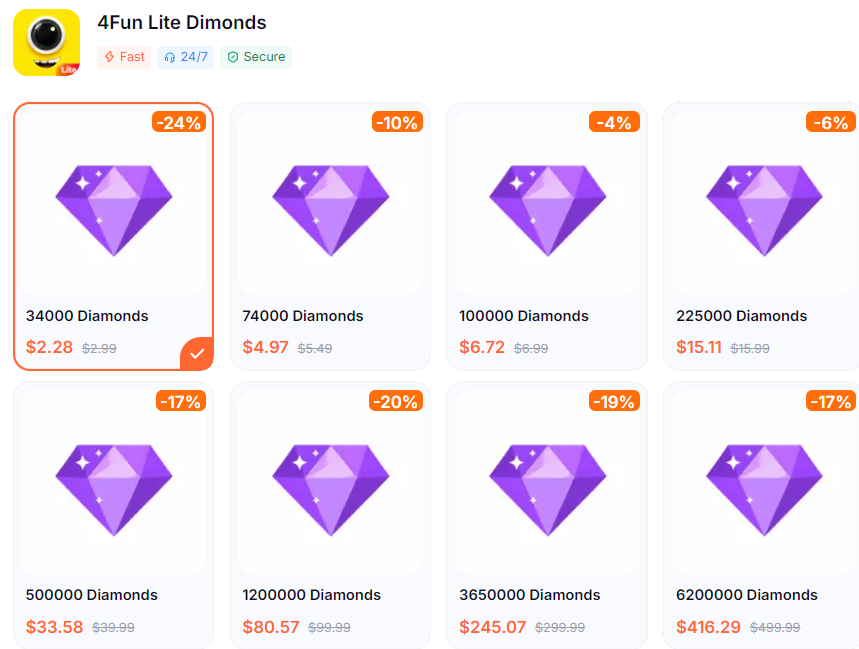
The safest way to choose a recharge amount is therefore to work backward from the purchase you plan to make. Open 4Fun Lite, inspect the current Diamond cost of the gift or feature, note your existing balance, and calculate only the shortfall. Do not assume a gift shown in an old screenshot still has the same cost, and do not treat a large package as better value until the final checkout amount and the number of Diamonds are both visible.
 4Fun Lite Dimonds
Where do you find the 4Fun Lite Player ID?
The Player ID is located on the account's own profile area. Open 4Fun Lite, tap the Me tab in the bottom-right corner, and look directly below the profile avatar and nickname. The ID is a numerical string. Tap the copy icon next to it and paste that value into the recharge form.
Launch 4Fun Lite and make sure you are signed in to the account that should receive the Diamonds.
Tap Me in the bottom-right navigation area.
Find the numerical ID displayed below the avatar and nickname.
Use the copy icon rather than selecting or retyping the digits.
Paste the ID into a temporary note and compare it with the profile once.
Paste the same unedited string into the checkout's Player ID field.
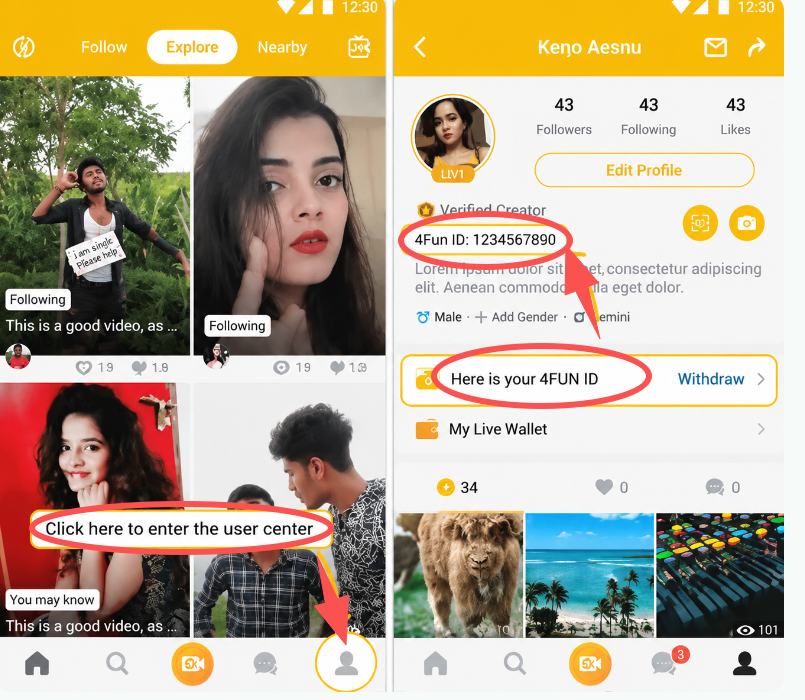
The temporary-note check is useful on phones because clipboard tools sometimes retain an older value. If the pasted digits do not match what is visible on the profile, copy the ID again. Do not add spaces, punctuation, a country code, or the account nickname.
Player ID is not the nickname, phone number, or room number
Information | What it does | Use for direct Diamond recharge? |
|---|---|---|
Player ID | Numerical identifier tied to the recipient account | Yes, when the checkout specifically asks for Player ID |
Nickname | Public display name that may be edited or resemble another user's name | No |
Phone number or email | May be associated with sign-in or recovery | No; do not submit it unless an official account process explicitly requires it |
Password or SMS code | Private authentication information | Never |
Room, club, or host identifier | Points to a social space or creator rather than the wallet owner | No |
This separation is the main account-safety advantage of Player-ID recharge. The seller routes currency with a public-facing recipient identifier; it does not need to enter your account. Any page or person that asks for a password, one-time code, or access to a linked Google or Facebook account is using a different and much riskier process.
How does a direct 4Fun Lite Diamond recharge work?
A direct recharge has three pieces of information that must agree: the product, the Diamond quantity, and the recipient Player ID. Start from the 4Fun Diamonds recharge page, select the package that matches your intended amount, enter the copied Player ID, and review the order summary before choosing a payment method.
Confirm the product name. The page should refer to 4Fun or 4Fun Lite Diamonds, not a similarly named game, chat app, or gift card.
Select a Diamond amount. Match the displayed number of Diamonds to your calculated shortfall; do not rely only on the package's position in the list.
Paste the Player ID. Use the copy icon inside 4Fun Lite and leave the digits unchanged.
Review the recipient data. If the checkout shows an account or nickname confirmation, compare it with your profile. If it does not, check the ID digit by digit.
Review the final payment total. The checkout total, currency, and any payment fee matter more than an advertised headline number.
Keep the order reference. Save the confirmation page or order number until the in-app Diamond balance is verified.
Do not submit the same order repeatedly because the wallet does not change instantly on screen. First inspect the payment and order status. A second successful order is a new purchase, not a refresh command, and can result in receiving more Diamonds than intended.
How much should you recharge?
The correct amount depends on the live in-app price of what you want and the balance already in the wallet. For example, if a virtual gift costs X Diamonds and your account already contains Y, the funding gap is X minus Y. Choose the smallest available package that covers that gap unless you already have a clear use for the remainder.
That approach avoids two common value mistakes. The first is buying from a promotional image without checking the current gift price inside the app. The second is comparing packages only by their payment total while ignoring the exact Diamond quantity. For a meaningful comparison, calculate the checkout cost per Diamond:
Final checkout total ÷ delivered Diamond amount = effective cost per Diamond.
Use the final total shown for your payment method, not a currency-converted estimate from a search result. Regional pricing, taxes, and payment fees can make the same nominal package cost different amounts to different buyers. If a package includes any extra quantity, count it only when the live checkout explicitly shows that quantity as part of the order.
A larger balance can be convenient for frequent gifting, but it also makes impulse spending easier. Set a purchase target before opening the recharge page, and treat any unused Diamonds as prepaid currency already committed to this app. They are not cash and should not be assumed to be transferable to another account.
Direct recharge or Google Play in-app purchase?
Both routes can fund the same app, but they use different recipient and payment logic. An in-app purchase is made while signed in to 4Fun Lite and is billed through the mobile store account. A direct recharge is placed on a website and routes Diamonds through the Player ID. The better route is the one whose recipient, Diamond quantity, total cost, and payment method you can verify most clearly.
Point to compare | Direct Player-ID recharge | In-app purchase |
|---|---|---|
Recipient | Numerical Player ID entered at checkout | The 4Fun Lite account currently signed in on the device |
Credentials | Player ID only for a standard ID-based order | Mobile-store authentication may be required by Google Play |
Price comparison | Compare website checkout total with exact Diamond quantity | Compare the in-app total shown by the mobile store |
Main preventable risk | Typing or pasting the wrong Player ID | Purchasing while signed in to the wrong app account or store profile |
Proof to keep | Seller order number and submitted Player ID | Mobile-store receipt and transaction record |
Do not assume one route is always cheaper. Compare like for like: the same Diamond quantity, the same billing currency, and the final amount after payment-method charges. Also check whether you are on the intended 4Fun Lite account before using either route.
How do you verify that the Diamonds reached the right account?
Keep the confirmation page open until you have checked three separate signals: payment status, order status, and the wallet balance inside 4Fun Lite. A completed card or wallet payment only proves that the payment provider accepted the charge. It does not, by itself, prove that the Diamonds were posted to the intended Player ID.
Record the order reference and the Player ID shown in the order details.
Open 4Fun Lite and return to the same Me profile used before payment.
Compare the profile's numerical ID with the submitted ID again.
Open the wallet, recharge, or gift area where the Diamond balance is displayed.
If the balance appears unchanged, fully close and reopen the app before placing another order.
When the balance updates, compare the increase with the Diamond quantity on the order.
Take screenshots of the order detail and current balance if something does not match. Useful support evidence includes the order reference, payment status, purchase time, submitted Player ID, and before-and-after wallet balance. Do not include a password, SMS code, full card number, or unrelated identity document in an ordinary balance inquiry.
What if the balance does not update or the Player ID was wrong?
If the balance has not changed, avoid guessing. Check whether the payment is pending, failed, refunded, or completed; then check whether the seller's order is pending, processing, failed, or completed. Those are different systems. A payment can be authorized while an order is still being processed, or an order can fail after a payment provider starts a temporary authorization.
Next, compare the submitted ID with the live profile ID. If they match, reopen the app and check the wallet again. If the order is marked completed but the balance is still unchanged, contact the seller through the support channel shown on the order page and provide the order reference plus the two matching ID records.
If the submitted ID is wrong, contact support immediately and do not place a replacement order until the first order's status is clear. Support may be able to correct an order that has not yet been fulfilled. Once Diamonds have been delivered to the entered account, however, digital-currency delivery is generally not reversible because the seller cannot remove the balance from another user's wallet.
Best prevention: use the copy icon in 4Fun Lite, paste the ID without editing it, and compare the first four and last four digits on the final checkout screen. If the account belongs to someone else, ask that person to send a fresh screenshot of the profile ID rather than relying on an old message.
4Fun Lite top-up FAQ
Where is my 4Fun Lite Player ID?
Open 4Fun Lite, tap Me in the bottom-right corner, and look below your profile avatar and nickname for the numerical ID. Use the nearby copy icon instead of typing it manually.
Is my Player ID the same as my nickname?
No. The nickname is editable public display text. The Player ID is the numerical account identifier used to route a direct Diamond recharge.
Do I need to give anyone my password?
No. A normal Player-ID recharge should not require a 4Fun Lite password, SMS verification code, Google password, Facebook login, or remote access to your device.
What can 4Fun Lite Diamonds be used for?
The official listing shows virtual gifts and cosmetic-style room features such as vehicles, badges, and backgrounds. Available items and their Diamond costs can change, so use the live in-app catalog as the final reference.
What should I do if my Diamonds do not appear?
Confirm the payment and order status, compare the submitted Player ID with the ID currently shown in the app, reopen 4Fun Lite to refresh the wallet, and contact the seller with the order reference if the balance still has not changed.
Can a completed recharge to the wrong Player ID be reversed?
Usually not after the Diamonds have been delivered to the submitted account. Contact support immediately if you notice the error, but the reliable protection is checking the copied ID before payment.
