



If you mainly edit on mobile and only need basic premium features, CapCut Standard may be enough. If you create content frequently and want more advanced AI tools, premium assets, cloud features, and a more complete editing workflow, CapCut Pro is the better choice.

CapCut
سريع
24/7
آمن
-13%

1 Month Standard
$8.77$9.99
الوصف
تعليمات الشحن
اشترك في CapCut على Topuplist الآن! احصل على إمكانية الوصول إلى خدمات اشتراك CapCut Standard أو CapCut Pro وافتح المزيد من ميزات التحرير القوية، والموارد الإبداعية المميزة، وأدوات AI المتقدمة، ودعم سير العمل السحابي، وتجربة أكثر سلاسة في إنشاء الفيديو.
تلتزم Topuplist بتوفير خدمة اشتراك سريعة وآمنة ومريحة لكل منشئي CapCut. ما عليك سوى إدخال CapCut ID الخاص بك، واختيار المنطقة الصحيحة وخطة الاشتراك المناسبة، وإكمال الدفع، والاستمتاع بتجربة تحرير CapCut مطورة.
معلومات الشحن الأساسية
العنصر | التفاصيل |
|---|---|
المنتج | اشتراك CapCut |
نوع التطبيق | تطبيق لتحرير الفيديو وإنشاء المحتوى |
المطور / الناشر | Bytedance / CapCut |
نوع الاشتراك | CapCut Standard / CapCut Pro |
طريقة الشحن | تفعيل الاشتراك |
المنطقة المطبقة | US / EU / UK، حسب المنتج المحدد |
المنصة المطبقة | CapCut Mobile / PC؛ قد يقتصر CapCut Standard على الأجهزة المحمولة |
المعلومات المطلوبة | CapCut ID |
وقت التسليم | تتم المعالجة عادةً بعد وقت قصير من نجاح الدفع؛ وقد يختلف وقت التسليم الفعلي حسب حالة الطلب ومعالجة النظام |
⚠️ ملاحظة: يرجى اختيار منتج الاشتراك الذي يطابق المنطقة التي تم تسجيل حساب CapCut فيها. أدخل CapCut ID الخاص بك بدقة لتجنب التأخير أو فشل التفعيل.
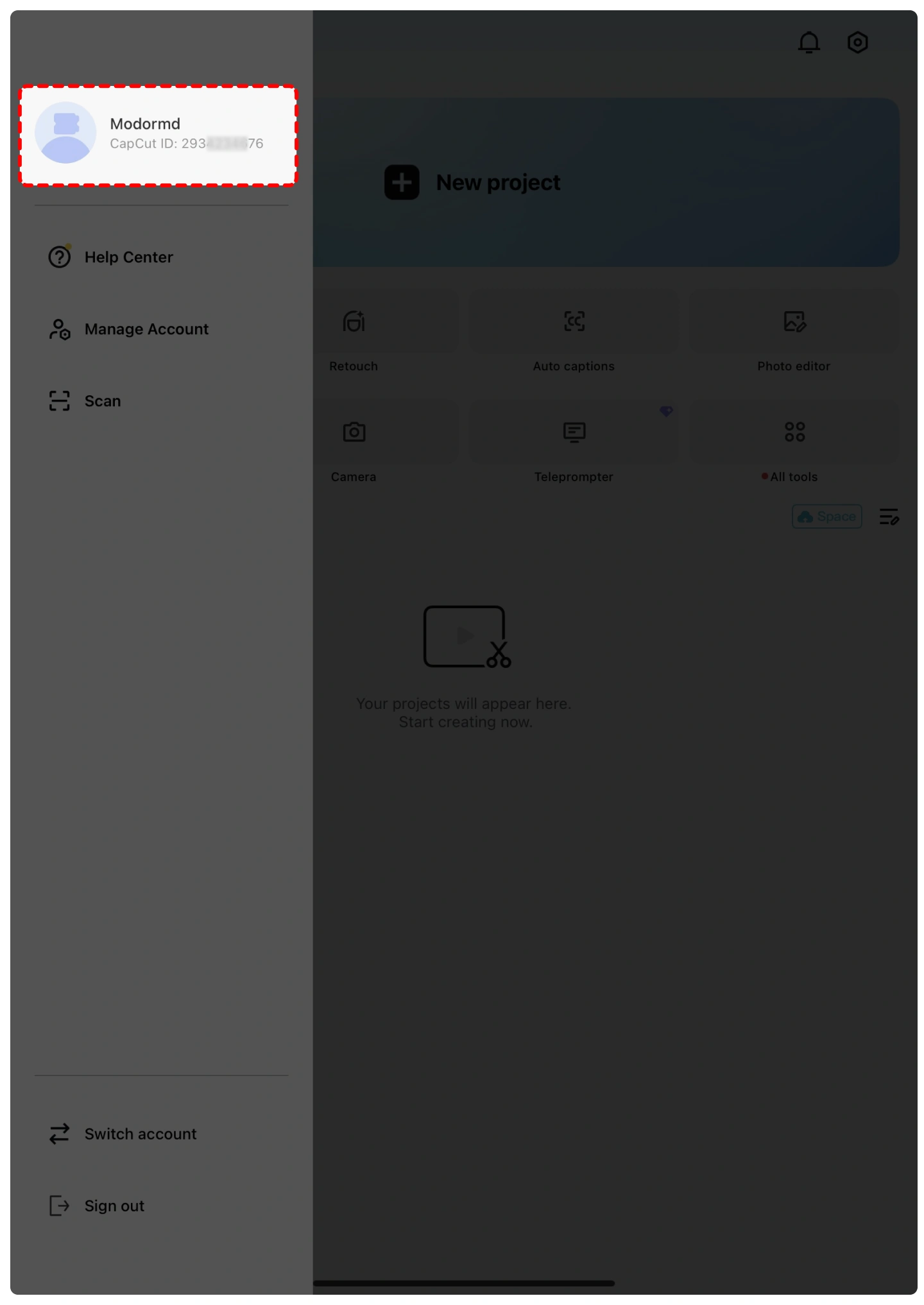
كيف تجد CapCut ID الخاص بك؟
افتح CapCut وسجل الدخول إلى حسابك.
اضغط على صورة ملفك الشخصي أو صفحة الملف الشخصي.
يُعرض CapCut ID الخاص بك عادةً بجانب صورتك الشخصية أو في صفحة معلومات ملفك الشخصي.
انسخ CapCut ID الخاص بك وأدخله بشكل صحيح على Topuplist.
⚠️ ملاحظة: يرجى التحقق مرة أخرى من CapCut ID الخاص بك قبل إرسال طلبك. قد تتسبب معلومات الحساب غير الصحيحة في تأخير التسليم.
كيف تشترك في CapCut على Topuplist؟
يرجى اتباع هذه الخطوات البسيطة لبدء شراء اشتراك CapCut بسرعة وأمان:
اختر لغتك وعملتك — حدد لغتك المفضلة وعملتك المحلية على Topuplist.
سجل الدخول أو أنشئ حسابًا — سجل الدخول إلى حسابك في Topuplist، أو أنشئ حسابًا جديدًا إذا لم يكن لديك حساب بعد.
حدد المنتج — انتقل إلى صفحة اشتراك CapCut على Topuplist.
اختر خطة اشتراكك — حدد باقة CapCut Standard أو CapCut Pro الصحيحة بناءً على منطقة حسابك.
أدخل CapCut ID الخاص بك — املأ CapCut ID الخاص بك بدقة.
أكد وادفع — انقر على “Top-up Now”، واختر طريقة الدفع المفضلة لديك، وأكمل الدفع.
استلم اشتراكك — ستتم معالجة اشتراك CapCut الخاص بك بعد نجاح الدفع.
ما هو CapCut؟
CapCut هو تطبيق شائع وشامل لتحرير الفيديو وإنشاء المحتوى طورته Bytedance. ويُستخدم على نطاق واسع من قبل المنشئين لتحرير الفيديوهات القصيرة، ومحتوى وسائل التواصل الاجتماعي، ومدونات الفيديو، والدروس التعليمية، والإعلانات، والمقاطع الإبداعية لمنصات مثل TikTok وYouTube وInstagram وFacebook وغيرها.
يوفر CapCut أدوات تحرير سهلة الاستخدام مثل القص، والتقسيم، وتعديل السرعة، والانتقالات، والفلاتر، والملصقات، والنصوص، والموسيقى، والمؤثرات الصوتية، والتسميات التوضيحية التلقائية، وإزالة الخلفية، والقوالب، وميزات التحرير المدعومة بـ AI. كما يدعم التحرير على الهاتف المحمول وسطح المكتب وعبر الإنترنت، مما يجعله مناسبًا للمبتدئين والمنشئين ذوي الخبرة على حد سواء.
بالنسبة للمستخدمين الذين ينشئون المحتوى بشكل متكرر، توفر اشتراكات CapCut Standard وCapCut Pro إمكانية الوصول إلى المزيد من الموارد المميزة والأدوات المتقدمة، مما يساعد المنشئين على إنتاج فيديوهات أعلى جودة بشكل أسرع وأكثر كفاءة.
ما هما CapCut Standard وCapCut Pro؟
CapCut Standard هو خيار اشتراك للمبتدئين مصمم للمستخدمين الذين يريدون المزيد من الموارد الإبداعية وتجربة تحرير أكثر سلاسة على الهاتف المحمول. وقد يتضمن الوصول إلى قوالب مميزة محددة، وفلاتر، وتأثيرات، وملصقات، وخطوط، وتصدير بدون علامة مائية، وميزات محسنة أخرى حسب المنطقة وتوفر المنصة.
CapCut Pro هو مستوى الاشتراك المميز للمنشئين الذين يحتاجون إلى مجموعة أدوات تحرير أكثر تكاملًا. فهو يفتح نطاقًا أوسع من الموارد المميزة، وأدوات AI المتقدمة، وميزات التخزين السحابي، والقوالب المميزة، والتأثيرات الاحترافية، والخطوط، وموارد الموسيقى، وميزات تحرير أخرى تركز على الإنتاجية.
يُعد CapCut Standard مناسبًا للمنشئين العاديين ولمستخدمي الهاتف المحمول أولًا، بينما يُعد CapCut Pro أفضل لمنشئي المحتوى المتكررين، ومحرري وسائل التواصل الاجتماعي، ومستخدمي التسويق، وكل من يحتاج إلى قدرات تحرير أكثر تقدمًا.
لماذا تشتري اشتراك CapCut؟
الإصدار المجاني من CapCut مفيد بالفعل لتحرير الفيديو الأساسي، لكن الاشتراك المدفوع يمكن أن يحسن سير عملك عندما تحتاج إلى موارد مميزة أو ميزات متقدمة أو كفاءة أعلى.
مع CapCut Standard أو CapCut Pro، يمكنك إنشاء فيديوهات أكثر احترافية باستخدام القوالب المميزة، والتأثيرات، والانتقالات، والخطوط، والموسيقى، والفلاتر، والملصقات، والأدوات المساعدة بالذكاء الاصطناعي. وتكون هذه الميزات مفيدة بشكل خاص للمنشئين الذين ينشئون محتوى بانتظام لـ TikTok أو YouTube Shorts أو Instagram Reels أو الإعلانات أو فيديوهات العلامات التجارية أو الدروس التعليمية أو المشاريع الشخصية.
إذا كنت تقضي وقتًا إضافيًا غالبًا في البحث عن التأثيرات، أو تحرير التسميات التوضيحية يدويًا، أو إزالة الخلفيات، أو تحسين جودة الفيديو، فإن الترقية إلى اشتراك CapCut يمكن أن تساعدك على توفير الوقت وجعل محتواك يبدو أكثر احترافية.
خيارات اشتراك CapCut
قد يختلف توفر اشتراك CapCut ومزاياه حسب المنطقة والمنصة وحالة الحساب والتحديثات الرسمية لـ CapCut.
قد تشمل خيارات الاشتراك الشائعة:
CapCut Standard — ترقية أكثر توفيرًا للمستخدمين الذين يريدون ميزات وموارد مميزة محددة، خاصة لتحرير الهاتف المحمول.
CapCut Pro — خطة مميزة أكثر تكاملًا تفتح نطاقًا أوسع من الأدوات المتقدمة، وميزات AI، والموارد المميزة، ودعم سير العمل السحابي، ومزايا التحرير الاحترافية.
⚠️ ملاحظة: يرجى دائمًا اختيار خطة الاشتراك التي تطابق منطقة حساب CapCut ومتطلبات المنصة الخاصة بك.
كيف تقوم بتنزيل CapCut؟
يمكنك تثبيت CapCut عبر القنوات الرسمية:
iOS / iPadOS — افتح App Store، وابحث عن “CapCut”، ثم ثبّت التطبيق.
Android — افتح Google Play، وابحث عن “CapCut”، ثم ثبّت التطبيق.
Windows — نزّل CapCut من موقع CapCut الرسمي أو Microsoft Store.
Mac — نزّل CapCut من موقع CapCut الرسمي أو Mac App Store حيثما كان متاحًا.
من أجل أمان الحساب، تجنب تنزيل ملفات APK غير الرسمية أو الإصدارات المعدلة من CapCut من مواقع ويب خارجية غير معروفة.
لماذا تختار Topuplist لاشتراك CapCut؟
أفضل الأسعار من حيث القيمة
تقدم Topuplist أسعارًا تنافسية لاشتراك CapCut، إلى جانب عروض ترويجية مختارة، ورموز قسائم، وصفقات باقات لمساعدتك على الحصول على قيمة أكبر من كل عملية شراء.
معاملات آمنة
أمان دفعتك مهم. تدعم Topuplist معالجة دفع آمنة للمساعدة في الحفاظ على حماية معلومات معاملتك.
طرق دفع متعددة
اختر من بين مجموعة متنوعة من خيارات الدفع، بما في ذلك البطاقات الائتمانية، والمحافظ الرقمية، وطرق الدفع المحلية، حسب منطقتك.
معالجة سريعة
بعد الدفع، ستتم معالجة طلب اشتراك CapCut الخاص بك بأسرع ما يمكن، حتى تتمكن من العودة إلى الإنشاء والتحرير مع وقت انتظار أقل.
دعم عملاء مفيد
إذا كانت لديك أسئلة حول طلبك، يمكن لدعم عملاء Topuplist المساعدة في استفسارات الدفع، والتحقق من معلومات الحساب، ومشكلات تسليم الاشتراك.
خدمة شحن رقمي عالمية
تدعم Topuplist المستخدمين في مناطق مختلفة وتوفر خدمات الشحن الرقمي للألعاب الشائعة، والتطبيقات، وبطاقات الهدايا، ومنتجات الاشتراك.
الأسئلة الشائعة
CapCut
لا توجد تقييمات حتى الآن
ستظهر تقييمات هذا المنتج هنا بمجرد أن يشارك العملاء تجربتهم.

CapCut 1 Month Standard
الشحن المباشر الإجمالي$8.77







لماذا تختار Topuplist؟

شحن سريع
استمتع بعمليات شحن سريعة وسهلة مع خطوات سلسة وأقل وقت ممكن للانتظار.

دفع آمن
تتم حماية معلومات الدفع والحساب من خلال إجراءات أمان موثوقة وآمنة.

دعم على مدار الساعة
فريق الدعم لدينا متاح على مدار الساعة لمساعدتك والإجابة عن استفساراتك في أي وقت.