


2026 Delta Force Top Up Guide: Safe & Fast Hawk Coins Recharge via Topuplist
Delta Force has become a global tactical shooter sensation, but international players consistently hit roadblocks — regional payment bans, cryptic transaction risk errors, and hidden platform fees that eat into their Hawk Coin balance. This 2026 guide explains why Topuplist has become the trusted top-up workaround for players worldwide. It covers step-by-step safe recharge instructions, how to avoid scams and account flags, proven strategies to maximize coin value by bypassing the Apple Tax, and troubleshooting fixes when payments go through but coins never arrive.
✦✦ Top Up Your Delta Force Account Instantly! ✦✦
Tired of failed payments or delayed Hawk Coins? Topuplist delivers the fastest, most secure Delta Force top-up for global players — bypass regional blocks, avoid hidden platform fees, and receive your in-game currency in minutes.
👉 Top up your Delta Force account now 👈
1. Why International Players Are Choosing Topuplist for Delta Force Top-Ups in 2026
The Delta Force Global Phenomenon
Since its worldwide launch on April 21, 2025, Delta Force has cemented its place as one of the most-played tactical first-person shooters on the planet. Developed by TiMi Studio Group and published by Level Infinite and Garena, the game arrived first on PC, iOS, and Android, then expanded to PlayStation 5 and Xbox Series X|S in August 2025. The February 2026 Morphosis season brought new maps, operators, and a 90-day reset cycle, driving a massive surge in demand for Hawk Coins.
But for countless global players, topping up is far from a one-click process.
The Official Top-Up Problem: What’s Going Wrong?
The official Delta Force website and major game platforms have repeatedly warned players about the dangers of “unauthorized top-ups” — and for good reason. The security team has enforced severe penalties against accounts using unofficial discounted recharge services. In just one week, enforcement actions targeted 21 cases of illicit coin acquisition; across a broader sweep, 2,601 cases saw benefits confiscated and 2,678 accounts banned.
Yet even players who try to stick to official channels keep hitting frustrating roadblocks:
How Topuplist Bridges the Gap
Topuplist solves these headaches by acting as a trusted bridge between international players and Delta Force’s payment ecosystem:
Global payment support — Accepts PayPal, international credit cards (Visa/Mastercard), and local e-wallets precisely where official in-game purchases tend to fail
Web-based checkout — Bypasses Apple’s 30% in-app purchase commission entirely (more on this in Section 4)
Fast processing — Currency usually arrives within 2–10 minutes
International accessibility — Serves players across the US, Canada, UK, Australia, Southeast Asia, and MENA regions
⚠️ Important: The official Delta Force team has warned that “unauthorized top-up services often utilize illegal or stolen payment methods, exposing your personal information to risks such as account theft”. That’s exactly why choosing legitimate platforms like Topuplist — which purchase currency through official channels using clean payment methods — is critical.
2. Step-by-Step: How to Safely Top Up Delta Force via Topuplist

Before You Start: What You’ll Need
Before initiating any top-up, gather these three pieces of information:
Your Delta Force Player ID — A unique numeric identifier tied to your account
Your server/region — Delta Force operates multiple regional servers (Global, Garena, etc.)
A valid payment method — PayPal, credit card, or a supported local payment option
How to Find Your Delta Force Player ID
This is the single most common source of top-up errors. Never guess or type it manually if you can copy it directly.
✅ Pro Tip: Never share your password or login credentials with any top-up service. A legitimate platform only needs your Player ID — nothing more.
The Complete Top-Up Process
Step 1 — Go to Topuplist
Open your browser and head to Delta Force
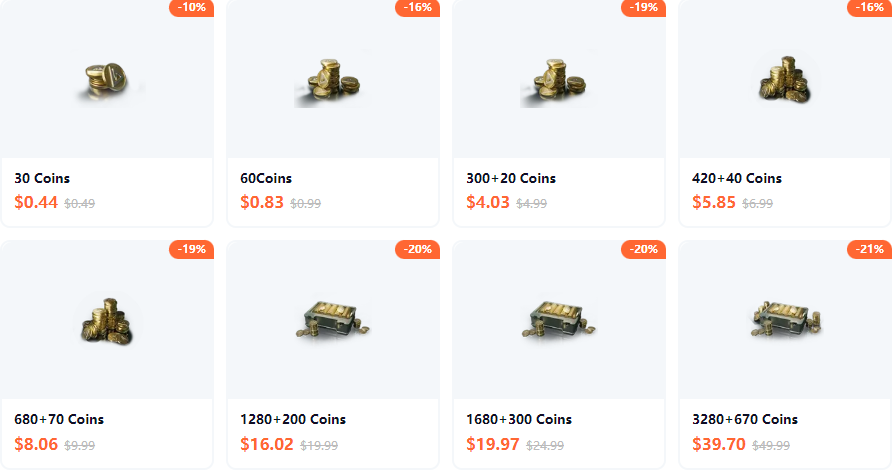
Step 2 — Select Your Currency Package
Choose the amount of Hawk Coins (Delta Coins) you want. If you’re a first-time user, start with a small test transaction ($5–$10) to confirm everything runs smoothly for your account.
Step 3 — Enter Your Player ID and Server
Paste your copied Player ID into the designated field. Select the correct server/region (Global, Garena, etc.).
Step 4 — Complete Payment
Pick your preferred payment method: PayPal (recommended for buyer protection), credit card, or a supported local e-wallet.
Step 5 — Verify Delivery
After a successful payment, your Hawk Coins should appear in your Delta Force wallet within 2–10 minutes. If they don’t, check the platform’s order status page first, then contact customer support with your transaction ID.
⚠️ Never, under any circumstances, share SMS verification codes or your account password with a top-up service.
✦✦ Need to Top Up Right Now? ✦✦
⏱️ Instant delivery. Secure payment. Global access.
Skip the payment errors and dive straight back into the action. Topuplist is the trusted choice for thousands of Delta Force players worldwide in 2026.
👉 Get your Hawk Coins delivered in minutes → Delta Force👈
3. Avoiding Scams & Account Risks: What Every Delta Force Player Must Know
The Official Stance: What Delta Force Actually Says
The Delta Force team has issued unequivocal warnings. According to an official statement on Steam and the Garena website:
Unauthorized top-up services — “often utilize illegal or stolen payment methods, exposing your personal information to risks such as account theft and unauthorized charges”
No support protection — “Transactions through unofficial top-up services are not protected by our support. If your funds are taken without receiving in-game currency, we cannot assist you!”
Potential penalties — “Players using unauthorized payment services may face penalties, including account bans in severe cases”
Enforcement data proves this is no empty threat. In the latest enforcement window, the G.T.I. Security Team targeted 21 cases of unauthorized coin acquisition in a single week. All illicit Delta Coins obtained were confiscated.
The Safety Checklist: 5 Rules for Legitimate Top-Ups
Red Flags: How to Spot a Scam
The Epic Games Store’s official currency guide warns that “some websites offer Delta Coins at discounted or reduced rates, but they’re all really shady and go against the game’s terms of service. Do not use these websites.”
Common red flags include:
Asking for your password or verification codes — Immediate scam indicator
Prices 30%+ below official rates — Almost certainly using black-market cards or fraudulent charges
Only accepting cryptocurrency or irreversible transfers — No buyer protection whatsoever
No customer support or contact information — You won’t reach anyone when problems arise
What to Do If Your Account Gets Flagged
If Delta Force flags your account for “unauthorized top-up” activity:
Stop using the problematic platform immediately
Document everything — Save transaction IDs, receipts, and timestamps
Switch to official in-game purchases temporarily — This helps restore your account’s normal standing
Contact Delta Force customer support — Provide legitimate payment proof if you were wrongly flagged
4. Maximizing Value: How to Get More Hawk Coins for Less Money
Understanding Delta Force Premium Currency
Delta Coins are the primary paid currency in Delta Force. They are used to purchase skins, unlock premium Season Pass tiers, and access limited-time events. According to Epic Games’ currency guide, you can get around 60 Delta Coins per dollar, with better value in larger bundles thanks to included “bonus” coins.
The “Apple Tax” Problem: iOS vs. Android vs. Web
One of the biggest hidden costs for iOS players is Apple’s 30% in-app purchase commission — commonly called the “Apple Tax.” This cut often forces developers to adjust pricing or coin amounts on the App Store, meaning iOS users can end up with fewer coins for the same price compared to Android or web users.
Real-world comparison for a $19.99 purchase:
Official iOS in-app (App Store) → ~1,280 Delta Coins (pricing often inflated to offset Apple’s fee)
Official Android in-app (Google Play) → ~1,410+ Delta Coins (lower platform fee)
Topuplist web checkout → Up to 1,800+ Delta Coins (no app-store fee, plus occasional bonuses)
The official Delta Force rebate system confirms that a single $19.99 top-up yields 1,410 Delta Coins (1,280 base + 130 bonus). Web-based platforms that bypass app-store fees can offer even more favorable ratios.
Bulk Purchase Strategy: Which Package Is Best?
Strategy Tip: Buy larger packages, less often. Delta Coins never expire, and bulk discounts generally increase with higher denominations. If a platform offers promo codes or seasonal bonuses (holidays, game anniversaries, new season launches), stack them with bulk purchases for maximum savings.
Additional Value Tips
Watch for seasonal events — Delta Force frequently runs top-up rebate promotions tied to major season updates
Use cashback credit cards — Layer rewards on top of already discounted rates
Join community channels — Some platforms announce flash sales via Telegram or Discord
5. Troubleshooting: Payment Deducted but No Currency Received
Step-by-Step Troubleshooting Flow
If your payment went through but your Hawk Coins haven’t arrived:
Step 1 — Wait 15 minutes
Server delays can happen. Give it a short wait and check again.
Step 2 — Relog into Delta Force
Sometimes the display simply hasn’t refreshed. Close the game completely and relaunch it.
Step 3 — Check your platform order status
Log into Topuplist and view your order history. Look for status indicators like “Completed,” “Processing,” or “Failed.”
Step 4 — Contact Topuplist customer support
Provide your order number, a payment screenshot, your Player ID, and the approximate time of purchase.
Step 5 — Initiate a payment dispute (if no resolution within 48 hours)
PayPal users: Open a dispute through the PayPal Resolution Center (reason: “Item not received”)
Credit card users: Contact your bank to initiate a chargeback
Bank and Payment Errors
Some errors aren’t specific to any single platform. The JollyMax FAQ notes: “If you make multiple purchases in a single day using the same bank card, it may trigger the bank’s limit, resulting in the message ‘Transaction failed at issuer end due to risk control.’ Please try again after 24 hours or use a different payment method.”
Common Issues and Solutions
6. FAQ: Real Player Questions About Delta Force Top-Up
Q1: Is using Topuplist against Delta Force’s terms?
A: The game officially recommends in-app purchases. Third-party services operate in a gray area. Legitimate platforms that purchase currency through official channels using clean payment methods are generally safer than unofficial “discount” sellers. Avoid any service claiming to use “black cards,” stolen accounts, or fraudulently obtained currency — these will trigger bans.
Q2: Can I get a refund for Delta Coins purchased via Topuplist?
A: Almost never. Virtual currency is considered consumed once delivered. Refunds are only possible if you were charged twice or received absolutely nothing after 48+ hours with no response from the platform.
Q3: I topped up the wrong Player ID. Can I transfer the coins?
A: No. Delta Force does not allow currency transfers between accounts. Always double-check by copying and pasting — never type your Player ID manually. Some platforms may assist if the ID doesn’t belong to any real account, but this is never guaranteed.
Q4: My new account shows a top-up limit. What’s happening?
A: New accounts often go through a temporary “observation period” (24–72 hours) where top-up functions are restricted. During this window, avoid switching between multiple top-up platforms, as that may trigger additional security flags.
Q5: Does Topuplist work in my country?
A: Topuplist serves most major regions: US, Canada, UK, Australia, EU countries, Southeast Asia (Indonesia, Thailand, Malaysia, Philippines, Singapore), and MENA (UAE, Saudi Arabia). Check the platform directly for the most current region support.
Q6: What’s the difference between Delta Coins and Delta Tickets?
A: Delta Coins are the premium currency purchased with real money. Delta Tickets are earned by selling cosmetics on the in-game market or from Season Pass rewards — they cannot be bought directly.
Q7: Why does my account show “transaction risk” after using a third-party platform?
A: Some low-quality platforms rely on abnormal billing methods or stolen cards. If your account gets flagged, immediately stop using that service and switch to official in-game purchases for a while to restore normal status. Legitimate Topuplist services avoid these triggers by using clean payment channels.
Conclusion
Topping up Delta Force as an international player in 2026 doesn’t have to be a headache. Official channels work well in some regions, but payment blocks, transaction risk errors, and hidden platform fees remain persistent obstacles for millions of players worldwide.
Key Takeaways:
🔐 Prioritize security — Never share passwords or verification codes. A legitimate platform only needs your Player ID.
📲 Double-check your Player ID — Copy and paste directly from the game. This single step prevents most top-up failures.
💰 Maximize value — Use web-based checkouts to dodge Apple’s 30% platform fee, buy in bulk for better rates, and keep an eye out for promo codes.
🚫 Avoid scams — Deals that look too good to be true almost always involve stolen payment methods. The Delta Force security team confiscates illicit currency and bans offending accounts.
🛡️ Know the risks — Official warnings exist for good reason. Choose legitimate, verified platforms over shady discount sellers.
With the right approach and a trusted platform like Topuplist, you can safely power up your Delta Force arsenal and get back to what really matters — the tactical firefight.
Ready to top up? 👉 Visit Topuplist.com/product/delta-force for instant delivery and secure payment.
